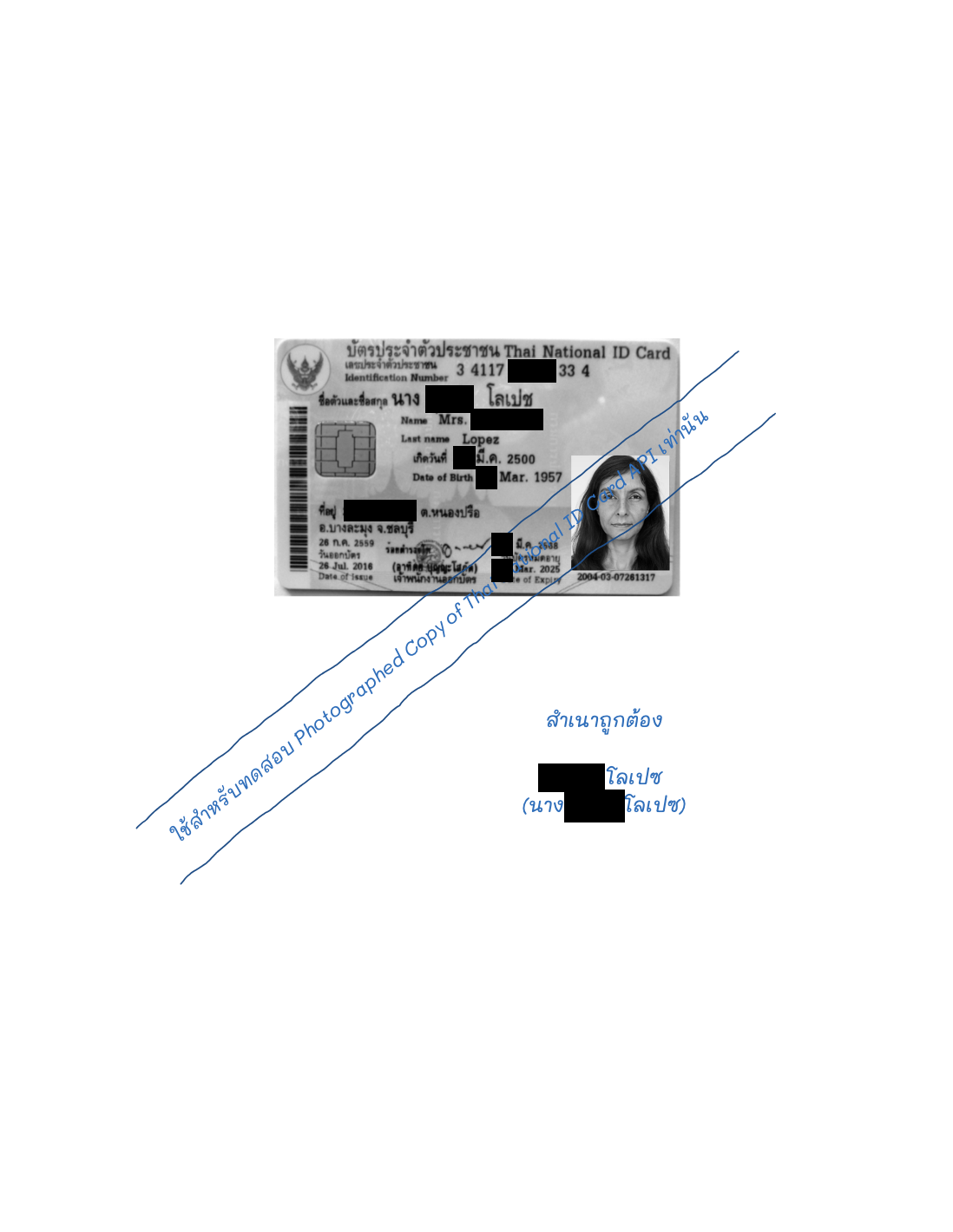
Photographed Thai National ID Card With Signature Detection
Skip the camera work — our free open-source eKYC SDK (Web, Flutter, iOS, Android & React Native) auto-captures documents and faces and calls this API for you. View on GitHub.
The Photographed Thai National ID Card With Signature Detection API extracts structured data from photographed copies of Thai National ID cards — color or black and white — and detects whether the copy has been signed. It locates the card in the image automatically and returns the ID number, names, date of birth, address, and expiry date as JSON with per-field confidence scores. The production service processes a card in 0.7 seconds (median) and sustains more than 10,500 cards per hour. Measured field-level accuracy is 97.1 percent against human-verified ground truth, with the 13-digit national ID number at 100 percent; see Accuracy.
Live Demo
Upload a photographed copy of a Thai national ID card, or select an example below. The examples are synthetic specimen cards, not real documents.
Try Our AI Demo
Login or create a free account to use this AI service demo and explore our powerful APIs.
Get 100 Free Credits (IC) when you sign up!
Offer ends December 31, 2025
Try the SDK (Live Camera)
Prefer not to upload a file? The free open-source iApp eKYC Web SDK captures the photographed ID card copy automatically from your camera — it detects the card boundary, waits for a sharp stable frame, perspective-corrects the image, and submits it to this API. See more flows on the full SDK live demo page.
Loading live demo…
Quick Start
You need an API key from the API Key Management page. Send the image as multipart/form-data:
curl -X POST https://api.iapp.co.th/v3/store/ekyc/thai-national-id-card-with-signature \
-H "apikey: YOUR_API_KEY" \
-F "file=@idcard.jpg"
{
"national_id": "3411700830334",
"fullname_th": "นาง บุญยัง โลเปช",
"fullname_en": "Mrs. Bunyang Lopez",
"date_of_birth": "22 มี.ค. 2500",
"address_full": "33/349 หมู่ที่ 7 ต.หนองปรือ อ.บางละมุง จ.ชลบุรี",
"reason_code_id_card_signature": 1,
"process_time": 0.7
}
The full response schema is in the Technical Reference.
Endpoints and Pricing
| Endpoint | Output | Price |
|---|---|---|
POST /v3/store/ekyc/thai-national-id-card-with-signature | JSON with extracted fields, signature detection, and confidence scores | 1.25 IC per page |
The legacy paths /thai-national-id-card-with-signature/front and /thai-national-id-card/copy remain supported at the same price. This API is optimized for photographed copies; for OCR directly from physical ID cards, use Thai National ID Card OCR. For on-premise deployment, see Data Security.
Performance
Measured on the production service, August 2026.
| Metric | Value |
|---|---|
| Median processing time | 0.7 s per card |
| Sustained throughput | 2.9 cards per second (10,500 cards per hour) |
| Maximum file size | 2 MB |
| Supported input formats | JPEG, JPG, PNG, HEIC, HEIF |
| Minimum card size in image | 600 × 400 px |
Accuracy
Accuracy is measured against human-verified ground truth: 33 labeled Thai national ID cards, 594 individual field observations. The ground-truth dataset contains real ID cards and is kept private for privacy reasons; the methodology is fully specified in the whitepaper below.
| Field | Exact match |
|---|---|
| National ID number (13 digits) | 100% |
| Address: house number | 97.0% |
| Address (full) | 93.9% |
| All fields (overall) | 97.1% |
| Signature detection | 96.5% |
The v1.1.1 recognition engine improved overall field-level accuracy from 96.3% to 97.1% compared with the previous engine, with the largest gains on house numbers and addresses. Full methodology, per-field results, and comparison against a leading global cloud OCR service are published in the benchmark whitepaper:
Download the benchmark whitepaper (PDF)
Data Security and Compliance
- The service is GDPR and PDPA compliant.
- Uploaded images are processed in memory and are not retained after the response is returned.
- A fully self-contained on-premise deployment is available, in which no card data leaves your infrastructure. Contact us for details.
Technical Reference
Request
POST with multipart/form-data and the apikey header.
| Parameter | Required | Description |
|---|---|---|
file | Yes | Photographed copy of a Thai national ID card (front side) |
Response
{
"national_id": "3411700830334",
"init_th": "นาง",
"init_en": "Mrs.",
"name_th": "บุญยัง",
"name_en": "Bunyang",
"surname_th": "โลเปช",
"surname_en": "Lopez",
"fullname_th": "นาง บุญยัง โลเปช",
"fullname_en": "Mrs. Bunyang Lopez",
"date_of_birth": "22 มี.ค. 2500",
"date_of_expire": "21 มี.ค. 2568",
"address_full": "33/349 หมู่ที่ 7 ต.หนองปรือ อ.บางละมุง จ.ชลบุรี",
"address_number": "33/349 หมู่ที่ 7",
"address_subdistrict": "ต.หนองปรือ",
"address_district": "บางละมุง",
"address_province": "ชลบุรี",
"address_postal_code": "20150",
"file_name_id_card": "idcard.jpg",
"process_time": 0.7,
"reason_code_api": 200,
"reason_code_id_card": 1,
"reason_code_id_card_national_id": 1,
"reason_code_id_card_signature": 1,
"request_id": "xxxxxxxx-xxxx-xxxx-xxxx-xxxxxxxxxxxx",
"confidence": {
"national_id": 0.95,
"fullname_th": 0.95,
"date_of_birth": 0.9,
"address_full": 0.95
}
}
Response Fields
| Field | Type | Description |
|---|---|---|
national_id | String | 13-digit national ID number |
init_th / init_en | String | Name title (Thai / English) |
name_th / name_en | String | Given name (Thai / English) |
surname_th / surname_en | String | Surname (Thai / English) |
fullname_th / fullname_en | String | Full name (Thai / English) |
date_of_birth | String | Date of birth, Thai format |
date_of_expire | String | Card expiry date, Thai format |
address_full | String | Full address as printed |
address_number | String | House number and moo |
address_subdistrict / address_district / address_province | String | Address components |
address_postal_code | String | Postal code (derived) |
file_name_id_card | String | Uploaded file name |
process_time | Float | Processing time in seconds |
reason_code_api | Integer | Response status code (see below) |
reason_code_id_card | Integer | 1 if an ID card was found in the image, 0 otherwise |
reason_code_id_card_national_id | Integer | 1 if the national ID number was found, 0 otherwise |
reason_code_id_card_signature | Integer | 1 if a signature was found on the paper, 0 otherwise |
request_id | String | Request ID from the API gateway |
confidence | Object | Confidence score (0–1) per extracted field |
Response Codes
| Status Code | Status Message | Description |
|---|---|---|
| 200 | SUCCESS | Request successful |
| 404 | REQUESTED_URL_NOT_FOUND | API route not found |
| 405 | METHOD_NOT_ALLOWED | Incorrect HTTP method |
| 413 | IMAGE_FILE_IS_TOO_LARGE | File exceeds the 2 MB limit |
| 414 | NO_FILE_ATTACHED | No file in the request |
| 415 | INVALID_IMAGE_SIZE | Image dimensions invalid |
| 420 | NO_ID_CARD_FOUND | ID card not detected in the image |
| 421 | IMAGE_ERROR_UNSUPPORTED_FORMAT | Unsupported or corrupted image format |
| 422 | INVALID_IMAGE_SIZE | Image size requirements not met |
| 427 | LONG_TIME_TO_PROCESS | Server processing timeout |
| 428 | LONG_TIME_TO_REQUEST | Queue timeout |
| 560 | SERVER_IS_BUSY | Server overloaded, retry |
| 563 | ID_CARD_API_NOT_SUPPORT_THIS_IMAGE | Processing error |
Code Examples
- cURL
- Python
- JavaScript
- PHP
- Swift
- Kotlin
- Java
- Dart
curl -X POST https://api.iapp.co.th/v3/store/ekyc/thai-national-id-card-with-signature \
-H "apikey: YOUR_API_KEY" \
-F "file=@idcard.jpg"
import requests
url = "https://api.iapp.co.th/v3/store/ekyc/thai-national-id-card-with-signature"
headers = {"apikey": "YOUR_API_KEY"}
files = {"file": open("idcard.jpg", "rb")}
response = requests.post(url, headers=headers, files=files)
print(response.json())
const axios = require("axios");
const FormData = require("form-data");
const fs = require("fs");
const data = new FormData();
data.append("file", fs.createReadStream("idcard.jpg"));
axios.post("https://api.iapp.co.th/v3/store/ekyc/thai-national-id-card-with-signature", data, {
headers: { apikey: "YOUR_API_KEY", ...data.getHeaders() },
})
.then((response) => console.log(response.data))
.catch((error) => console.log(error));
<?php
$curl = curl_init();
curl_setopt_array($curl, array(
CURLOPT_URL => 'https://api.iapp.co.th/v3/store/ekyc/thai-national-id-card-with-signature',
CURLOPT_RETURNTRANSFER => true,
CURLOPT_POST => true,
CURLOPT_POSTFIELDS => array(
'file' => new CURLFILE('idcard.jpg')
),
CURLOPT_HTTPHEADER => array(
'apikey: YOUR_API_KEY'
),
));
$response = curl_exec($curl);
curl_close($curl);
echo $response;
?>
import Foundation
let url = URL(string: "https://api.iapp.co.th/v3/store/ekyc/thai-national-id-card-with-signature")!
var request = URLRequest(url: url)
request.httpMethod = "POST"
request.addValue("YOUR_API_KEY", forHTTPHeaderField: "apikey")
let boundary = "Boundary-\(UUID().uuidString)"
request.setValue("multipart/form-data; boundary=\(boundary)", forHTTPHeaderField: "Content-Type")
var body = Data()
body.append("--\(boundary)\r\n".data(using: .utf8)!)
body.append("Content-Disposition: form-data; name=\"file\"; filename=\"idcard.jpg\"\r\n".data(using: .utf8)!)
body.append("Content-Type: image/jpeg\r\n\r\n".data(using: .utf8)!)
if let fileData = try? Data(contentsOf: URL(fileURLWithPath: "idcard.jpg")) {
body.append(fileData)
}
body.append("\r\n--\(boundary)--\r\n".data(using: .utf8)!)
request.httpBody = body
URLSession.shared.dataTask(with: request) { data, response, error in
if let data = data {
print(String(data: data, encoding: .utf8)!)
}
}.resume()
import okhttp3.*
import okhttp3.MediaType.Companion.toMediaTypeOrNull
import okhttp3.RequestBody.Companion.asRequestBody
import java.io.File
val client = OkHttpClient()
val file = File("idcard.jpg")
val requestBody = MultipartBody.Builder()
.setType(MultipartBody.FORM)
.addFormDataPart("file", file.name, file.asRequestBody("image/jpeg".toMediaTypeOrNull()))
.build()
val request = Request.Builder()
.url("https://api.iapp.co.th/v3/store/ekyc/thai-national-id-card-with-signature")
.addHeader("apikey", "YOUR_API_KEY")
.post(requestBody)
.build()
client.newCall(request).execute().use { response ->
println(response.body?.string())
}
import okhttp3.*;
import java.io.File;
OkHttpClient client = new OkHttpClient();
File file = new File("idcard.jpg");
RequestBody requestBody = new MultipartBody.Builder()
.setType(MultipartBody.FORM)
.addFormDataPart("file", file.getName(),
RequestBody.create(MediaType.parse("image/jpeg"), file))
.build();
Request request = new Request.Builder()
.url("https://api.iapp.co.th/v3/store/ekyc/thai-national-id-card-with-signature")
.addHeader("apikey", "YOUR_API_KEY")
.post(requestBody)
.build();
try (Response response = client.newCall(request).execute()) {
System.out.println(response.body().string());
}
import 'package:http/http.dart' as http;
var request = http.MultipartRequest(
'POST',
Uri.parse('https://api.iapp.co.th/v3/store/ekyc/thai-national-id-card-with-signature'),
);
request.files.add(await http.MultipartFile.fromPath('file', 'idcard.jpg'));
request.headers.addAll({'apikey': 'YOUR_API_KEY'});
var response = await request.send();
print(await response.stream.bytesToString());
Limitations
- Optimized for photographed copies of ID cards; for physical cards use Thai National ID Card OCR.
- The card must be at least 600 × 400 px in the image; scans at 300 dpi or higher give the best results.
- Files larger than 2 MB are rejected.
- Very low-resolution field crops reduce recognition quality; ensure the card is in focus and fills a reasonable portion of the frame.
Changelog
| Version | Date | Changes |
|---|---|---|
| v1.1.1-20260822 | 22 Aug 2026 | Upgraded recognition engine: field-level accuracy improved from 96.3% to 97.1% against human-verified ground truth, with the national ID number at 100%. Median processing time 0.7 s per card. Fully self-contained on-premise deployment available. |
| v1.0 | 2023 | Initial release with signature detection. |