Thai Driver License OCR
Skip the camera work — our free open-source eKYC SDK (Web, Flutter, iOS, Android & React Native) auto-captures documents and faces and calls this API for you. View on GitHub.
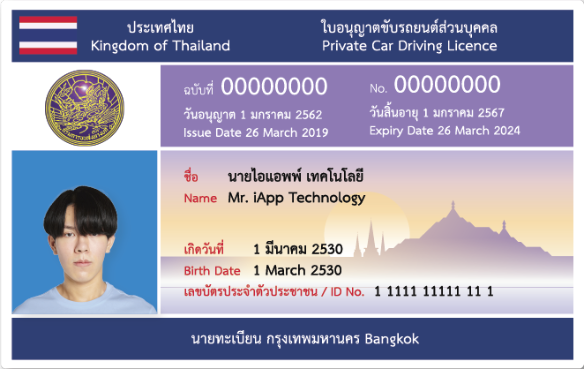
The Thai Driver License OCR API extracts structured data from photographs of Thai driver licenses: the license number, names and dates in both Thai and English, the license type, and detection of the face photo, flag, and signature. The production service processes a card in 0.3 seconds (median) and sustains 25,000 cards per hour. The response contract has been stable across every upgrade — no field has ever been removed or retyped; see Accuracy.
Live Demo
Upload a Thai driver license, or use the synthetic specimen below.
Try Our AI Demo
Login or create a free account to use this AI service demo and explore our powerful APIs.
Get 100 Free Credits (IC) when you sign up!
Offer ends December 31, 2025
Try the SDK (Live Camera)
Prefer not to upload a file? The free open-source iApp eKYC Web SDK captures the license automatically from your camera — it detects the card boundary, waits for a sharp stable frame, perspective-corrects the image, and submits it to this API. See more flows on the full SDK live demo page.
Loading live demo…
Quick Start
You need an API key from the API Key Management page. Send the image as multipart/form-data:
curl -X POST https://api.iapp.co.th/v3/store/ekyc/thai-driver-license \
-H "apikey: YOUR_API_KEY" \
-F "file=@driver_license.jpg"
{
"en_license_no": "00000000",
"en_name": "Mr. iApp Technology",
"en_type": "Private Car Driving License",
"en_expiry": "26 March 2024",
"id_no": "1111111111111",
"face": "Detected",
"message": "Success"
}
The full response is in the Technical Reference.
Endpoints and Pricing
| Endpoint | Output | Price |
|---|---|---|
POST /v3/store/ekyc/thai-driver-license | JSON with license fields in Thai and English, plus face, flag, and signature detection | 1.25 IC per page |
The legacy path /thai-driver-license-ocr remains supported at the same price. For on-premise deployment, see Data Security.
Performance
Measured on the production service, August 2026.
| Metric | Value |
|---|---|
| Median processing time | 0.3 s per card |
| Sustained throughput | 6.9 cards per second (25,000 cards per hour) |
| Maximum file size | 6 MB |
| Supported input formats | JPEG, JPG, PNG, GIF, HEIC, HEIF (iPhone photos) |
| Coverage | Front side only |
Accuracy
| Metric | Result |
|---|---|
| Character-level accuracy (overall) | 95.14% |
| Face detection | 100% |
| License number | 97.37% |
| Name (English) | 99.13% |
| Name (Thai) | 95.62% |
The recognition engine was upgraded in August 2026 and audited field by field against the previous engine on identical license images: agreement across all 25 response fields was 99.65 percent, every adjudicated difference favored the new engine (date formatting and Thai word segmentation, verified against the physical cards), and no field was removed or changed type — existing clients need no modification. The audit method and results are published in the whitepaper:
Download the engine audit whitepaper (PDF)
Data Security and Compliance
- The service is GDPR and PDPA compliant.
- Uploaded images are processed in memory and are not retained after the response is returned.
- A fully self-contained on-premise deployment is available, in which no license data leaves your infrastructure. Contact us for details.
Technical Reference
Request
POST with multipart/form-data and the apikey header.
| Parameter | Required | Description |
|---|---|---|
file | Yes | Thai driver license image (front side) |
fields | No | Set to photo to also return face_photo_base64, the holder's face crop |
Response
{
"driving_license_type1": "Detected",
"en_country": "Kingdom of Thailand",
"en_dob": "1 March 1987",
"en_expiry": "26 March 2024",
"en_issue": "18 May 2006",
"en_license_no": "00000000",
"en_name": "Mr. iApp Technology",
"en_type": "Private Car Driving License",
"face": "Detected",
"file_name": "driver_license.jpg",
"flag": "Detected",
"id_no": "1111111111111",
"id_no_checksum_valid": true,
"inference": "0.523",
"message": "Success",
"registrar": "นายทะเบียนจังหวัด กรุงเทพมหานคร Bangkok",
"sign": "Detected",
"status_code": 200,
"text_is_white": "Detected",
"th_country": "ประเทศไทย",
"th_dob": "1 มีนาคม 2530",
"th_expiry": "26 มีนาคม 2567",
"th_issue": "1 มกราคม 2562",
"th_license_no": "000000000",
"th_name": "นาย ไอแอพพ์ เทคโนโลยี",
"th_type": "ใบอนุญาติขับรถยนต์ส่วนบุคคล"
}
Response Fields
| Field | Type | Description |
|---|---|---|
en_country / th_country | String | Country name (English / Thai) |
en_name / th_name | String | Full name (English / Thai) |
en_dob / th_dob | String | Date of birth (English / Thai) |
en_issue / th_issue | String | Issue date (English / Thai) |
en_expiry / th_expiry | String | Expiry date (English / Thai) |
en_license_no / th_license_no | String | License number (English / Thai) |
en_type / th_type | String | License type (English / Thai) |
id_no | String | National ID number |
id_no_checksum_valid | Boolean | Whether id_no passes its 13th-digit checksum. Advisory: the request succeeds either way; false on an otherwise good response usually means the image is too low-contrast or small, and it is also false when no ID was found |
face_photo_base64 | String | The holder's face crop as Base64. Returned only with fields=photo |
registrar | String | Issuing registrar |
face / flag / sign / text_is_white | String | Detection status of the face photo, flag, signature, and white-text security feature |
driving_license_type1 ... | String | Detected license class markers |
inference | String | Model inference time (seconds) |
message / status_code | String / Integer | Result message and status code |
Code Examples
- cURL
- Python
- JavaScript
- PHP
- Swift
- Kotlin
- Java
- Dart
curl -X POST https://api.iapp.co.th/v3/store/ekyc/thai-driver-license \
-H "apikey: YOUR_API_KEY" \
-F "file=@driver_license.jpg"
import requests
url = "https://api.iapp.co.th/v3/store/ekyc/thai-driver-license"
headers = {"apikey": "YOUR_API_KEY"}
files = {"file": open("driver_license.jpg", "rb")}
response = requests.post(url, headers=headers, files=files)
print(response.json())
const axios = require("axios");
const FormData = require("form-data");
const fs = require("fs");
const data = new FormData();
data.append("file", fs.createReadStream("driver_license.jpg"));
axios.post("https://api.iapp.co.th/v3/store/ekyc/thai-driver-license", data, {
headers: { apikey: "YOUR_API_KEY", ...data.getHeaders() },
})
.then((response) => console.log(response.data))
.catch((error) => console.log(error));
<?php
$curl = curl_init();
curl_setopt_array($curl, array(
CURLOPT_URL => 'https://api.iapp.co.th/v3/store/ekyc/thai-driver-license',
CURLOPT_RETURNTRANSFER => true,
CURLOPT_POST => true,
CURLOPT_POSTFIELDS => array(
'file' => new CURLFILE('driver_license.jpg')
),
CURLOPT_HTTPHEADER => array(
'apikey: YOUR_API_KEY'
),
));
$response = curl_exec($curl);
curl_close($curl);
echo $response;
?>
import Foundation
let url = URL(string: "https://api.iapp.co.th/v3/store/ekyc/thai-driver-license")!
var request = URLRequest(url: url)
request.httpMethod = "POST"
request.addValue("YOUR_API_KEY", forHTTPHeaderField: "apikey")
let boundary = "Boundary-\(UUID().uuidString)"
request.setValue("multipart/form-data; boundary=\(boundary)", forHTTPHeaderField: "Content-Type")
var body = Data()
body.append("--\(boundary)\r\n".data(using: .utf8)!)
body.append("Content-Disposition: form-data; name=\"file\"; filename=\"driver_license.jpg\"\r\n".data(using: .utf8)!)
body.append("Content-Type: image/jpeg\r\n\r\n".data(using: .utf8)!)
if let fileData = try? Data(contentsOf: URL(fileURLWithPath: "driver_license.jpg")) {
body.append(fileData)
}
body.append("\r\n--\(boundary)--\r\n".data(using: .utf8)!)
request.httpBody = body
URLSession.shared.dataTask(with: request) { data, response, error in
if let data = data {
print(String(data: data, encoding: .utf8)!)
}
}.resume()
import okhttp3.*
import okhttp3.MediaType.Companion.toMediaTypeOrNull
import okhttp3.RequestBody.Companion.asRequestBody
import java.io.File
val client = OkHttpClient()
val file = File("driver_license.jpg")
val requestBody = MultipartBody.Builder()
.setType(MultipartBody.FORM)
.addFormDataPart("file", file.name, file.asRequestBody("image/jpeg".toMediaTypeOrNull()))
.build()
val request = Request.Builder()
.url("https://api.iapp.co.th/v3/store/ekyc/thai-driver-license")
.addHeader("apikey", "YOUR_API_KEY")
.post(requestBody)
.build()
client.newCall(request).execute().use { response ->
println(response.body?.string())
}
import okhttp3.*;
import java.io.File;
OkHttpClient client = new OkHttpClient();
File file = new File("driver_license.jpg");
RequestBody requestBody = new MultipartBody.Builder()
.setType(MultipartBody.FORM)
.addFormDataPart("file", file.getName(),
RequestBody.create(MediaType.parse("image/jpeg"), file))
.build();
Request request = new Request.Builder()
.url("https://api.iapp.co.th/v3/store/ekyc/thai-driver-license")
.addHeader("apikey", "YOUR_API_KEY")
.post(requestBody)
.build();
try (Response response = client.newCall(request).execute()) {
System.out.println(response.body().string());
}
import 'package:http/http.dart' as http;
var request = http.MultipartRequest(
'POST',
Uri.parse('https://api.iapp.co.th/v3/store/ekyc/thai-driver-license'),
);
request.files.add(await http.MultipartFile.fromPath('file', 'driver_license.jpg'));
request.headers.addAll({'apikey': 'YOUR_API_KEY'});
var response = await request.send();
print(await response.stream.bytesToString());
Response Codes
| Status Code | Description |
|---|---|
| 200 | Success |
| 415 | Unsupported file extension |
| 461 | No file part in the request |
| 462 | More than one file attached |
Limitations
- Front side only.
- Files larger than 6 MB are rejected; supported formats are JPEG, JPG, PNG, GIF, HEIC, and HEIF.
- Check the
inferencescore andmessagein the response, and validate the license number format on your side.
Changelog
| Version | Date | Changes |
|---|---|---|
| v1.1.3-20260824 | 24 Aug 2026 | HEIC/HEIF (iPhone) and GIF input support. New advisory field id_no_checksum_valid validating the national ID check digit. Restored face_photo_base64 via fields=photo. Eliminated intermittent errors under concurrent load. |
| v1.1.2-20260823 | 23 Aug 2026 | Upgraded recognition engine. Field-by-field audit against the previous engine on identical images: 99.65% agreement across all 25 response fields, with every adjudicated difference favoring the new engine; response contract unchanged. Median processing time 0.3 s per card. Fully self-contained on-premise deployment available. |
| v1.1 | Jan 2023 | Added face photo extraction; character-level accuracy 95.14%. |
| v1.0 | Dec 2022 | Initial release. |