📊 NCB Credit Report OCR
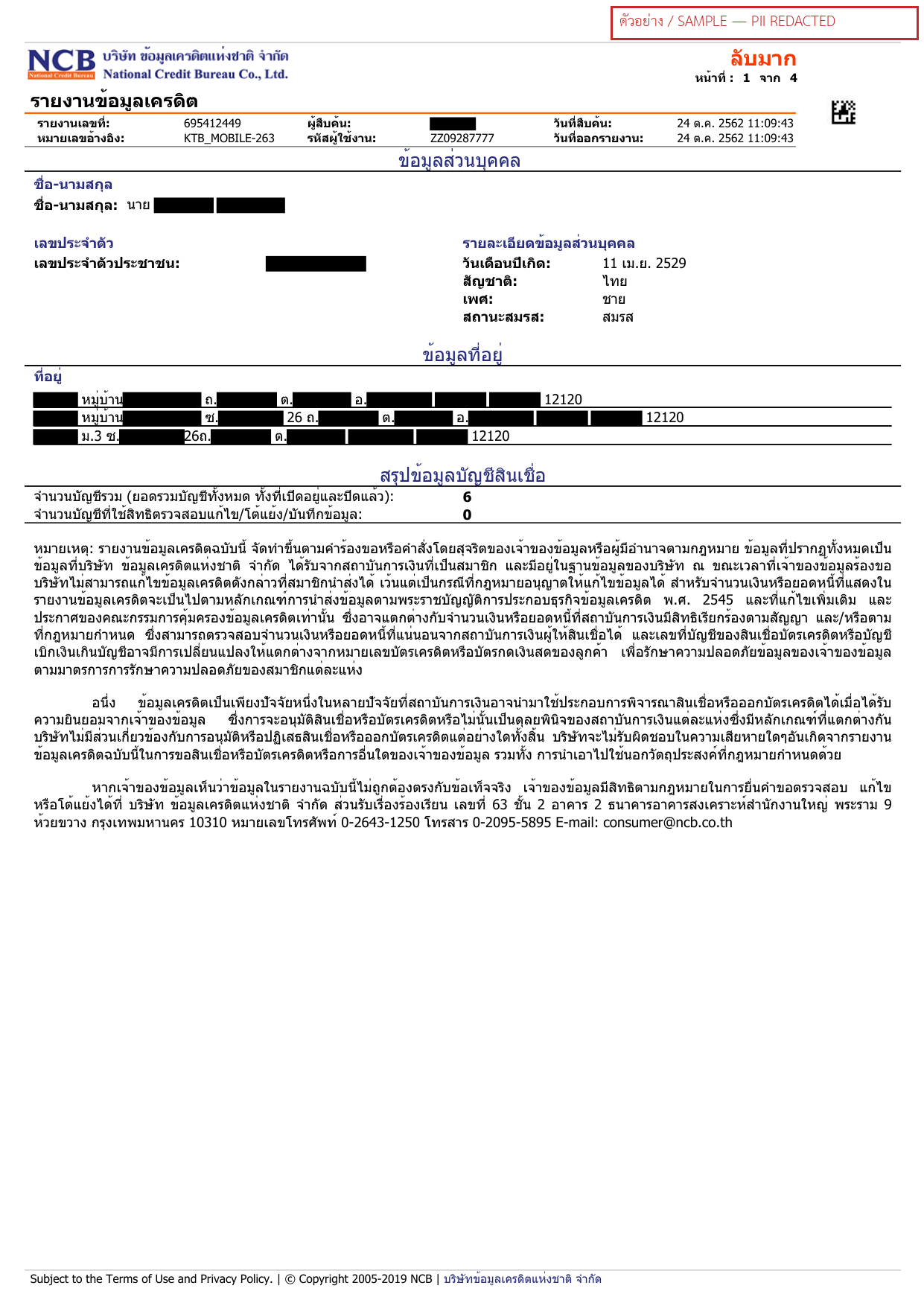
Welcome to the NCB Credit Report OCR API, part of iApp Any Documents OCR by iApp Technology Co., Ltd. Extracts report metadata, owner identity and a per-account summary from National Credit Bureau (บริษัท ข้อมูลเครดิตแห่งชาติ) reports, including multi-page PDF reports.
Try Demo!
Try Our AI Demo
Login or create a free account to use this AI service demo and explore our powerful APIs.
Get 100 Free Credits (IC) when you sign up!
Offer ends December 31, 2025
Getting Started
-
Prerequisites
- An API key from iApp Technology
- Document file: NCB Credit Report (รายงานข้อมูลเครดิต (เครดิตบูโร))
- Supported file formats: PDF, JPG, JPEG, PNG, WEBP
- Maximum file size: 50MB
-
Quick Start
- Single
POSTwithmultipart/form-data - Structured JSON out, with a per-field confidence score
- Multi-page PDFs are combined into a single
docsentry.
- Single
-
Key Features
- Field-level extraction with confidence scoring
- Thai and English output via
target_lang - Optional raw OCR text via
return_ocr - Handles photographs and scanned PDFs
-
Security & Compliance
- GDPR and PDPA compliant
- Secure API endpoints
- No data retention after processing
Please visit API Key Management page to view your existing API key or request a new one.
API Endpoints
| Endpoint | Method | Description | Cost |
|---|---|---|---|
/ocr/v3/ncb-credit-report/file/v3/store/ocr/ncb-credit-report | POST | Extract report metadata, identity and per-account summaries from NCB credit reports | 1 IC per page |
Both forms are equivalent. There is no base64 variant for this endpoint — file upload only.
Request
Request Headers
| Header | Value | Required |
|---|---|---|
apikey | Your iApp API key | Yes |
Request Body (multipart/form-data)
| Parameter | Type | Default | Description |
|---|---|---|---|
file | File (repeatable) | — | Required. Document file. PDF pages are processed automatically. |
return_ocr | Boolean | false | Include the raw OCR text in the response. |
target_lang | String | th | Language of extracted values: th or en. |
include_confidence | Boolean | true | Include a per-field confidence score (0.00–1.00). |
cURL
curl -X POST "https://api.iapp.co.th/ocr/v3/ncb-credit-report/file" \
-H "apikey: YOUR_API_KEY" \
-F "file=@/path/to/document.pdf" \
-F "target_lang=th" \
-F "include_confidence=true"
Response
{
"docs": [
{
"message": "success",
"raw": {},
"processed": {
"report_number": "123456789",
"reference_number": "MOBILE_APP-001",
"query_date": "24 ต.ค. 2562 11:09:43",
"id_card_number": "1100000000001",
"full_name": "นาย สมชาย ตัวอย่าง",
"date_of_birth": "11 เม.ย. 2529",
"total_accounts": 6,
"accounts_under_dispute": 0,
"accounts": [
{
"lender_name": "ธนาคารตัวอย่าง",
"credit_type": "สินเชื่อที่อยู่อาศัย",
"account_status": "ปกติ",
"credit_limit": 3000000,
"outstanding_balance": 2500000
}
]
},
"confidence": {
"report_number": 0.95,
"reference_number": 0.95,
"query_date": 0.95,
"id_card_number": 0.95,
"full_name": 0.95,
"date_of_birth": 0.95
},
"process_ms": 4120
}
],
"docs_count": 1,
"process_ms": 4300
}
The iapp-input-pages response header reports the number of billed pages.
Supported Fields
| Field | Type | Description |
|---|---|---|
| report_number | String | Report number |
| reference_number | String | Reference number |
| query_date | String | Date and time the report was requested |
| id_card_number | String | 13-digit Thai national ID of the data owner |
| full_name | String | Full name of the data owner |
| date_of_birth | String | Date of birth |
| total_accounts | Integer | Total number of credit accounts |
| accounts_under_dispute | Integer | Number of accounts under dispute |
| accounts | Array | Per-account summary — each has lender_name, credit_type, account_status, credit_limit, outstanding_balance |
Error Handling
| Status | Meaning |
|---|---|
| 400 | Unsupported file extension, or file larger than 50MB |
| 401 | Missing or invalid apikey |
| 402 | Insufficient credit balance |
| 404 | Unknown document type in the URL |
| 422 | No file attached to the request |
| 500 | Processing error — the response contains an error code to quote to support |
Code Examples
Python
import requests
url = "https://api.iapp.co.th/ocr/v3/ncb-credit-report/file"
headers = {"apikey": "YOUR_API_KEY"}
files = {"file": open("document.pdf", "rb")}
data = {"target_lang": "th", "include_confidence": "true"}
response = requests.post(url, headers=headers, files=files, data=data)
result = response.json()
print(result["docs"][0]["processed"])
print(result["docs"][0]["confidence"])
JavaScript
const form = new FormData();
form.append("file", fileInput.files[0]);
form.append("target_lang", "th");
form.append("include_confidence", "true");
const res = await fetch("https://api.iapp.co.th/ocr/v3/ncb-credit-report/file", {
method: "POST",
headers: { apikey: "YOUR_API_KEY" },
body: form,
});
const result = await res.json();
console.log(result.docs[0].processed);
PHP
<?php
$ch = curl_init();
curl_setopt($ch, CURLOPT_URL, "https://api.iapp.co.th/ocr/v3/ncb-credit-report/file");
curl_setopt($ch, CURLOPT_POST, true);
curl_setopt($ch, CURLOPT_RETURNTRANSFER, true);
curl_setopt($ch, CURLOPT_HTTPHEADER, ["apikey: YOUR_API_KEY"]);
curl_setopt($ch, CURLOPT_POSTFIELDS, [
"file" => new CURLFile("/path/to/document.pdf"),
"target_lang" => "th",
]);
$response = curl_exec($ch);
curl_close($ch);
echo $response;
Java
OkHttpClient client = new OkHttpClient();
RequestBody body = new MultipartBody.Builder()
.setType(MultipartBody.FORM)
.addFormDataPart("file", "document.pdf",
RequestBody.create(new File("/path/to/document.pdf"),
MediaType.parse("application/pdf")))
.addFormDataPart("target_lang", "th")
.build();
Request request = new Request.Builder()
.url("https://api.iapp.co.th/ocr/v3/ncb-credit-report/file")
.addHeader("apikey", "YOUR_API_KEY")
.post(body)
.build();
try (Response response = client.newCall(request).execute()) {
System.out.println(response.body().string());
}
Swift
let url = URL(string: "https://api.iapp.co.th/ocr/v3/ncb-credit-report/file")!
var request = URLRequest(url: url)
request.httpMethod = "POST"
request.setValue("YOUR_API_KEY", forHTTPHeaderField: "apikey")
let boundary = UUID().uuidString
request.setValue("multipart/form-data; boundary=\(boundary)",
forHTTPHeaderField: "Content-Type")
var data = Data()
let fileData = try Data(contentsOf: URL(fileURLWithPath: "/path/to/document.pdf"))
data.append("--\(boundary)\r\n".data(using: .utf8)!)
data.append("Content-Disposition: form-data; name=\"file\"; filename=\"document.pdf\"\r\n\r\n".data(using: .utf8)!)
data.append(fileData)
data.append("\r\n--\(boundary)--\r\n".data(using: .utf8)!)
URLSession.shared.uploadTask(with: request, from: data) { responseData, _, _ in
if let responseData, let json = String(data: responseData, encoding: .utf8) {
print(json)
}
}.resume()
Kotlin
val client = OkHttpClient()
val body = MultipartBody.Builder()
.setType(MultipartBody.FORM)
.addFormDataPart(
"file", "document.pdf",
File("/path/to/document.pdf").asRequestBody("application/pdf".toMediaType())
)
.addFormDataPart("target_lang", "th")
.build()
val request = Request.Builder()
.url("https://api.iapp.co.th/ocr/v3/ncb-credit-report/file")
.addHeader("apikey", "YOUR_API_KEY")
.post(body)
.build()
client.newCall(request).execute().use { response ->
println(response.body?.string())
}
Dart
import 'package:http/http.dart' as http;
final request = http.MultipartRequest(
'POST',
Uri.parse('https://api.iapp.co.th/ocr/v3/ncb-credit-report/file'),
);
request.headers['apikey'] = 'YOUR_API_KEY';
request.fields['target_lang'] = 'th';
request.files.add(
await http.MultipartFile.fromPath('file', '/path/to/document.pdf'),
);
final response = await request.send();
print(await response.stream.bytesToString());
Limitations & Best Practices
Limitations
- Maximum file size 50MB per request
- Supported formats: PDF, JPG, JPEG, PNG, WEBP
- Accuracy depends on image quality — heavily degraded scans, glare and handwriting over printed values reduce field-level accuracy
- Extraction is limited to the fields listed above
Best Practices
- Prefer the original PDF over a photograph where you have one
- Photograph the whole document, square-on and in even lighting
- Use at least 300 DPI for scans
- Check the
confidencescore per field and route low-confidence values to manual review - Send multiple documents in one request where supported to reduce round trips
Accuracy & Performance
Field-level extraction accuracy measured on the internal ChindaOCR-M3 golden evaluation set — visually re-verified labels over real Thai documents, including low-resolution photographs and bills partly obscured by handwriting.
| Document Type | Docs | Fields | Accuracy |
|---|---|---|---|
| NCB Credit Report | 5 | 19 | 100% |
| Overall, all six document types | 25 | 147 | 98.6% |
Support
Need help? Contact us:
- Email: sale@iapp.co.th
- Phone: 086-322-5858
- Discord: iApp Technology