💧 Water Bill OCR

1 ICper page
v1.0 Active Jul 2026 POST /ocr/v3/water-bill/file

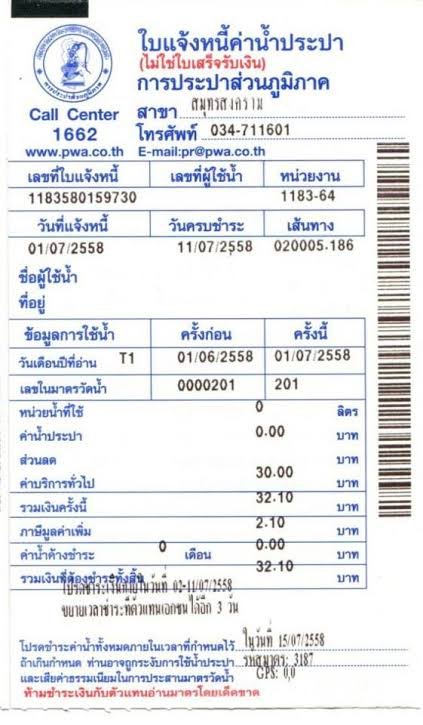
Welcome to the Water Bill OCR API, part of iApp Any Documents OCR by iApp Technology Co., Ltd. Extracts billing data from Metropolitan Waterworks Authority (การประปานครหลวง) and Provincial Waterworks Authority (การประปาส่วนภูมิภาค) bills, including meter readings, consumption and VAT. Amounts are cross-checked arithmetically (subtotal + VAT = total) for reliability on low-quality images.

Try Demo!

Try Our AI Demo

Login or create a free account to use this AI service demo and explore our powerful APIs.

Get 100 Free Credits (IC) when you sign up!

Offer ends December 31, 2025

Example Images (Click to try)

Getting Started

  1. Prerequisites

    • An API key from iApp Technology
    • Document file: Water Bill (ใบแจ้งค่าน้ำประปา)
    • Supported file formats: PDF, JPG, JPEG, PNG, WEBP
    • Maximum file size: 50MB
  2. Quick Start

    • Single POST with multipart/form-data
    • Structured JSON out, with a per-field confidence score
    • Each input page returns its own entry in docs, so a batch of documents can be sent in one request.
  3. Key Features

    • Field-level extraction with confidence scoring
    • Thai and English output via target_lang
    • Optional raw OCR text via return_ocr
    • Handles photographs and scanned PDFs
  4. Security & Compliance

    • GDPR and PDPA compliant
    • Secure API endpoints
    • No data retention after processing
How to get API Key?

Please visit API Key Management page to view your existing API key or request a new one.

API Endpoints

EndpointMethodDescriptionCost
/ocr/v3/water-bill/file
/v3/store/ocr/water-bill
POSTExtract billing data from Thai water bills (MWA / PWA)1 IC per page

Both forms are equivalent. There is no base64 variant for this endpoint — file upload only.

Request

Request Headers

HeaderValueRequired
apikeyYour iApp API keyYes

Request Body (multipart/form-data)

ParameterTypeDefaultDescription
fileFile (repeatable)Required. Document file. PDF pages are processed automatically.
return_ocrBooleanfalseInclude the raw OCR text in the response.
target_langStringthLanguage of extracted values: th or en.
include_confidenceBooleantrueInclude a per-field confidence score (0.00–1.00).

cURL

curl -X POST "https://api.iapp.co.th/ocr/v3/water-bill/file" \
-H "apikey: YOUR_API_KEY" \
-F "file=@/path/to/document.pdf" \
-F "target_lang=th" \
-F "include_confidence=true"

Response

{
"docs": [
{
"message": "success",
"raw": {},
"processed": {
"provider": "การประปานครหลวง",
"customer_name": null,
"customer_address": "32/14 ม.3 ตำบลท่าจีน อำเภอสามพราน จังหวัดนครปฐม 11130",
"account_number": "67983262",
"invoice_number": "192011-5",
"invoice_date": "12/02/2567",
"current_reading": 606,
"previous_reading": 567,
"consumption_cubic_meter": 39,
"water_usage_charge": 430.39,
"monthly_service_fee": 25.0,
"discount": 0.0,
"subtotal_before_vat": 461.24,
"vat_amount": 32.29,
"total_amount": 493.53,
"due_date": "22/02/2567"
},
"confidence": {
"provider": 0.95,
"customer_name": 0.95,
"customer_address": 0.95,
"account_number": 0.95,
"invoice_number": 0.95,
"invoice_date": 0.95
},
"process_ms": 4120
}
],
"docs_count": 1,
"process_ms": 4300
}

The iapp-input-pages response header reports the number of billed pages.

Supported Fields

FieldTypeDescription
providerStringIssuing authority, e.g. การประปานครหลวง
customer_nameStringWater customer name
customer_addressStringService address
account_numberStringWater customer registration number
invoice_numberStringBill number
invoice_dateStringBill issue date
current_readingNumberCurrent water meter reading
previous_readingNumberPrevious water meter reading
consumption_cubic_meterNumberWater consumed (m³)
water_usage_chargeNumberWater usage charge (THB)
monthly_service_feeNumberMonthly service fee (THB)
discountNumberDiscount (THB)
subtotal_before_vatNumberSubtotal before VAT (THB)
vat_amountNumberVAT amount (THB)
total_amountNumberTotal amount payable (THB)
due_dateStringPayment due date

Error Handling

StatusMeaning
400Unsupported file extension, or file larger than 50MB
401Missing or invalid apikey
402Insufficient credit balance
404Unknown document type in the URL
422No file attached to the request
500Processing error — the response contains an error code to quote to support

Code Examples

Python

import requests

url = "https://api.iapp.co.th/ocr/v3/water-bill/file"
headers = {"apikey": "YOUR_API_KEY"}
files = {"file": open("document.pdf", "rb")}
data = {"target_lang": "th", "include_confidence": "true"}

response = requests.post(url, headers=headers, files=files, data=data)
result = response.json()
print(result["docs"][0]["processed"])
print(result["docs"][0]["confidence"])

JavaScript

const form = new FormData();
form.append("file", fileInput.files[0]);
form.append("target_lang", "th");
form.append("include_confidence", "true");

const res = await fetch("https://api.iapp.co.th/ocr/v3/water-bill/file", {
method: "POST",
headers: { apikey: "YOUR_API_KEY" },
body: form,
});
const result = await res.json();
console.log(result.docs[0].processed);

PHP

<?php
$ch = curl_init();
curl_setopt($ch, CURLOPT_URL, "https://api.iapp.co.th/ocr/v3/water-bill/file");
curl_setopt($ch, CURLOPT_POST, true);
curl_setopt($ch, CURLOPT_RETURNTRANSFER, true);
curl_setopt($ch, CURLOPT_HTTPHEADER, ["apikey: YOUR_API_KEY"]);
curl_setopt($ch, CURLOPT_POSTFIELDS, [
"file" => new CURLFile("/path/to/document.pdf"),
"target_lang" => "th",
]);
$response = curl_exec($ch);
curl_close($ch);
echo $response;

Java

OkHttpClient client = new OkHttpClient();

RequestBody body = new MultipartBody.Builder()
.setType(MultipartBody.FORM)
.addFormDataPart("file", "document.pdf",
RequestBody.create(new File("/path/to/document.pdf"),
MediaType.parse("application/pdf")))
.addFormDataPart("target_lang", "th")
.build();

Request request = new Request.Builder()
.url("https://api.iapp.co.th/ocr/v3/water-bill/file")
.addHeader("apikey", "YOUR_API_KEY")
.post(body)
.build();

try (Response response = client.newCall(request).execute()) {
System.out.println(response.body().string());
}

Swift

let url = URL(string: "https://api.iapp.co.th/ocr/v3/water-bill/file")!
var request = URLRequest(url: url)
request.httpMethod = "POST"
request.setValue("YOUR_API_KEY", forHTTPHeaderField: "apikey")

let boundary = UUID().uuidString
request.setValue("multipart/form-data; boundary=\(boundary)",
forHTTPHeaderField: "Content-Type")

var data = Data()
let fileData = try Data(contentsOf: URL(fileURLWithPath: "/path/to/document.pdf"))
data.append("--\(boundary)\r\n".data(using: .utf8)!)
data.append("Content-Disposition: form-data; name=\"file\"; filename=\"document.pdf\"\r\n\r\n".data(using: .utf8)!)
data.append(fileData)
data.append("\r\n--\(boundary)--\r\n".data(using: .utf8)!)

URLSession.shared.uploadTask(with: request, from: data) { responseData, _, _ in
if let responseData, let json = String(data: responseData, encoding: .utf8) {
print(json)
}
}.resume()

Kotlin

val client = OkHttpClient()

val body = MultipartBody.Builder()
.setType(MultipartBody.FORM)
.addFormDataPart(
"file", "document.pdf",
File("/path/to/document.pdf").asRequestBody("application/pdf".toMediaType())
)
.addFormDataPart("target_lang", "th")
.build()

val request = Request.Builder()
.url("https://api.iapp.co.th/ocr/v3/water-bill/file")
.addHeader("apikey", "YOUR_API_KEY")
.post(body)
.build()

client.newCall(request).execute().use { response ->
println(response.body?.string())
}

Dart

import 'package:http/http.dart' as http;

final request = http.MultipartRequest(
'POST',
Uri.parse('https://api.iapp.co.th/ocr/v3/water-bill/file'),
);
request.headers['apikey'] = 'YOUR_API_KEY';
request.fields['target_lang'] = 'th';
request.files.add(
await http.MultipartFile.fromPath('file', '/path/to/document.pdf'),
);

final response = await request.send();
print(await response.stream.bytesToString());

Limitations & Best Practices

Limitations

  • Maximum file size 50MB per request
  • Supported formats: PDF, JPG, JPEG, PNG, WEBP
  • Accuracy depends on image quality — heavily degraded scans, glare and handwriting over printed values reduce field-level accuracy
  • Extraction is limited to the fields listed above

Best Practices

  • Prefer the original PDF over a photograph where you have one
  • Photograph the whole document, square-on and in even lighting
  • Use at least 300 DPI for scans
  • Check the confidence score per field and route low-confidence values to manual review
  • Send multiple documents in one request where supported to reduce round trips

Accuracy & Performance

Field-level extraction accuracy measured on the internal ChindaOCR-M3 golden evaluation set — visually re-verified labels over real Thai documents, including low-resolution photographs and bills partly obscured by handwriting.

Document TypeDocsFieldsAccuracy
Water Bill525100%
Overall, all six document types2514798.6%

Support

Need help? Contact us: