Thai Receipt OCR
ยินดีต้อนรับสู่ API Thai Receipt OCR โซลูชันที่ขับเคลื่อนด้วย AI พัฒนาโดย บริษัท ไอแอพพ์เทคโนโลยี จำกัด สำหรับการแยกข้อมูลจากใบเสร็จและใบแจ้งหนี้ของไทย เอกสารนี้จะช่วยให้คุณสามารถผสานรวมและใช้งานบริการ OCR ของเราได้อย่างมีประสิทธิภาพ
ทดลองใช้ AI Demo
เข้าสู่ระบบหรือสร้างบัญชีฟรีเพื่อใช้งาน AI Demo และสำรวจ API ที่ทรงพลังของเรา
รับ 50 เครดิตฟรี (IC) เมื่อสมัครสมาชิก!
โปรโมชันหมดเขต 31 ธันวาคม 2568
เริ่มต้นใช้งาน
-
ข้อกำหนดเบื้องต้น
- คีย์ API จาก ไอแอพพ์เทคโนโลยี
- ใบเสร็จภาษาไทย/อังกฤษ โดยใช้รูปภาพที่พิมพ์หรือเขียนด้วยลายมือ
- รูปแบบไฟล์ที่รองรับ: JPEG, JPG, PNG, HEIC, HEIF, PDF
- ขนาดไฟล์สูงสุด: 10MB
-
เริ่มต้นใช้งานอย่างรวดเร็ว
- การประมวลผลที่รวดเร็ว (5-10 วินาทีต่อเอกสาร)
- การแยกข้อความที่มีความแม่นยำสูง
- รองรับรูปแบบไฟล์หลายรูปแบบ
-
คุณสมบัติหลัก
- การแยกฟิลด์อย่างละเอียด รวมถึง:
- รายละเอียดใบแจ้งหนี้ (ประเภท, รหัส, วันที่, เลขที่เล่ม)
- ข้อมูลผู้ออก (ชื่อ, ที่อยู่, รหัสประจำตัวผู้เสียภาษี, ติดต่อ)
- ข้อมูลลูกค้า (ชื่อ, ที่อยู่, รหัสประจำตัวผู้เสียภาษี, ติดต่อ)
- รายละเอียดรายการสินค้า (รหัสสินค้า, ชื่อ, จำนวน, ราคาต่อหน่วย, ยอดรวม)
- สรุปทางการเงิน (ยอดรวมก่อนหักภาษี, ส่วนลด, ภาษีมูลค่าเพิ่ม, ยอดรวมสุทธิ)
- รองรับเอกสารหน้าเดียวและหลายหน้า (PDF)
- ตัวเลือกในการส่งคืนข้อความ OCR ต้นฉบับและรูปภาพที่ประมวลผลแล้ว
- รูปแบบการตอบสนอง JSON ที่ยืดหยุ่นพร้อมการแยกฟิลด์อย่างละเอียด
- การแยกฟิลด์อย่างละเอียด รวมถึง:
-
ความปลอดภัยและการปฏิบัติตามข้อกำหนด
- เป็นไปตาม GDPR และ PDPA
- จุดเชื่อมต่อ API ที่ปลอดภัย
- ไม่มีการเก็บข้อมูลหลังการประมวลผล
API ของเราออกแบบมาเพื่อจัดการกับรูปแบบและเค้าโครงใบเสร็จที่หลากหลายซึ่งใช้กันทั่วไปในประเทศไทย ตั้งแต่ใบเสร็จค้าปลีกแบบง่ายไปจนถึงใบกำกับภาษีอย่างเป็นทางการ โมเดล AI สำหรับการประมวลผลหลังการจับภาพได้รับการฝึกฝนให้เข้าใจโครงสร้างใบเสร็จของไทย และสามารถแยกข้อมูลได้อย่างน่าเชื่อถือแม้จากเอกสารที่มีสัญญาณรบกวนหรือสแกนไม่ชัดเจน
ตัวอย่าง
นี่คือใบเสร็จตัวอย่างและข้อมูลที่แยกออกมา:
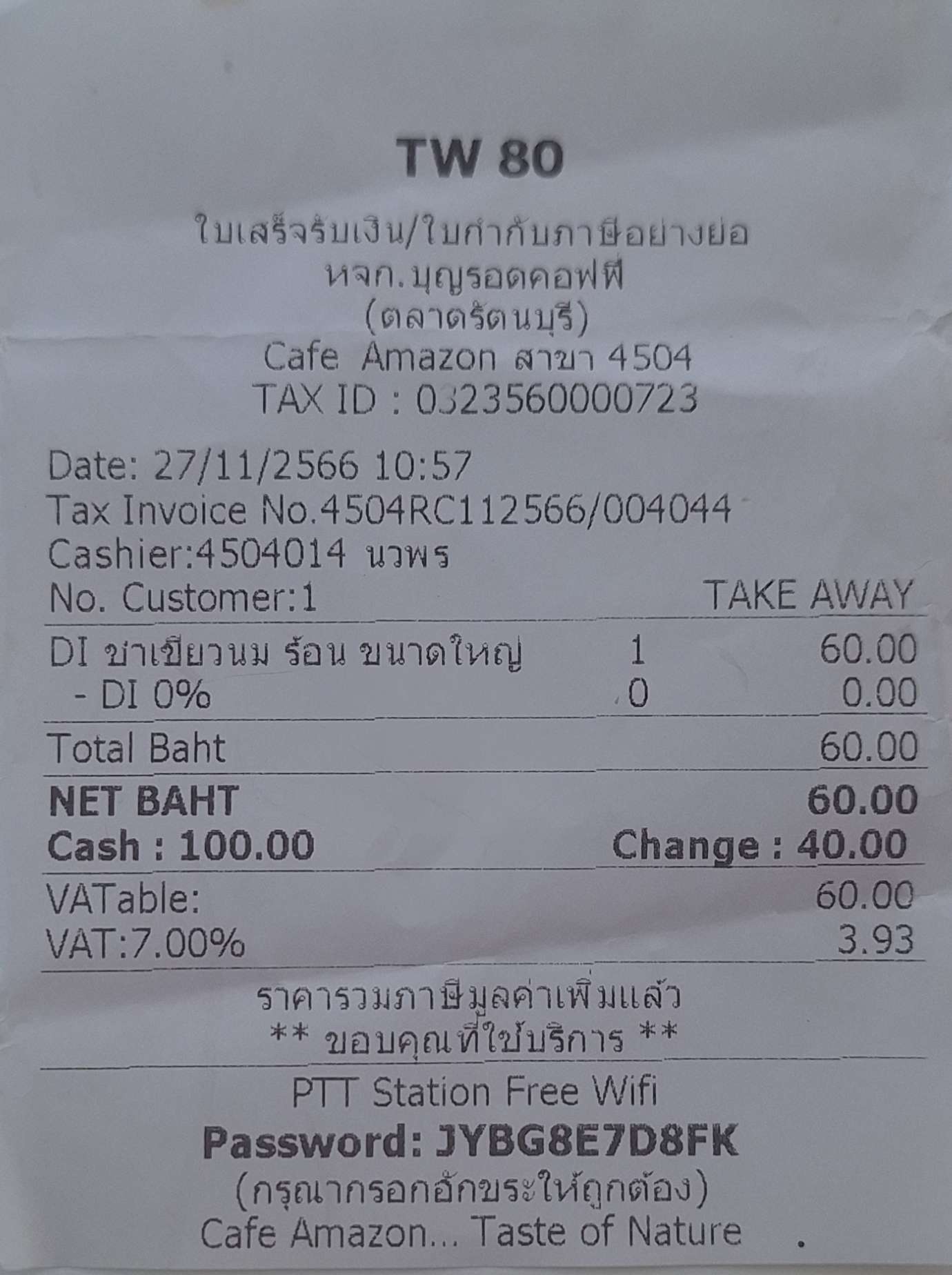
คำขอ:
cURL
curl -X POST "https://api.iapp.co.th/ocr/v3/receipt/file" \
-H "apikey: YOUR_API_KEY" \
-F "file=@/path/to/receipt.jpg" \
-F "return_image=false" \
-F "return_ocr=false"
จุดเชื่อมต่อ API
| จุดเชื่อมต่อ | วิธีการ | คำอธิบาย | ราคา |
|---|---|---|---|
/v3/store/ocr/receipt/ocr/v3/receipt | POST | แยกข้อมูลจากใบเสร็จและใบแจ้งหนี้ของไทย | 1 IC ต่อหน้า |
การตอบสนอง:
{
    "message": "success",
    "processed": {
        "invoiceType": "ใบเสร็จรับเงิน/ใบกำกับภาษีอย่างย่อ",
        "invoiceBook": null,
        "invoiceID": "4504RC112566/004044",
        "invoiceDate": "27/11/2566",
        "issuerName": "หจก.บุญรอดคอฟฟี (ตลาดรัตนบุรี)",
        "issuerTaxID": "0323560000723",
        "items": [
            {
                "itemNo": 1,
                "itemName": "ชาเขียวนม ร้อน ขนาดใหญ่",
                "itemUnit": 1,
                "itemUnitCost": 60.0,
                "itemTotalCost": 60.0
            }
        ],
        "totalCost": 60.0,
        "discount": 0.0,
        "totalCostAfterDiscount": 60.0,
        "vat": 3.93,
        "grandTotal": 60.0
    },
    "confidence": {
        "invoiceType": 0.95,
        "invoiceBook": 0.9,
        "invoiceID": 0.95,
        "invoiceDate": 0.9,
        "issuerName": 0.95,
        "issuerTaxID": 0.95,
        "items": 0.9,
        "totalCost": 0.95,
        "discount": 0.95,
        "totalCostAfterDiscount": 0.95,
        "vat": 0.95,
        "grandTotal": 0.95
    },
    "process_ms": 6821
}
คุณสมบัติและความสามารถ
คุณสมบัติหลัก
-
การประมวลผลเอกสาร
- การแยกข้อความและการรู้จำฟิลด์ที่มีความแม่นยำสูง
- รองรับภาษาไทย/อังกฤษ
- รองรับการพิมพ์/เขียนด้วยลายมือ
- เวลาประมวลผลรวดเร็ว 5-10 วินาทีต่อเอกสาร
- รองรับหลายรูปแบบ (JPEG, JPG, PNG, HEIC, HEIF, PDF)
- การจัดการเอกสารหลายหน้า
- ตัวเลือกในการส่งคืนข้อความ OCR ต้นฉบับและรูปภาพที่ประมวลผลแล้ว
- การประมวลผลที่สอดคล้องกับ GDPR และ PDPA
-
การแยกข้อมูล
- รูปแบบการตอบสนอง JSON ที่ยืดหยุ่นพร้อมการแยกฟิลด์อย่างละเอียด
ฟิลด์ที่รองรับ
| ฟิลด์ | ประเภท | คำอธิบาย |
|---|---|---|
| invoiceType | String | ชื่อหรือประเภทของใบแจ้งหนี้ |
| invoiceBook | String | เลขที่เล่มของใบแจ้งหนี้ |
| invoiceID | String | หมายเลข ID ของใบแจ้งหนี้ |
| invoiceDate | String | วันที่ออกใบแจ้งหนี้ |
| purchaseOrderID | String | หมายเลข ID ของใบสั่งซื้อที่เชื่อมโยง |
| issuerName | String | ชื่อผู้ออกใบแจ้งหนี้ |
| issuerAddress | String | ที่อยู่ผู้ออกใบแจ้งหนี้ |
| issuerTaxID | String | รหัสประจำตัวผู้เสียภาษีของผู้ออกใบแจ้งหนี้ |
| issuerPhone | String | เบอร์ติดต่อของผู้ออกใบแจ้งหนี้ |
| customerName | String | ชื่อลูกค้า |
| customerAddress | String | ที่อยู่ลูกค้า |
| customerTaxID | String | รหัสประจำตัวผู้เสียภาษีของลูกค้า |
| customerPhone | String | เบอร์ติดต่อของลูกค้า |
| items | Array | อาร์เรย์ของรายการสินค้าพร้อมรายละเอียดด้านล่าง |
| - itemNo | String | ลำดับรายการสินค้า |
| - itemCode | String | รหัสสินค้า/บริการ |
| - itemName | String | ชื่อสินค้า/บริการ |
| - itemUnit | Number | จำนวนสินค้า |
| - itemUnitCost | Number | ราคาต่อหน่วย |
| - itemTotalCost | Number | ราคารวมของรายการสินค้านี้ |
| totalCost | Number | ผลรวมของราคาสินค้าทั้งหมด |
| discount | Number | จำนวนส่วนลด (ถ้ามี) |
| totalCostAfterDiscount | Number | ยอดรวมหลังหักส่วนลด |
| vat | Number | จำนวนภาษีมูลค่าเพิ่ม (7%) |
| grandTotal | Number | ยอดรวมสุดท้ายรวมภาษีมูลค่าเพิ่ม |
| confidence | Object | คะแนนความเชื่อมั่น (0-1) สำหรับแต่ละฟิลด์ที่แยกออกมา ค่าที่สูงขึ้นบ่งชี้ถึงความน่าเชื่อถือในการแยกข้อมูลที่มากขึ้น |
หมายเหตุ: มูลค่าสกุลเงินทั้งหมดจะถูกปัดเศษทศนิยมสองตำแหน่ง
เอกสารอ้างอิง API
ยินดีต้อนรับสู่ API Thai Receipt OCR เครื่องมืออันทรงพลังสำหรับการแปลงใบเสร็จและใบแจ้งหนี้ของไทยให้เป็นข้อมูล JSON ที่มีโครงสร้าง API นี้ใช้เทคโนโลยี OCR และ AI ขั้นสูงเพื่อแยกข้อมูลสำคัญ เช่น รายละเอียดใบแจ้งหนี้ ข้อมูลผู้ออกและลูกค้า รายการสินค้า และยอดรวมทางการเงิน
การรู้จำใบเสร็จ
มีจุดเชื่อมต่อสองจุดให้บริการสำหรับการประมวลผลใบเสร็จ:
1. การอัปโหลดไฟล์
POST https://api.iapp.co.th/ocr/v3/receipt/file
ส่วนหัวคำขอ
| ชื่อ | ประเภท | จำเป็น | คำอธิบาย |
|---|---|---|---|
| apikey | string | ใช่ | คีย์ API ของคุณ |
เนื้อหาคำขอ (multipart/form-data)
| พารามิเตอร์ | ประเภท | จำเป็น | คำอธิบาย |
|---|---|---|---|
| file | file | ใช่ | รูปภาพใบเสร็จ (JPEG, PNG) หรือเอกสาร PDF |
| return_image | boolean | ไม่ | รวมรูปภาพที่เข้ารหัส base64 ในการตอบสนอง (ค่าเริ่มต้น: false) |
| return_ocr | boolean | ไม่ | รวมข้อความ OCR ดิบในการตอบสนอง (ค่าเริ่มต้น: false) |
ประเภทไฟล์ที่รองรับ
- รูปภาพ: JPEG, PNG
- เอกสาร: PDF (หน้าเดียวหรือหลายหน้า)
รูปแบบการตอบสนอง
{
    "message": "success",
    "raw": {
        "image": "string", // เข้ารหัส Base64 เฉพาะเมื่อ return_image=true
        "text": "string" // เฉพาะเมื่อ return_ocr=true
    },
    "processed": {
        "invoiceType": "string",
        "invoiceBook": "string",
        "invoiceID": "string",
        "invoiceDate": "string",
        "purchaseOrderID": "string",
        "issuerName": "string",
        "issuerAddress": "string",
        "issuerTaxID": "string",
        "issuerPhone": "string",
        "customerName": "string",
        "customerAddress": "string",
        "customerTaxID": "string",
        "customerPhone": "string",
        "items": [
            {
                "itemNo": "string",
                "itemCode": "string",
                "itemName": "string",
                "itemUnit": "number",
                "itemUnitCost": "number",
                "itemTotalCost": "number"
            }
        ],
        "totalCost": "number",
        "discount": "number",
        "totalCostAfterDiscount": "number",
        "vat": "number",
        "grandTotal": "number"
    },
    "confidence": {
        "invoiceType": "number",
        "invoiceBook": "number",
        "invoiceID": "number",
        "invoiceDate": "number",
        "purchaseOrderID": "number",
        "issuerName": "number",
        "issuerAddress": "number",
        "issuerTaxID": "number",
        "issuerPhone": "number",
        "customerName": "number",
        "customerAddress": "number",
        "customerTaxID": "number",
        "customerPhone": "number",
        "items": "number",
        "totalCost": "number",
        "discount": "number",
        "totalCostAfterDiscount": "number",
        "vat": "number",
        "grandTotal": "number"
    },
    "template": "receipt",
    "iapp": "string",
    "process_ms": "number"
}
การจัดการข้อผิดพลาด
| สถานะ | รหัส | คำอธิบาย |
|---|---|---|
| 400 | BAD_REQUEST | พารามิเตอร์หรือรูปแบบไฟล์ไม่ถูกต้อง |
| 401 | UNAUTHORIZED | คีย์ API ไม่ถูกต้องหรือไม่พบ |
| 404 | NOT_FOUND | จุดเชื่อมต่อไม่ถูกต้อง |
| 500 | INTERNAL_SERVER_ERROR | การประมวลผลล้มเหลว |
2. รูปภาพ Base64
POST https://api.iapp.co.th/ocr/v3/receipt/base64
ส่วนหัวคำขอ
| ชื่อ | ประเภท | จำเป็น | คำอธิบาย |
|---|---|---|---|
| apikey | string | ใช่ | คีย์ API ของคุณ |
เนื้อหาคำขอ
คุณสามารถส่งข้อมูล base64 เป็น JSON หรือ Form Data:
รูปแบบ JSON:
{
    "base64_string": "string", // ข้อมูลรูปภาพที่เข้ารหัส Base64
    "return_image": false, // ไม่บังคับ
    "return_ocr": false // ไม่บังคับ
}
รูปแบบ Form Data:
| พารามิเตอร์ | ประเภท | จำเป็น | คำอธิบาย |
|---|---|---|---|
| base64_string | string | ใช่ | ข้อมูลรูปภาพที่เข้ารหัส Base64 |
| return_image | boolean | ไม่ | รวมรูปภาพที่เข้ารหัส base64 ในการตอบสนอง (ค่าเริ่มต้น: false) |
| return_ocr | boolean | ไม่ | รวมข้อความ OCR ดิบในการตอบสนอง (ค่าเริ่มต้น: false) |
รูปแบบการตอบสนอง
เหมือนกับจุดเชื่อมต่อการอัปโหลดไฟล์
ตัวอย่างโค้ด
Curl
curl -X POST https://api.iapp.co.th/v3/store/ocr/receipt \
    -H "apikey: YOUR_API_KEY" \
    -F "file=@/path/to/file.jpg"
Python (อัปโหลดไฟล์)
import requests
apiKey = 'YOUR_API_KEY'
filePath = '/path/to/receipt.jpg'
url = "https://api.iapp.co.th/ocr/v3/receipt/file"

headers = {'apikey': apiKey}
files = {'file': ('receipt.jpg', open(filePath, 'rb'), 'image/jpeg')}
data = {'return_image': 'false', 'return_ocr': 'false'}

response = requests.post(url, headers=headers, files=files, data=data)
print(response.json())
Python (Base64)
import requests
import base64

apiKey = 'YOUR_API_KEY'
url = "https://api.iapp.co.th/ocr/v3/receipt/base64"

# อ่านไฟล์รูปภาพและแปลงเป็น base64
with open('/path/to/receipt.jpg', 'rb') as image_file:
    base64_string = base64.b64encode(image_file.read()).decode()

headers = {
    'apikey': apiKey,
    'Content-Type': 'application/json'
}

data = {
    'base64_string': base64_string,
    'return_image': False,
    'return_ocr': False
}

response = requests.post(url, headers=headers, json=data)
print(response.json())
Javascript (อัปโหลดไฟล์)
const axios = require("axios")
const FormData = require("form-data")
const fs = require("fs")

const apiKey = "YOUR_API_KEY"
const filePath = "/path/to/receipt.jpg"
const url = "https://api.iapp.co.th/ocr/v3/receipt/file"

const form = new FormData()
form.append("file", fs.createReadStream(filePath))
form.append("return_image", "false")
form.append("return_ocr", "false")

try {
    const response = await axios.post(url, form, {
        headers: {
            ...form.getHeaders(),
            apikey: apiKey,
        },
    })
    return response.data
} catch (error) {
    throw error
}
Javascript (Base64)
const axios = require("axios")
const fs = require("fs")

const apiKey = "YOUR_API_KEY"
const url = "https://api.iapp.co.th/ocr/v3/receipt/base64"

// อ่านไฟล์รูปภาพและแปลงเป็น base64
const base64String = fs.readFileSync("/path/to/receipt.jpg", { encoding: "base64" })

const data = {
    base64_string: base64String,
    return_image: false,
    return_ocr: false,
}

try {
    const response = await axios.post(url, data, {
        headers: {
            "Content-Type": "application/json",
            apikey: apiKey,
        },
    })
    return response.data
} catch (error) {
    throw error
}
PHP (อัปโหลดไฟล์)
$url = 'https://api.iapp.co.th/ocr/v3/receipt/file';
$apiKey = 'YOUR_API_KEY';
$filePath = '/path/to/receipt.jpg';

$headers = array(
    'apikey: ' . $apiKey
);

$postFields = array(
    'file' => new CURLFile($filePath),
    'return_image' => 'false',
    'return_ocr' => 'false'
);

$ch = curl_init();
curl_setopt($ch, CURLOPT_URL, $url);
curl_setopt($ch, CURLOPT_POST, 1);
curl_setopt($ch, CURLOPT_POSTFIELDS, $postFields);
curl_setopt($ch, CURLOPT_RETURNTRANSFER, true);
curl_setopt($ch, CURLOPT_HTTPHEADER, $headers);

$response = curl_exec($ch);
curl_close($ch);

echo $response;
PHP (Base64)
<?php
$url = 'https://api.iapp.co.th/ocr/v3/receipt/base64';
$apiKey = 'YOUR_API_KEY';
$filePath = '/path/to/receipt.jpg';

// อ่านไฟล์รูปภาพและแปลงเป็น base64
$base64String = base64_encode(file_get_contents($filePath));

$data = array(
    'base64_string' => $base64String,
    'return_image' => false,
    'return_ocr' => false
);

$headers = array(
    'Content-Type: application/json',
    'apikey: ' . $apiKey
);

$ch = curl_init();
curl_setopt($ch, CURLOPT_URL, $url);
curl_setopt($ch, CURLOPT_POST, 1);
curl_setopt($ch, CURLOPT_POSTFIELDS, json_encode($data));
curl_setopt($ch, CURLOPT_RETURNTRANSFER, true);
curl_setopt($ch, CURLOPT_HTTPHEADER, $headers);

$response = curl_exec($ch);
curl_close($ch);

echo $response;
Swift (อัปโหลดไฟล์)
import Foundation

let url = URL(string: "https://api.iapp.co.th/ocr/v3/receipt/file")!
let filePath = "/path/to/receipt.jpg"
let apiKey = "YOUR_API_KEY"

var request = URLRequest(url: url)
request.httpMethod = "POST"
request.setValue(apiKey, forHTTPHeaderField: "apikey")

let boundary = UUID().uuidString
request.setValue("multipart/form-data; boundary=\(boundary)", forHTTPHeaderField: "Content-Type")

var body = Data()
body.append("--\(boundary)\r\n".data(using: .utf8)!)
body.append("Content-Disposition: form-data; name=\"file\"; filename=\"receipt.jpg\"\r\n".data(using: .utf8)!)
body.append("Content-Type: image/jpeg\r\n\r\n".data(using: .utf8)!)
body.append(try! Data(contentsOf: URL(fileURLWithPath: filePath)))
body.append("\r\n--\(boundary)\r\n".data(using: .utf8)!)
body.append("Content-Disposition: form-data; name=\"return_image\"\r\n\r\nfalse\r\n".data(using: .utf8)!)
body.append("--\(boundary)\r\n".data(using: .utf8)!)
body.append("Content-Disposition: form-data; name=\"return_ocr\"\r\n\r\nfalse\r\n".data(using: .utf8)!)
body.append("--\(boundary)--\r\n".data(using: .utf8)!)

request.httpBody = body

let task = URLSession.shared.dataTask(with: request) { data, response, error in
    guard let data = data, error == nil else {
        print("Error: \(error?.localizedDescription ?? "Unknown error")")
        return
    }
    print(String(data: data, encoding: .utf8)!)
}

task.resume()
Swift (Base64)
import Foundation

let url = URL(string: "https://api.iapp.co.th/ocr/v3/receipt/base64")!
let filePath = "/path/to/receipt.jpg"
let apiKey = "YOUR_API_KEY"

// อ่านไฟล์รูปภาพและแปลงเป็น base64
guard let imageData = try? Data(contentsOf: URL(fileURLWithPath: filePath)) else {
    print("Error reading file")
    return
}
let base64String = imageData.base64EncodedString()

let parameters: [String: Any] = [
    "base64_string": base64String,
    "return_image": false,
    "return_ocr": false
]

var request = URLRequest(url: url)
request.httpMethod = "POST"
request.setValue("application/json", forHTTPHeaderField: "Content-Type")
request.setValue(apiKey, forHTTPHeaderField: "apikey")
request.httpBody = try? JSONSerialization.data(withJSONObject: parameters)

let task = URLSession.shared.dataTask(with: request) { data, response, error in
    guard let data = data, error == nil else {
        print("Error: \(error?.localizedDescription ?? "Unknown error")")
        return
    }
    print(String(data: data, encoding: .utf8)!)
}

task.resume()
Kotlin (อัปโหลดไฟล์)
import okhttp3.*
import java.io.File

val client = OkHttpClient()
val apiKey = "YOUR_API_KEY"
val filePath = "/path/to/receipt.jpg"
val url = "https://api.iapp.co.th/ocr/v3/receipt/file"

val file = File(filePath)
val requestBody = MultipartBody.Builder()
    .setType(MultipartBody.FORM)
    .addFormDataPart("file", file.name, RequestBody.create(MediaType.parse("image/jpeg"), file))
    .addFormDataPart("return_image", "false")
    .addFormDataPart("return_ocr", "false")
    .build()

val request = Request.Builder()
    .url(url)
    .post(requestBody)
    .addHeader("apikey", apiKey)
    .build()

client.newCall(request).enqueue(object : Callback {
    override fun onFailure(call: Call, e: IOException) {
        e.printStackTrace()
    }

    override fun onResponse(call: Call, response: Response) {
        response.use {
            if (!response.isSuccessful) throw IOException("Unexpected code $response")
            println(response.body()?.string())
        }
    }
})
Kotlin (Base64)
import okhttp3.*
import java.io.File
import android.util.Base64
import org.json.JSONObject

fun processBase64Image() {
    val client = OkHttpClient()
    val apiKey = "YOUR_API_KEY"
    val filePath = "/path/to/receipt.jpg"
    val url = "https://api.iapp.co.th/ocr/v3/receipt/base64"

    // อ่านไฟล์และแปลงเป็น base64
    val file = File(filePath)
    val bytes = file.readBytes()
    val base64String = Base64.encodeToString(bytes, Base64.DEFAULT)

    val json = JSONObject()
    json.put("base64_string", base64String)
    json.put("return_image", false)
    json.put("return_ocr", false)

    val requestBody = RequestBody.create(
        MediaType.parse("application/json"),
        json.toString()
    )

    val request = Request.Builder()
        .url(url)
        .post(requestBody)
        .addHeader("Content-Type", "application/json")
        .addHeader("apikey", apiKey)
        .build()

    client.newCall(request).enqueue(object : Callback {
        override fun onFailure(call: Call, e: IOException) {
            e.printStackTrace()
        }

        override fun onResponse(call: Call, response: Response) {
            response.use {
                if (!response.isSuccessful) throw IOException("Unexpected code $response")
                println(response.body()?.string())
            }
        }
    })
}
Java (อัปโหลดไฟล์)
import okhttp3.*;
import java.io.File;
import java.io.IOException;

public class Main {
    public static void main(String[] args) {
        OkHttpClient client = new OkHttpClient();

        String apiKey = "YOUR_API_KEY";
        String url = "https://api.iapp.co.th/ocr/v3/receipt/file";
        String filePath = "/path/to/receipt.jpg";

        File file = new File(filePath);
        RequestBody requestBody = new MultipartBody.Builder()
            .setType(MultipartBody.FORM)
            .addFormDataPart("file", file.getName(), RequestBody.create(MediaType.parse("image/jpeg"), file))
            .addFormDataPart("return_image", "false")
            .addFormDataPart("return_ocr", "false")
            .build();

        Request request = new Request.Builder()
            .url(url)
            .post(requestBody)
            .addHeader("apikey", apiKey)
            .build();

        client.newCall(request).enqueue(new Callback() {
            @Override
            public void onFailure(Call call, IOException e) {
                e.printStackTrace();
            }

            @Override
            public void onResponse(Call call, Response response) throws IOException {
                if (!response.isSuccessful()) throw new IOException("Unexpected code " + response);
                System.out.println(response.body().string());
            }
        });
    }
}
Java (Base64)
import okhttp3.*;
import java.io.File;
import java.io.IOException;
import java.util.Base64;
import java.nio.file.Files;
import org.json.JSONObject;

public class Main {
    public static void main(String[] args) {
        OkHttpClient client = new OkHttpClient();

        String apiKey = "YOUR_API_KEY";
        String url = "https://api.iapp.co.th/ocr/v3/receipt/base64";
        String filePath = "/path/to/receipt.jpg";

        try {
            // อ่านไฟล์และแปลงเป็น base64
            byte[] fileContent = Files.readAllBytes(new File(filePath).toPath());
            String base64String = Base64.getEncoder().encodeToString(fileContent);

            JSONObject json = new JSONObject();
            json.put("base64_string", base64String);
            json.put("return_image", false);
            json.put("return_ocr", false);

            RequestBody requestBody = RequestBody.create(
                MediaType.parse("application/json"),
                json.toString()
            );

            Request request = new Request.Builder()
                .url(url)
                .post(requestBody)
                .addHeader("Content-Type", "application/json")
                .addHeader("apikey", apiKey)
                .build();

            client.newCall(request).enqueue(new Callback() {
                @Override
                public void onFailure(Call call, IOException e) {
                    e.printStackTrace();
                }

                @Override
                public void onResponse(Call call, Response response) throws IOException {
                    if (!response.isSuccessful()) throw new IOException("Unexpected code " + response);
                    System.out.println(response.body().string());
                }
            });
        } catch (Exception e) {
            e.printStackTrace();
        }
    }
}
Dart (อัปโหลดไฟล์)
import 'dart:convert';
import 'dart:io';
import 'package:http/http.dart' as http;

String url = 'https://api.iapp.co.th/ocr/v3/receipt/file';
String filePath = '/path/to/receipt.jpg';
String apiKey = 'YOUR_API_KEY';

void main() async {
    var url = Uri.parse(url);
    var request = http.MultipartRequest('POST', url)
        ..headers['apikey'] = apiKey
        ..files.add(await http.MultipartFile.fromPath('file', filePath))
        ..fields['return_image'] = 'false'
        ..fields['return_ocr'] = 'false';

    var response = await request.send();

    if (response.statusCode == 200) {
        var responseData = await response.stream.bytesToString();
        print(responseData);
    } else {
        print('Error: ${response.statusCode}');
    }
}
Dart (Base64)
import 'dart:convert';
import 'dart:io';
import 'package:http/http.dart' as http;

void main() async {
    String url = 'https://api.iapp.co.th/ocr/v3/receipt/base64';
    String filePath = '/path/to/receipt.jpg';
    String apiKey = 'YOUR_API_KEY';

    try {
        // อ่านไฟล์และแปลงเป็น base64
        File file = File(filePath);
        List<int> fileBytes = await file.readAsBytes();
        String base64String = base64Encode(fileBytes);

        Map<String, dynamic> data = {
            'base64_string': base64String,
            'return_image': false,
            'return_ocr': false
        };

        var response = await http.post(
            Uri.parse(url),
            headers: {
                'Content-Type': 'application/json',
                'apikey': apiKey
            },
            body: jsonEncode(data)
        );

        if (response.statusCode == 200) {
            print(response.body);
        } else {
            print('Error: ${response.statusCode}');
        }
    } catch (e) {
        print('Error: $e');
    }
}
ข้อจำกัดและแนวทางปฏิบัติที่ดีที่สุด
ข้อจำกัด
- ขนาดไฟล์สูงสุด: 10MB
- ภาษาที่รองรับ: ไทย
- ไฟล์ PDF: สูงสุด 10 หน้า
- ขีดจำกัดอัตรา: 10 คำขอต่อวินาทีต่อคีย์ API
แนวทางปฏิบัติที่ดีที่สุด
- ตรวจสอบให้แน่ใจว่าคุณภาพของภาพดีที่สุดเพื่อผลลัพธ์ที่เหมาะสมที่สุด
- ใช้รูปแบบ JPEG หรือ PNG สำหรับรูปภาพ
- ใช้การจัดการข้อผิดพลาดสำหรับคำขอที่ล้มเหลว
- แคชการตอบสนองเมื่อประมวลผลเอกสารเดียวกันหลายครั้ง
- ตั้งค่าเวลาหมดอายุที่เหมาะสมสำหรับไฟล์ขนาดใหญ่
ความแม่นยำและประสิทธิภาพ
ความแม่นยำโดยรวม
จากชุดข้อมูลการวัดผลของเรา 10,000 ใบเสร็จไทย:
| ประเภทฟิลด์ | ความแม่นยำ (%) | หมายเหตุ |
|---|---|---|
| หมายเลขใบแจ้งหนี้ | 99.2% | รวมถึงหมายเลขใบกำกับภาษี |
| จำนวนเงิน | 99.5% | มูลค่าสกุลเงินและยอดรวม |
| วันที่ | 98.7% | รูปแบบวันที่ไทยหลากหลาย |
| รายการสินค้า | 97.8% | รายละเอียดสินค้าและราคา |
| โดยรวม | 98.8% | ค่าเฉลี่ยถ่วงน้ำหนัก |
ความเร็วในการประมวลผล
- เวลาประมวลผลเฉลี่ย: 5-10 วินาที
- เปอร์เซ็นไทล์ที่ 95: 12 วินาที
- เวลาประมวลผลสูงสุด: 15 วินาที
ปัจจัยที่มีผลต่อความแม่นยำ
-
คุณภาพของภาพ
- ความละเอียด (แนะนำขั้นต่ำ 300 DPI)
- สภาพแสง
- โฟกัสและความคมชัดของภาพ
-
สภาพเอกสาร
- ความเสียหายทางกายภาพ
- สีซีดจางหรือสึกหรอ
- การแก้ไขด้วยลายมือ
-
รูปแบบใบเสร็จ
- รูปแบบมาตรฐาน: ความแม่นยำ 99%+
- เค้าโครงที่ไม่เป็นมาตรฐาน: ความแม่นยำ 95%+
- องค์ประกอบที่เขียนด้วยลายมือ: ความแม่นยำ 90%+
ประวัติ
โมเดลของเราได้รับการฝึกฝนอย่างต่อเนื่องด้วยข้อมูลใหม่เพื่อปรับปรุงความแม่นยำ:
| เวอร์ชั่น | วันที่ออก | ความแม่นยำ | การปรับปรุงหลัก |
|---|---|---|---|
| 3.0 | 27-12-2024 | 96.5% | เวอร์ชั่นพื้นฐาน |
ราคา
| ชื่อบริการ AI API | จุดเชื่อมต่อ | ราคา | On-Premise |
|---|---|---|---|
| Receipt OCR [v1.0] | receipt-ocr | 1 IC/หน้า | ติดต่อ |