AI OCR ประกาศรับสมัครงานและ API ดึงข้อมูล
1 ICต่อหน้า
โครงการนี้ยังรวมถึงฟังก์ชันการประมวลผลเอกสารประกาศรับสมัครงาน (JD) (PDF, JPG, PNG) บริการ iApp OCR จะดึงข้อความดิบจาก JD และโมเดล OpenThaiGPT จะถูกใช้เพื่อแปลงข้อความที่ดึงมาให้เป็นข้อมูล JSON ที่มีโครงสร้าง รายละเอียดสำคัญที่ดึงออกมา ได้แก่ ชื่อตำแหน่งงาน ชื่อบริษัท สถานที่ ความรับผิดชอบ คุณสมบัติที่ต้องการ และทักษะที่แนะนำโดย AI ซึ่งจำเป็นสำหรับตำแหน่งนั้นๆ ข้อมูลนี้สามารถนำไปใช้เพื่อทำให้การจับคู่ตำแหน่งงาน การสรรหาบุคลากร หรือการดำเนินงานด้านทรัพยากรบุคคลอื่นๆ เป็นไปโดยอัตโนมัติ
ลองใช้ Demo
ทดลองใช้ AI Demo
เข้าสู่ระบบหรือสร้างบัญชีฟรีเพื่อใช้งาน AI Demo และสำรวจ API ที่ทรงพลังของเรา
รับ 50 เครดิตฟรี (IC) เมื่อสมัครสมาชิก!
โปรโมชันหมดเขต 31 ธันวาคม 2568
วิธีรับ API Key?
กรุณาเยี่ยมชมหน้า การจัดการ API Key เพื่อดู API Key ที่มีอยู่ของคุณ หรือขอ API Key ใหม่
API Endpoints
| Endpoint | Method | คำอธิบาย | ราคา |
|---|---|---|---|
/v3/store/ocr/job-description/ocr/jd | POST | ดึงข้อมูลที่มีโครงสร้างจากประกาศรับสมัครงาน | 1 IC ต่อหน้า |
ตัวอย่างโค้ด
ตัวอย่าง JD
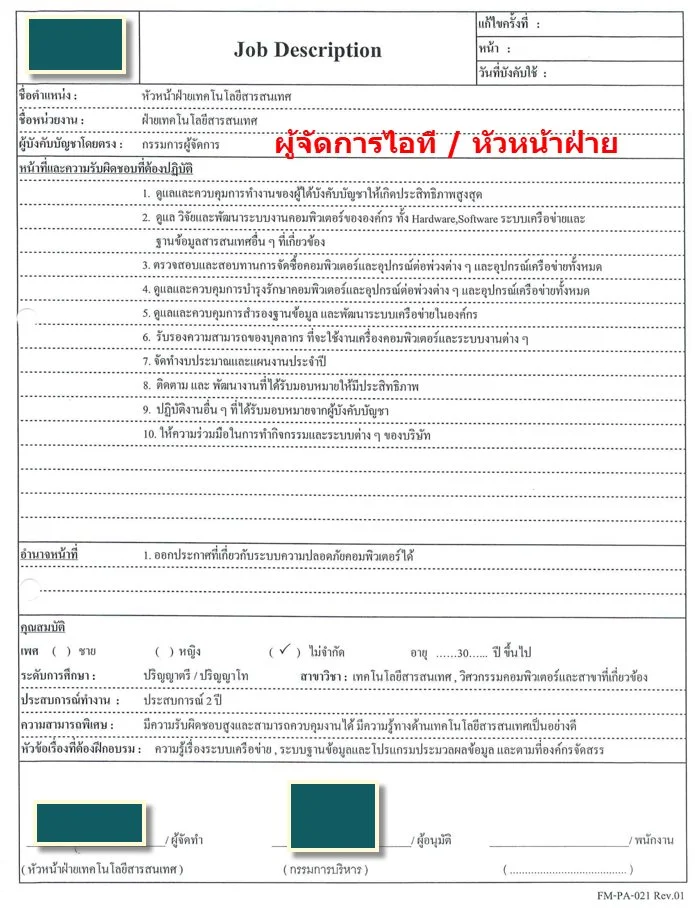
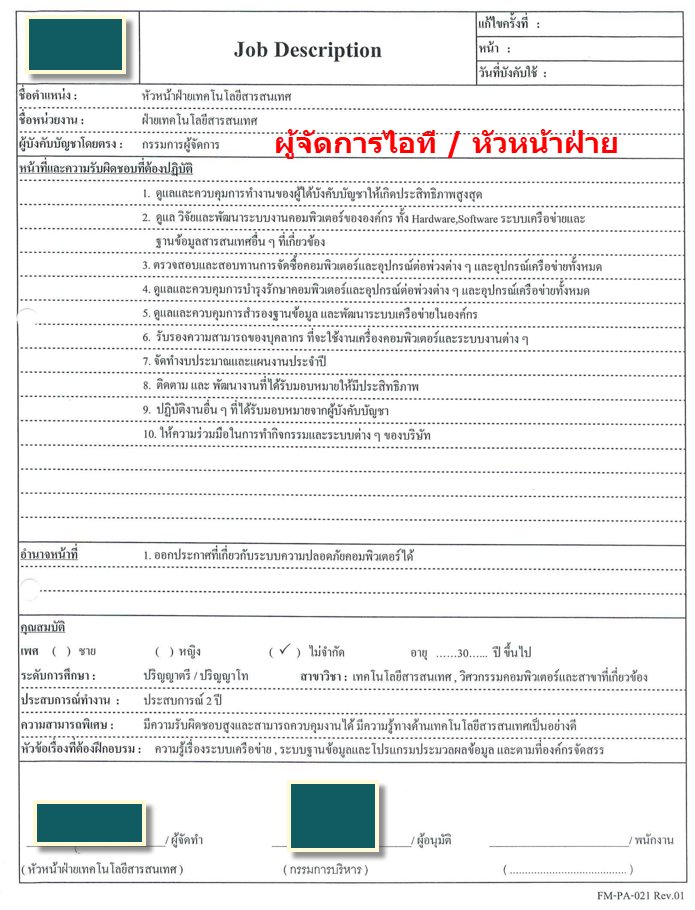
Request:
    curl -X POST https://api.iapp.co.th/ocr/jd
        -H "apikey: YOUR_API_KEY"
        -F "file=@/path/to/sample_jd_2.png"
Response:
{
    "jobTitle": "หัวหน้าฝ่ายเทคโนโลยีสารสนเทศ (Head of Information Technology)",
    "companyName": null,
    "location": null,
    "salaryRange": null,
    "responsibilities": [
        "Supervise and control the work of subordinates for maximum efficiency.",
        "Oversee, research, and develop the organization's computer systems, including hardware, software, network systems, and other related information databases.",
        "Inspect and review the procurement of computers, peripherals, and all network equipment.",
        "Oversee and control the maintenance of computers, peripherals, and all network equipment.",
        "Oversee and control database backups and develop the organization's network system.",
        "Certify the ability of personnel to use computers and various systems.",
        "Prepare annual budgets and work plans.",
        "Monitor and develop assigned tasks for effectiveness.",
        "Perform other duties as assigned by superiors.",
        "Cooperate in company activities and systems."
    ],
    "qualifications": [
        "Bachelor's/Master's degree",
        "Major in Information Technology, Computer Engineering, or related fields",
        "At least 2 years of experience",
        "30 years old or older",
        "Highly responsible and able to control work",
        "Good knowledge of information technology"
    ],
    "possibleSkillAndQualificationsByAI": [
        "IT Management",
        "Hardware",
        "Software",
        "Network Administration",
        "Database Management",
        "System Administration",
        "Procurement",
        "Maintenance Management",
        "Data Backup and Recovery",
        "Training",
        "Budgeting",
        "Problem Solving",
        "Leadership",
        "Team Management",
        "Communication Skills"
    ],
    "confidence": {
        "jobTitle": 0.95,
        "company": 0.95,
        "location": 0.9,
        "employmentType": 0.9,
        "salary": 0.9,
        "responsibilities": 0.9,
        "qualifications": 0.9,
        "skills": 0.9,
        "possibleSkillsByAI": 0.85
    }
}
คุณสมบัติ
- การประมวลผลประกาศรับสมัครงาน: ดึงข้อมูลสำคัญจาก JD เช่น ชื่อตำแหน่งงาน บริษัท สถานที่ ความรับผิดชอบ คุณสมบัติ และทักษะที่ต้องการซึ่งแนะนำโดย AI
- คะแนนความมั่นใจ: แต่ละฟิลด์ที่ดึงมาจะมีคะแนนความมั่นใจ (0-1) ระบุระดับความน่าเชื่อถือของการดึงข้อมูล
- รูปแบบที่รองรับ: รับไฟล์ PDF, JPG, PNG และ JPEG
ตัวอย่างโค้ด
Curl
curl -X POST https://api.iapp.co.th/v3/store/ocr/job-description \
    -H "apikey: YOUR_API_KEY" \
    -F "file=@/path/to/file.jpg"
Python
import requests

url = "https://api.iapp.co.th/ocr/jd"

payload = {}
files=[
  ('file',('sample_jd_2.png',open('sample_jd_2.png','rb'),'application/pdf'))
]
headers = {"apikey": "YOUR_API_KEY"}

response = requests.request("POST", url, headers=headers, data=payload, files=files)

print(response.text)
JavaScript
const axios = require("axios")
const FormData = require("form-data")
const fs = require("fs")

let data = new FormData()
data.append("file", fs.createReadStream("sample_jd_2.png"))

let config = {
    method: "post",
    maxBodyLength: Infinity,
    url: "https://api.iapp.co.th/ocr/jd",
    headers: {
        apikey: "YOUR_API_KEY",
        ...data.getHeaders(),
    },
    data: data,
}

axios
    .request(config)
    .then((response) => {
        console.log(JSON.stringify(response.data))
    })
    .catch((error) => {
        console.log(error)
    })
PHP
<?php

$curl = curl_init();

curl_setopt_array($curl, array(
  CURLOPT_URL => 'https://api.iapp.co.th/ocr/jd',
  CURLOPT_RETURNTRANSFER => true,
  CURLOPT_ENCODING => '',
  CURLOPT_MAXREDIRS => 10,
  CURLOPT_TIMEOUT => 0,
  CURLOPT_FOLLOWLOCATION => true,
  CURLOPT_HTTP_VERSION => CURL_HTTP_VERSION_1_1,
  CURLOPT_CUSTOMREQUEST => 'POST',
  CURLOPT_POSTFIELDS => array('file'=> new CURLFILE('sample_jd_2.png')),
  CURLOPT_HTTPHEADER => array(
    'apikey: YOUR_API_KEY'
  ),
));

$response = curl_exec($curl);

curl_close($curl);
echo $response;
Swift
let parameters = [
  [
    "key": "file",
    "src": "sample_jd_2.png",
    "type": "file"
  ]] as [[String: Any]]

let boundary = "Boundary-\(UUID().uuidString)"
var body = Data()
var error: Error? = nil
for param in parameters {
  if param["disabled"] != nil { continue }
  let paramName = param["key"]!
  body += Data("--\(boundary)\r\n".utf8)
  body += Data("Content-Disposition:form-data; name=\"\(paramName)\"".utf8)
  if param["contentType"] != nil {
    body += Data("\r\nContent-Type: \(param["contentType"] as! String)".utf8)
  }
  let paramType = param["type"] as! String
  if paramType == "text" {
    let paramValue = param["value"] as! String
    body += Data("\r\n\r\n\(paramValue)\r\n".utf8)
  } else {
    let paramSrc = param["src"] as! String
    let fileURL = URL(fileURLWithPath: paramSrc)
    if let fileContent = try? Data(contentsOf: fileURL) {
      body += Data("; filename=\"\(paramSrc)\"\r\n".utf8)
      body += Data("Content-Type: \"content-type header\"\r\n".utf8)
      body += Data("\r\n".utf8)
      body += fileContent
      body += Data("\r\n".utf8)
    }
  }
}
body += Data("--\(boundary)--\r\n".utf8);
let postData = body


var request = URLRequest(url: URL(string: "https://api.iapp.co.th/ocr/jd")!,timeoutInterval: Double.infinity)
request.addValue("YOUR_API_KEY", forHTTPHeaderField: "apikey")
request.addValue("multipart/form-data; boundary=\(boundary)", forHTTPHeaderField: "Content-Type")

request.httpMethod = "POST"
request.httpBody = postData

let task = URLSession.shared.dataTask(with: request) { data, response, error in
  guard let data = data else {
    print(String(describing: error))
    return
  }
  print(String(data: data, encoding: .utf8)!)
}

task.resume()
Kotlin
val client = OkHttpClient()
val mediaType = "text/plain".toMediaType()
val body = MultipartBody.Builder().setType(MultipartBody.FORM)
  .addFormDataPart("file","sample_jd_2.png",
    File("sample_jd_2.png").asRequestBody("application/octet-stream".toMediaType()))
  .build()
val request = Request.Builder()
  .url("https://api.iapp.co.th/ocr/jd")
  .post(body)
  .addHeader("apikey", "YOUR_API_KEY")
  .build()
val response = client.newCall(request).execute()
Java
OkHttpClient client = new OkHttpClient().newBuilder()
  .build();
MediaType mediaType = MediaType.parse("text/plain");
RequestBody body = new MultipartBody.Builder().setType(MultipartBody.FORM)
  .addFormDataPart("file","sample_jd_2.png",
    RequestBody.create(MediaType.parse("application/octet-stream"),
    new File("sample_jd_2.png")))
  .build();
Request request = new Request.Builder()
  .url("https://api.iapp.co.th/ocr/jd")
  .method("POST", body)
  .addHeader("apikey", "YOUR_API_KEY")
  .build();
Response response = client.newCall(request).execute();
Dart
var headers = {
  'apikey': 'YOUR_API_KEY'
};
var request = http.MultipartRequest('POST', Uri.parse('https://api.iapp.co.th/ocr/jd'));
request.files.add(await http.MultipartFile.fromPath('file', 'sample_jd_2.png'));
request.headers.addAll(headers);

http.StreamedResponse response = await request.send();

if (response.statusCode == 200) {
  print(await response.stream.bytesToString());
}
else {
  print(response.reasonPhrase);
}
ราคา
| ชื่อบริการ AI API | Endpoint | IC ต่อหน้า | On-Premise |
|---|---|---|---|
| AI Job Description OCR and Information Extraction API | iapp_jd_ocr | 1 IC/หน้า | ติดต่อ |