🪪 AI 职位描述 OCR 和信息提取 API
1 IC每页
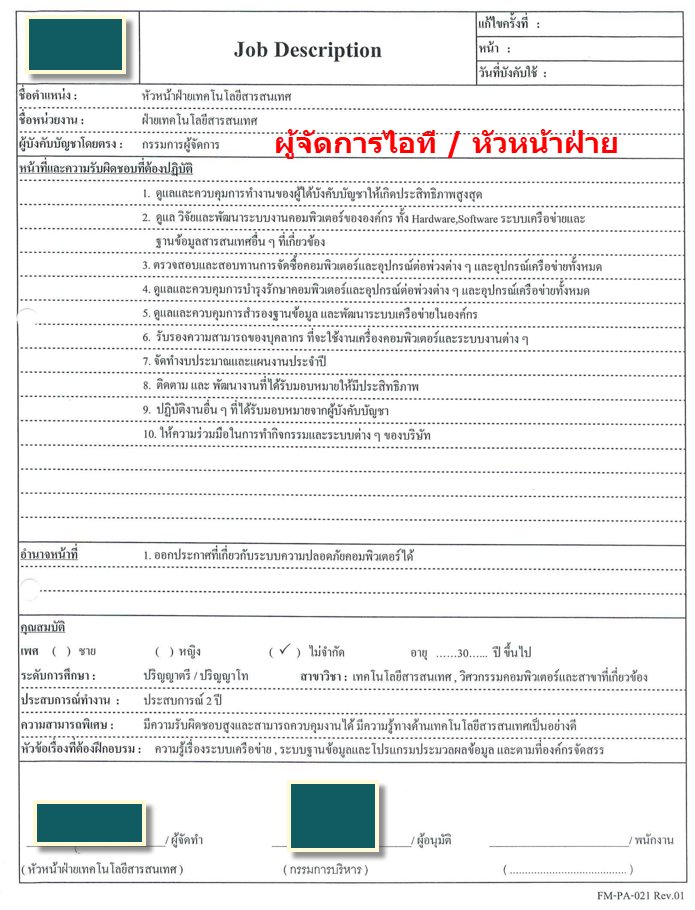
本项目还包括处理职位描述 (JD) 文档(PDF、JPG、PNG)的功能。艾艾普科技OCR服务从职位描述中提取原始文本,并使用OpenThaiGPT模型将提取的文本转换为结构化的JSON数据。提取的关键详细信息包括职位名称、公司名称、地点、职责、所需资质以及AI建议的该职位所需的技能。这些数据可用于自动化职位匹配、人才招聘或其他与人力资源相关的任务。
试用演示
如何获取 API 密钥?
请访问 API 密钥管理 页面查看您现有的 API 密钥或申请新密钥。
API 端点
| 端点 | 方法 | 描述 | 费用 |
|---|---|---|---|
/v3/store/ocr/job-description/ocr/jd | POST | 从职位描述中提取结构化数据 | 每页 1 IC |
代码示例
职位描述示例

请求:
curl -X POST https://api.iapp.co.th/ocr/jd
-H "apikey: YOUR_API_KEY"
-F "file=@/path/to/sample_jd_2.png"
响应:
{
"jobTitle": "หัวหน้าฝ่ายเทคโนโลยีสารสนเทศ (Head of Information Technology)",
"companyName": null,
"location": null,
"salaryRange": null,
"responsibilities": [
"Supervise and control the work of subordinates for maximum efficiency.",
"Oversee, research, and develop the organization's computer systems, including hardware, software, network systems, and other related information databases.",
"Inspect and review the procurement of computers, peripherals, and all network equipment.",
"Oversee and control the maintenance of computers, peripherals, and all network equipment.",
"Oversee and control database backups and develop the organization's network system.",
"Certify the ability of personnel to use computers and various systems.",
"Prepare annual budgets and work plans.",
"Monitor and develop assigned tasks for effectiveness.",
"Perform other duties as assigned by superiors.",
"Cooperate in company activities and systems."
],
"qualifications": [
"Bachelor's/Master's degree",
"Major in Information Technology, Computer Engineering, or related fields",
"At least 2 years of experience",
"30 years old or older",
"Highly responsible and able to control work",
"Good knowledge of information technology"
],
"possibleSkillAndQualificationsByAI": [
"IT Management",
"Hardware",
"Software",
"Network Administration",
"Database Management",
"System Administration",
"Procurement",
"Maintenance Management",
"Data Backup and Recovery",
"Training",
"Budgeting",
"Problem Solving",
"Leadership",
"Team Management",
"Communication Skills"
]
}
功能
- 职位描述处理: 从职位描述中提取关键详细信息,如职位名称、公司、地点、职责、资质和AI建议的所需技能。
- 支持的格式: 接受 PDF、JPG、PNG 和 JPEG 文件。
代码示例
Curl
curl -X POST https://api.iapp.co.th/v3/store/ocr/job-description \
-H "apikey: YOUR_API_KEY" \
-F "file=@/path/to/file.jpg"
Python
import requests
url = "https://api.iapp.co.th/ocr/jd"
payload = {}
files=[
('file',('sample_jd_2.png',open('sample_jd_2.png','rb'),'application/pdf'))
]
headers = {"apikey": "YOUR_API_KEY"}
response = requests.request("POST", url, headers=headers, data=payload, files=files)
print(response.text)
JavaScript
const axios = require("axios")
const FormData = require("form-data")
const fs = require("fs")
let data = new FormData()
data.append("file", fs.createReadStream("sample_jd_2.png"))
let config = {
method: "post",
maxBodyLength: Infinity,
url: "https://api.iapp.co.th/ocr/jd",
headers: {
apikey: "YOUR_API_KEY",
...data.getHeaders(),
},
data: data,
}
axios
.request(config)
.then((response) => {
console.log(JSON.stringify(response.data))
})
.catch((error) => {
console.log(error)
})
PHP
<?php
$curl = curl_init();
curl_setopt_array($curl, array(
CURLOPT_URL => 'https://api.iapp.co.th/ocr/jd',
CURLOPT_RETURNTRANSFER => true,
CURLOPT_ENCODING => '',
CURLOPT_MAXREDIRS => 10,
CURLOPT_TIMEOUT => 0,
CURLOPT_FOLLOWLOCATION => true,
CURLOPT_HTTP_VERSION => CURL_HTTP_VERSION_1_1,
CURLOPT_CUSTOMREQUEST => 'POST',
CURLOPT_POSTFIELDS => array('file'=> new CURLFILE('sample_jd_2.png')),
CURLOPT_HTTPHEADER => array(
'apikey: YOUR_API_KEY'
),
));
$response = curl_exec($curl);
curl_close($curl);
echo $response;
Swift
let parameters = [
[
"key": "file",
"src": "sample_jd_2.png",
"type": "file"
]] as [[String: Any]]
let boundary = "Boundary-\(UUID().uuidString)"
var body = Data()
var error: Error? = nil
for param in parameters {
if param["disabled"] != nil { continue }
let paramName = param["key"]!
body += Data("--\(boundary)\r\n".utf8)
body += Data("Content-Disposition:form-data; name=\"\(paramName)\"".utf8)
if param["contentType"] != nil {
body += Data("\r\nContent-Type: \(param["contentType"] as! String)".utf8)
}
let paramType = param["type"] as! String
if paramType == "text" {
let paramValue = param["value"] as! String
body += Data("\r\n\r\n\(paramValue)\r\n".utf8)
} else {
let paramSrc = param["src"] as! String
let fileURL = URL(fileURLWithPath: paramSrc)
if let fileContent = try? Data(contentsOf: fileURL) {
body += Data("; filename=\"\(paramSrc)\"\r\n".utf8)
body += Data("Content-Type: \"content-type header\"\r\n".utf8)
body += Data("\r\n".utf8)
body += fileContent
body += Data("\r\n".utf8)
}
}
}
body += Data("--\(boundary)--\r\n".utf8);
let postData = body
var request = URLRequest(url: URL(string: "https://api.iapp.co.th/ocr/jd")!,timeoutInterval: Double.infinity)
request.addValue("YOUR_API_KEY", forHTTPHeaderField: "apikey")
request.addValue("multipart/form-data; boundary=\(boundary)", forHTTPHeaderField: "Content-Type")
request.httpMethod = "POST"
request.httpBody = postData
let task = URLSession.shared.dataTask(with: request) { data, response, error in
guard let data = data else {
print(String(describing: error))
return
}
print(String(data: data, encoding: .utf8)!)
}
task.resume()
Kotlin
val client = OkHttpClient()
val mediaType = "text/plain".toMediaType()
val body = MultipartBody.Builder().setType(MultipartBody.FORM)
.addFormDataPart("file","sample_jd_2.png",
File("sample_jd_2.png").asRequestBody("application/octet-stream".toMediaType()))
.build()
val request = Request.Builder()
.url("https://api.iapp.co.th/ocr/jd")
.post(body)
.addHeader("apikey", "YOUR_API_KEY")
.build()
val response = client.newCall(request).execute()
Java
OkHttpClient client = new OkHttpClient().newBuilder()
.build();
MediaType mediaType = MediaType.parse("text/plain");
RequestBody body = new MultipartBody.Builder().setType(MultipartBody.FORM)
.addFormDataPart("file","sample_jd_2.png",
RequestBody.create(MediaType.parse("application/octet-stream"),
new File("sample_jd_2.png")))
.build();
Request request = new Request.Builder()
.url("https://api.iapp.co.th/ocr/jd")
.method("POST", body)
.addHeader("apikey", "YOUR_API_KEY")
.build();
Response response = client.newCall(request).execute();
Dart
var headers = {
'apikey': 'YOUR_API_KEY'
};
var request = http.MultipartRequest('POST', Uri.parse('https://api.iapp.co.th/ocr/jd'));
request.files.add(await http.MultipartFile.fromPath('file', 'sample_jd_2.png'));
request.headers.addAll(headers);
http.StreamedResponse response = await request.send();
if (response.statusCode == 200) {
print(await response.stream.bytesToString());
}
else {
print(response.reasonPhrase);
}
定价
| AI API 服务名称 | 端点 | 每页 IC | 本地部署 |
|---|---|---|---|
| AI 职位描述 OCR 和信息提取 API | iapp_jd_ocr | 1 IC/页 | 联系我们 |