跳到主要内容

📄 泰国税款扣除证明 OCR

1 IC每页
✅ 活跃📄 OCR

欢迎来到泰国税款扣除证明 OCR API,这是由艾艾普科技有限公司开发的一款人工智能解决方案,用于从泰国税款扣除证明中提取数据。本文档将帮助您有效集成和使用我们的 OCR 服务。

试用演示!

Example Images (Click to try)

Example 1

入门指南

  1. 前提条件

    • 艾艾普科技的 API 密钥
    • 泰国税款扣除证明图片
    • 支持的文件格式:JPEG, JPG, PNG, HEIC, HEIF, PDF
    • 最大文件大小:10MB
  2. 快速入门

    • 快速处理(每份文档 5-10 秒)
    • 高精度文本提取
    • 支持多种文件格式
  3. 主要功能

    • 详细字段提取,包括:
      • 证明详情(ID,日期)
      • 扣缴义务人信息(姓名,地址,税号)
      • 纳税人信息(姓名,地址,税号)
      • 收入详情(类型,金额,代扣税款)
      • 财务摘要(总收入,总代扣税款)
    • 支持单页和多页文档(PDF)
    • 可选返回原始 OCR 文本和处理后的图像
    • 灵活的 JSON 响应格式,包含详细的字段提取
  4. 安全与合规

    • 符合 GDPR 和 PDPA
    • 安全的 API 端点
    • 处理后不保留数据

我们的 API 旨在处理泰国常用的各种税款扣除证明格式和布局。后处理人工智能模型经过训练,能够理解泰国税务文件结构,即使在嘈杂或扫描质量差的文档中也能可靠地提取信息。

示例

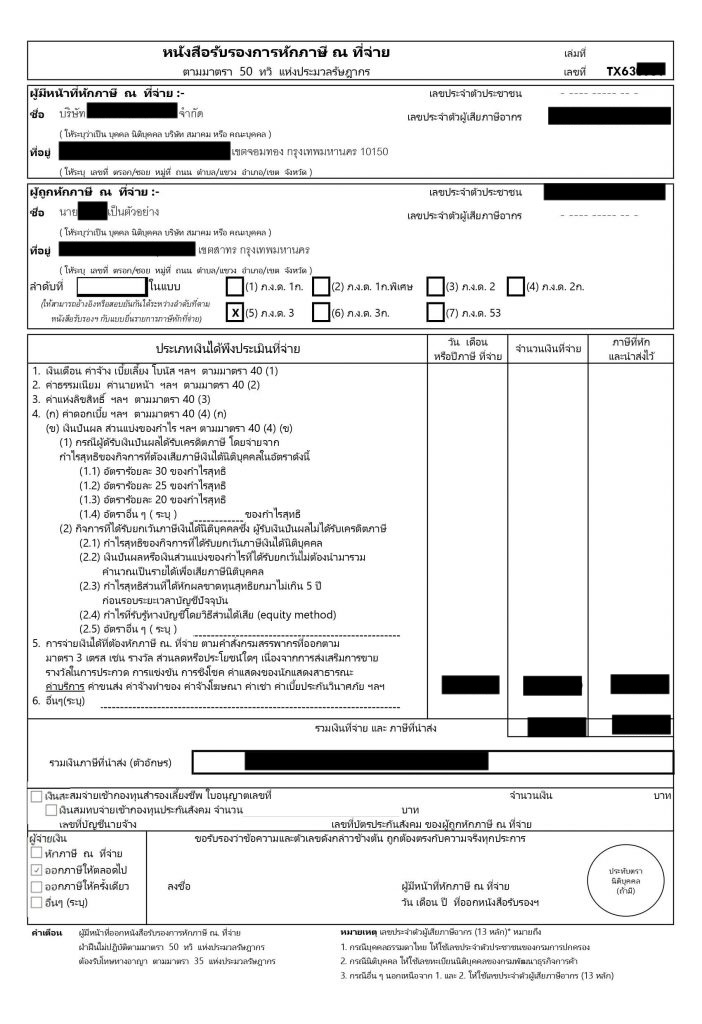
以下是泰国税款扣除证明的样本及其提取的数据:

泰国税款扣除证明示例

请求:

cURL

curl -X POST https://api.iapp.co.th/ocr/v3/tax-deduction-certificate/file \
-H apikey: YOUR_API_KEY \
-F file=@/path/to/certificate.jpg \
-F return_image=false \
-F return_ocr=false
如何获取 API Key?

请访问 API Key 管理 页面查看您现有的 API Key 或申请新的 API Key。

API 端点

端点方法描述费用
/v3/store/ocr/tax-deduction-certificate
/ocr/v3/tax-deduction-certificate
POST从泰国税款扣除证明中提取数据每页 1 IC

响应:

{
"message": "success",
"raw": {},
"processed": {
"documentType": "หนังสือรับรองการหักภาษี ณ ที่จ่าย",
"documentForm": "ภ.ง.ด.3",
"bookNumber": "TX63XXXX",
"documentNumber": null,
"taxDeductor": {
"name": "บริษัท XXXXXXXXXXXXXXXXXXXX จำกัด",
"taxId": "010XXXXXXXX64",
"address": "XXXX XXXXXX XXXXXXXX เขตจอมทอง กรุงเทพมหานคร 10150"
},
"taxpayer": {
"name": "นายXXXXX เป็นตัวอย่าง",
"taxId": "31XXXXXXXX123",
"address": "XXXX XXXXXX XXXXXXXX เขตสาทร กรุงเทพมหานคร"
},
"paymentTypes": [
{
"paymentDate": "02/09/63",
"amount": XXXXX.XX,
"withholdingTax": XXXX.XX
}
],
"totalAmount": XXXXX.XX,
"totalTax": XXXX.XX,
"socialSecurity": {
"amount": null,
"year": null
},
"taxPayerMethod": "ออกภาษีให้ตลอดไป"
},
"template": "tax-deduction-certificate",
"iapp": {
"page": 0,
"char": 3260
},
"process_ms": 46649
}

功能与能力

核心功能

  1. 文档处理

    • 高精度文本提取和字段识别
    • 支持泰语
    • 快速处理时间,每份文档 25-30 秒
    • 多格式支持(JPEG, JPG, PNG, HEIC, HEIF, PDF)
    • 多页文档处理
    • 可选返回原始 OCR 文本和处理后的图像
    • 符合 GDPR 和 PDPA 的处理
  2. 数据提取

    • 灵活的 JSON 响应格式,包含详细的字段提取

支持的字段

字段类型描述
documentTypeString税务文件类型
documentFormString表单类型(ภ.ง.ด.1ก, ภ.ง.ด.1ก พิเศษ, ภ.ง.ด.2, ภ.ง.ด.3, ภ.ง.ด.2ก, ภ.ง.ด.3ก, ภ.ง.ด.53)
bookNumberString文件簿号
documentNumberString文件号
taxDeductor.nameString扣缴义务人姓名
taxDeductor.taxIdString扣缴义务人税号
taxDeductor.addressString扣缴义务人地址
taxpayer.nameString纳税人姓名
taxpayer.taxIdString纳税人税号
taxpayer.addressString纳税人地址
paymentTypes[].paymentDateString付款日期
paymentTypes[].amountNumber付款金额
paymentTypes[].withholdingTaxNumber代扣税款金额
totalAmountNumber总付款金额
totalTaxNumber总代扣税款金额
socialSecurity.amountNumber社会保障缴费金额
socialSecurity.yearNumber社会保障缴费年份
taxPayerMethodString纳税方式(หักภาษี ณ ที่จ่าย, ออกภาษีให้ตลอดไป, ออกภาษีให้ครั้งเดียว, อื่นๆ)

API 参考

欢迎来到泰国税款扣除证明 OCR API,这是一个将泰国税款扣除证明转换为结构化 JSON 数据的强大工具。该 API 利用先进的 OCR 和人工智能技术,提取关键信息,如文件详情、扣缴义务人和纳税人数据、付款信息和税款金额。

识别税款扣除证明

有两个可用的端点用于处理税款扣除证明:

1. 文件上传

POST https://api.iapp.co.th/ocr/v3/tax-deduction-certificate/file

请求头

名称类型是否必填描述
apikeystring您的 API 密钥

请求体 (multipart/form-data)

参数类型是否必填描述
filefile税款证明图片 (JPEG, PNG) 或 PDF 文档
return_imageboolean在响应中包含 Base64 编码的图像(默认为:false)
return_ocrboolean在响应中包含原始 OCR 文本(默认为:false)

支持的文件类型

  • 图片:JPEG, PNG, HEIC, HEIF
  • 文档:PDF(最多 10 页)

响应格式

{
"message": "success",
"raw": {
"image": "string", // Base64 编码,仅当 return_image=true 时提供
"text": "string" // 仅当 return_ocr=true 时提供
},
"processed": {
"documentType": "string",
"documentForm": "string",
"bookNumber": "string",
"documentNumber": "string",
"taxDeductor": {
"name": "string",
"taxId": "string",
"address": "string"
},
"taxpayer": {
"name": "string",
"taxId": "string",
"address": "string"
},
"paymentTypes": [
{
"paymentDate": "string",
"amount": "number",
"withholdingTax": "number"
}
],
"totalAmount": "number",
"totalTax": "number",
"socialSecurity": {
"amount": "number",
"year": "number"
},
"taxPayerMethod": "string"
},
"template": "tax-deduction-certificate",
"iapp": {
"page": "number",
"char": "number"
},
"process_ms": "number"
}

2. Base64 图片

POST https://api.iapp.co.th/ocr/v3/tax-deduction-certificate/base64

请求头
名称类型是否必填描述
apikeystring您的 API 密钥
请求体

您可以将 Base64 数据作为 JSON 或表单数据发送:

JSON 格式:

{
"base64_string": "string", // Base64 编码的图像数据
"return_image": false, // 可选
"return_ocr": false // 可选
}

表单数据格式:

参数类型是否必填描述
base64_stringstringBase64 编码的图像数据
return_imageboolean在响应中包含 Base64 编码的图像(默认为:false)
return_ocrboolean在响应中包含原始 OCR 文本(默认为:false)
响应格式

与文件上传端点相同

代码示例

Curl

curl -X POST https://api.iapp.co.th/v3/store/ocr/tax-deduction-certificate \
-H "apikey: YOUR_API_KEY" \
-F "file=@/path/to/file.jpg"

Python (文件上传)

import requests
apiKey = 'YOUR_API_KEY'
filePath = '/path/to/tax-deduction-certificate.jpg'
url = "https://api.iapp.co.th/ocr/v3/tax-deduction-certificate/file"

headers = {'apikey': apiKey}
files = {'file': ('tax-deduction-certificate.jpg', open(filePath, 'rb'), 'image/jpeg')}
data = {'return_image': 'false', 'return_ocr': 'false'}

response = requests.post(url, headers=headers, files=files, data=data)
print(response.json())

Python (Base64)

import requests
import base64

apiKey = 'YOUR_API_KEY'
filePath = '/path/to/tax-deduction-certificate.jpg'
url = "https://api.iapp.co.th/ocr/v3/tax-deduction-certificate/base64"

# 读取图像文件并转换为 base64
with open(filePath, 'rb') as image_file:
base64_string = base64.b64encode(image_file.read()).decode()

headers = {
'apikey': apiKey,
'Content-Type': 'application/json'
}

data = {
'base64_string': base64_string,
'return_image': False,
'return_ocr': False
}

response = requests.post(url, headers=headers, json=data)
print(response.json())

Javascript (文件上传)

const axios = require("axios")
const FormData = require("form-data")
const fs = require("fs")

const apiKey = "YOUR_API_KEY"
const filePath = "/path/to/tax-deduction-certificate.jpg"
const url = "https://api.iapp.co.th/ocr/v3/tax-deduction-certificate/file"

const form = new FormData()
form.append("file", fs.createReadStream(filePath))
form.append("return_image", "false")
form.append("return_ocr", "false")

try {
const response = await axios.post(url, form, {
headers: {
...form.getHeaders(),
apikey: apiKey,
},
})
return response.data
} catch (error) {
throw error
}

Javascript (Base64)

const axios = require("axios")
const fs = require("fs")

const apiKey = "YOUR_API_KEY"
const filePath = "/path/to/tax-deduction-certificate.jpg"
const url = "https://api.iapp.co.th/ocr/v3/tax-deduction-certificate/base64"

// 读取图像文件并转换为 base64
const base64String = fs.readFileSync(filePath, { encoding: "base64" })

const data = {
base64_string: base64String,
return_image: false,
return_ocr: false,
}

try {
const response = await axios.post(url, data, {
headers: {
"Content-Type": "application/json",
apikey: apiKey,
},
})
return response.data
} catch (error) {
throw error
}

PHP (文件上传)

$url = 'https://api.iapp.co.th/ocr/v3/tax-deduction-certificate/file';
$apiKey = 'YOUR_API_KEY';
$filePath = '/path/to/tax-deduction-certificate.jpg';

$headers = array(
'apikey: ' . $apiKey
);

$postFields = array(
'file' => new CURLFile($filePath),
'return_image' => 'false',
'return_ocr' => 'false'
);

$ch = curl_init();
curl_setopt($ch, CURLOPT_URL, $url);
curl_setopt($ch, CURLOPT_POST, 1);
curl_setopt($ch, CURLOPT_POSTFIELDS, $postFields);
curl_setopt($ch, CURLOPT_RETURNTRANSFER, true);
curl_setopt($ch, CURLOPT_HTTPHEADER, $headers);

$response = curl_exec($ch);
curl_close($ch);

echo $response;

PHP (Base64)

$url = 'https://api.iapp.co.th/ocr/v3/tax-deduction-certificate/base64';
$apiKey = 'YOUR_API_KEY';
$filePath = '/path/to/tax-deduction-certificate.jpg';

// 读取图像文件并转换为 base64
$base64String = base64_encode(file_get_contents($filePath));

$data = array(
'base64_string' => $base64String,
'return_image' => false,
'return_ocr' => false
);

$headers = array(
'Content-Type: application/json',
'apikey: ' . $apiKey
);

$ch = curl_init();
curl_setopt($ch, CURLOPT_URL, $url);
curl_setopt($ch, CURLOPT_POST, 1);
curl_setopt($ch, CURLOPT_POSTFIELDS, json_encode($data));
curl_setopt($ch, CURLOPT_RETURNTRANSFER, true);
curl_setopt($ch, CURLOPT_HTTPHEADER, $headers);

$response = curl_exec($ch);
curl_close($ch);

echo $response;

Swift (文件上传)

import Foundation

let url = URL(string: "https://api.iapp.co.th/ocr/v3/tax-deduction-certificate/file")!
let filePath = "/path/to/tax-deduction-certificate.jpg"
let apiKey = "YOUR_API_KEY"

var request = URLRequest(url: url)
request.httpMethod = "POST"
request.setValue(apiKey, forHTTPHeaderField: "apikey")

let boundary = UUID().uuidString
request.setValue("multipart/form-data; boundary=\(boundary)", forHTTPHeaderField: "Content-Type")

var body = Data()
body.append("--\(boundary)\r\n".data(using: .utf8)!)
body.append("Content-Disposition: form-data; name=\"file\"; filename=\"tax-deduction-certificate.jpg\"\r\n".data(using: .utf8)!)
body.append("Content-Type: image/jpeg\r\n\r\n".data(using: .utf8)!)
body.append(try! Data(contentsOf: URL(fileURLWithPath: filePath)))
body.append("\r\n--\(boundary)\r\n".data(using: .utf8)!)
body.append("Content-Disposition: form-data; name=\"return_image\"\r\n\r\nfalse\r\n".data(using: .utf8)!)
body.append("--\(boundary)\r\n".data(using: .utf8)!)
body.append("Content-Disposition: form-data; name=\"return_ocr\"\r\n\r\nfalse\r\n".data(using: .utf8)!)
body.append("--\(boundary)--\r\n".data(using: .utf8)!)

request.httpBody = body

let task = URLSession.shared.dataTask(with: request) { data, response, error in
guard let data = data, error == nil else {
print("Error: \(error?.localizedDescription ?? "Unknown error")")
return
}
print(String(data: data, encoding: .utf8)!)
}

task.resume()

Swift (Base64)

import Foundation

let url = URL(string: "https://api.iapp.co.th/ocr/v3/tax-deduction-certificate/base64")!
let filePath = "/path/to/tax-deduction-certificate.jpg"
let apiKey = "YOUR_API_KEY"

// 读取图像文件并转换为 base64
guard let imageData = try? Data(contentsOf: URL(fileURLWithPath: filePath)) else {
print("Error reading file")
return
}
let base64String = imageData.base64EncodedString()

let parameters: [String: Any] = [
"base64_string": base64String,
"return_image": false,
"return_ocr": false
]

var request = URLRequest(url: url)
request.httpMethod = "POST"
request.setValue("application/json", forHTTPHeaderField: "Content-Type")
request.setValue(apiKey, forHTTPHeaderField: "apikey")
request.httpBody = try? JSONSerialization.data(withJSONObject: parameters)

let task = URLSession.shared.dataTask(with: request) { data, response, error in
guard let data = data, error == nil else {
print("Error: \(error?.localizedDescription ?? "Unknown error")")
return
}
print(String(data: data, encoding: .utf8)!)
}

task.resume()

Kotlin (文件上传)

import okhttp3.*
import java.io.File

val client = OkHttpClient()
val apiKey = "YOUR_API_KEY"
val filePath = "/path/to/tax-deduction-certificate.jpg"
val url = "https://api.iapp.co.th/ocr/v3/tax-deduction-certificate/file"

val file = File(filePath)
val requestBody = MultipartBody.Builder()
.setType(MultipartBody.FORM)
.addFormDataPart("file", file.name, RequestBody.create(MediaType.parse("image/jpeg"), file))
.addFormDataPart("return_image", "false")
.addFormDataPart("return_ocr", "false")
.build()

val request = Request.Builder()
.url(url)
.post(requestBody)
.addHeader("apikey", apiKey)
.build()

client.newCall(request).enqueue(object : Callback {
override fun onFailure(call: Call, e: IOException) {
e.printStackTrace()
}

override fun onResponse(call: Call, response: Response) {
response.use {
if (!response.isSuccessful) throw IOException("Unexpected code $response")
println(response.body()?.string())
}
}
})

Kotlin (Base64)

import okhttp3.*
import java.io.File
import android.util.Base64
import org.json.JSONObject

fun processBase64Image() {
val client = OkHttpClient()
val apiKey = "YOUR_API_KEY"
val filePath = "/path/to/tax-deduction-certificate.jpg"
val url = "https://api.iapp.co.th/ocr/v3/tax-deduction-certificate/base64"

// 读取文件并转换为 base64
val file = File(filePath)
val bytes = file.readBytes()
val base64String = Base64.encodeToString(bytes, Base64.DEFAULT)

val json = JSONObject()
json.put("base64_string", base64String)
json.put("return_image", false)
json.put("return_ocr", false)

val requestBody = RequestBody.create(
MediaType.parse("application/json"),
json.toString()
)

val request = Request.Builder()
.url(url)
.post(requestBody)
.addHeader("Content-Type", "application/json")
.addHeader("apikey", apiKey)
.build()

client.newCall(request).enqueue(object : Callback {
override fun onFailure(call: Call, e: IOException) {
e.printStackTrace()
}

override fun onResponse(call: Call, response: Response) {
response.use {
if (!response.isSuccessful) throw IOException("Unexpected code $response")
println(response.body()?.string())
}
}
})
}

Java (文件上传)

import okhttp3.*;
import java.io.File;
import java.io.IOException;
import java.nio.file.Files;
import org.json.JSONObject;
import java.util.Base64;

public class Main {
public static void main(String[] args) {
OkHttpClient client = new OkHttpClient();

String apiKey = "YOUR_API_KEY";
String url = "https://api.iapp.co.th/ocr/v3/tax-deduction-certificate/file";
String filePath = "/path/to/tax-deduction-certificate.jpg";

try {
// 读取文件并转换为 base64
byte[] fileContent = Files.readAllBytes(new File(filePath).toPath());
String base64String = Base64.getEncoder().encodeToString(fileContent);

JSONObject json = new JSONObject();
json.put("base64_string", base64String);
json.put("return_image", false);
json.put("return_ocr", false);

RequestBody requestBody = RequestBody.create(
MediaType.parse("application/json"),
json.toString()
);

Request request = new Request.Builder()
.url(url)
.post(requestBody)
.addHeader("Content-Type", "application/json")
.addHeader("apikey", apiKey)
.build();

client.newCall(request).enqueue(new Callback() {
@Override
public void onFailure(Call call, IOException e) {
e.printStackTrace();
}

@Override
public void onResponse(Call call, Response response) throws IOException {
if (!response.isSuccessful()) throw new IOException("Unexpected code " + response);
System.out.println(response.body().string());
}
});
} catch (Exception e) {
e.printStackTrace();
}
}
}

Java (Base64)

import okhttp3.*;
import java.io.File;
import java.io.IOException;
import java.util.Base64;
import java.nio.file.Files;
import org.json.JSONObject;

public class Main {
public static void main(String[] args) {
OkHttpClient client = new OkHttpClient();

String apiKey = "YOUR_API_KEY";
String url = "https://api.iapp.co.th/ocr/v3/tax-deduction-certificate/base64";
String filePath = "/path/to/tax-deduction-certificate.jpg";

try {
// 读取文件并转换为 base64
byte[] fileContent = Files.readAllBytes(new File(filePath).toPath());
String base64String = Base64.getEncoder().encodeToString(fileContent);

JSONObject json = new JSONObject();
json.put("base64_string", base64String);
json.put("return_image", false);
json.put("return_ocr", false);

RequestBody requestBody = RequestBody.create(
MediaType.parse("application/json"),
json.toString()
);

Request request = new Request.Builder()
.url(url)
.post(requestBody)
.addHeader("Content-Type", "application/json")
.addHeader("apikey", apiKey)
.build();

client.newCall(request).enqueue(new Callback() {
@Override
public void onFailure(Call call, IOException e) {
e.printStackTrace();
}

@Override
public void onResponse(Call call, Response response) throws IOException {
if (!response.isSuccessful()) throw new IOException("Unexpected code " + response);
System.out.println(response.body().string());
}
});
} catch (Exception e) {
e.printStackTrace();
}
}
}

Dart (文件上传)

import 'dart:convert';
import 'dart:io';
import 'package:http/http.dart' as http;

String url = 'https://api.iapp.co.th/ocr/v3/tax-deduction-certificate/file';
String filePath = '/path/to/tax-deduction-certificate.jpg';
String apiKey = 'YOUR_API_KEY';

void main() async {
var url = Uri.parse(url);
var request = http.MultipartRequest('POST', url)
..headers['apikey'] = apiKey
..files.add(await http.MultipartFile.fromPath('file', filePath))
..fields['return_image'] = 'false'
..fields['return_ocr'] = 'false';

var response = await request.send();

if (response.statusCode == 200) {
var responseData = await response.stream.bytesToString();
print(responseData);
} else {
print('Error: ${response.statusCode}');
}
}

Dart (Base64)

import 'dart:convert';
import 'dart:io';
import 'package:http/http.dart' as http;

String url = 'https://api.iapp.co.th/ocr/v3/tax-deduction-certificate/base64';
String filePath = '/path/to/tax-deduction-certificate.jpg';
String apiKey = 'YOUR_API_KEY';

void main() async {
var url = Uri.parse(url);
var request = http.MultipartRequest('POST', url)
..headers['apikey'] = apiKey
..fields['return_image'] = 'false'
..fields['return_ocr'] = 'false';

// 读取图像文件并转换为 base64
File file = File(filePath);
List<int> fileBytes = await file.readAsBytes();
String base64String = base64Encode(fileBytes);

request.fields['base64_string'] = base64String;

var response = await request.send();

if (response.statusCode == 200) {
var responseData = await response.stream.bytesToString();
print(responseData);
} else {
print('Error: ${response.statusCode}');
}
}

限制与最佳实践

限制

  • 最大文件大小:10MB
  • 支持语言:泰语
  • PDF 文件:最多 10 页
  • 速率限制:每秒每 API 密钥 10 个请求

最佳实践

  1. 确保良好的图像质量以获得最佳结果
  2. 对图像使用 JPEG 或 PNG 格式
  3. 为失败的请求实现错误处理
  4. 在多次处理同一文档时缓存响应
  5. 为大文件设置适当的超时时间

准确性与性能

总体准确性

基于我们对 5,000 份泰国税款扣除证明的基准数据集:

字段类型准确率 (%)说明
证明编号99.5%包括证明 ID
金额99.8%货币值和总计
日期99.0%各种泰国日期格式
税号99.7%个人和公司税号
总体99.5%加权平均值

处理速度

  • 平均处理时间:25-30 秒
  • 95% 分位数:45 秒
  • 最大处理时间:67 秒

影响准确性的因素

  1. 图像质量

    • 分辨率(建议最低 300 DPI)
    • 光照条件
    • 图像聚焦和清晰度
  2. 文件状况

    • 物理损坏
    • 褪色或磨损
    • 手写修改
  3. 文件格式

    • 标准格式:99%+ 准确率
    • 非标准布局:95%+ 准确率
    • 手写元素:90%+ 准确率

历史记录

我们的模型正在不断地使用新数据进行训练以提高准确性:

版本发布日期准确率主要改进
3.02024-12-2799.5%基础版本

定价

AI API 服务名称定价本地部署
泰国税款扣除证明 OCR1 IC/页联系我们