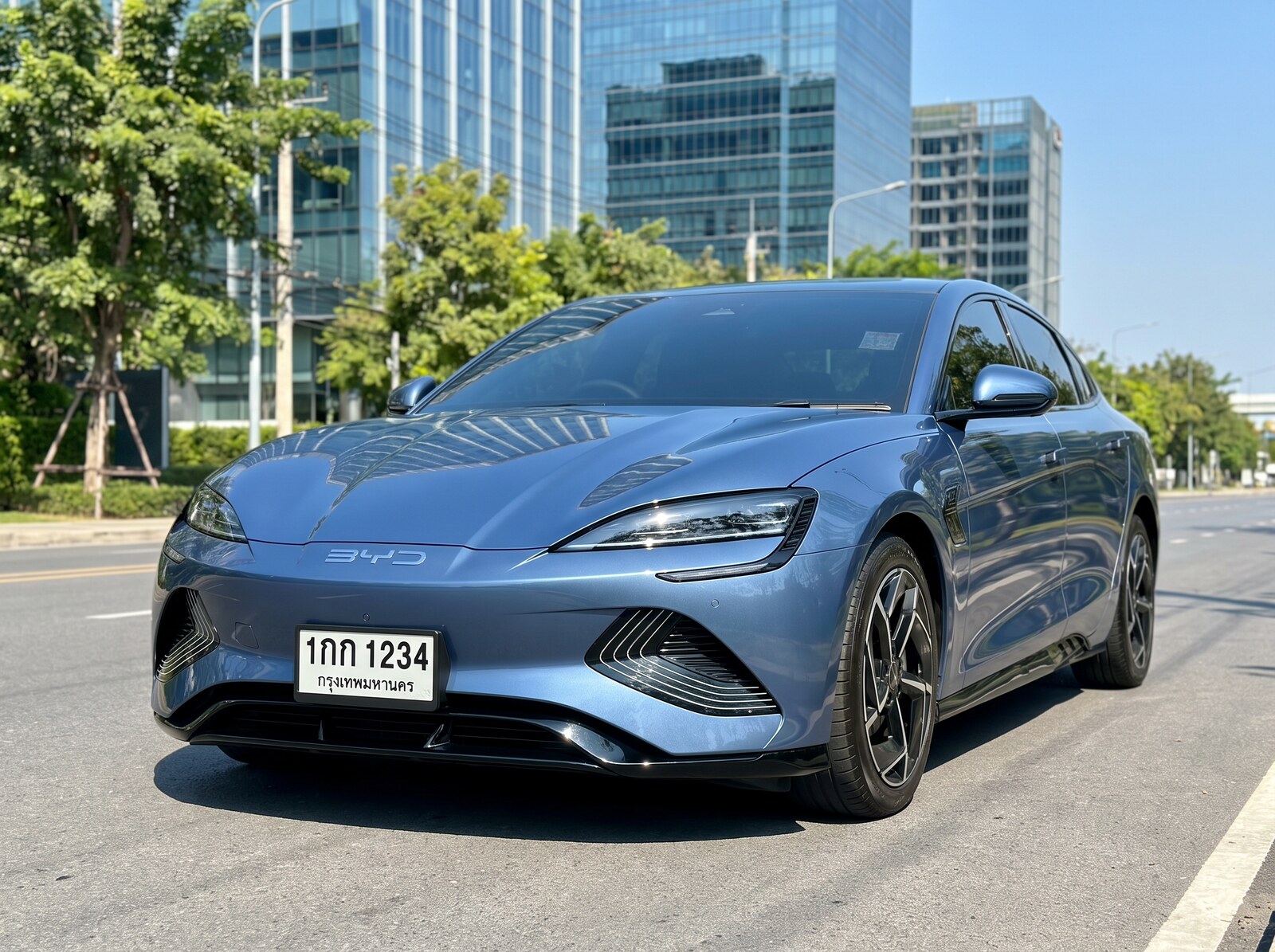
泰国车牌 OCR
泰国车牌 OCR API(LPR)从照片中读取泰国车牌,返回车牌号码、注册省份,以及车辆的品牌、型号、车身类型、颜色与朝向。版本 3.0 以一套面向当前泰国汽车市场构建的全新引擎替换了车辆品牌/型 号识别引擎:在覆盖当今车流的 853 张图像基准测试中,其品牌识别正确率为 99.4%(上一代引擎:38.5%),品牌加型号完全正确率为 99.18%,覆盖 17 个品牌下的 73 款车型,包括 2020–2026 年上市的车型以及比亚迪(BYD)、名爵(MG)、长城(GWM)、哪吒(Neta)等中国电动车品牌。版本 3.0 还新增了燃料类型/电动车识别、置信度分数以及邻国车牌支持。参见准确率。
版本 3.0 目前不会强制切换到任何现有集成。下方的主端点将继续由久经验证的版本 2.0 引擎提供服务。版本 3.0 现已通过独立的预览端点(…/license-plate-ocr-v3)以相同价格开放,您可以先在自己的真实流量上对其进行评估。2026年9月11日起,主端点将自动切换至版本 3.0 引擎。API 契约完全向后兼容——请求格式不变,所有既有响应字段的名称与格式保持完全一致,全部新增内容均以增量字段的形式提供——因此您在任何时点都无需修改任何代码。切换后,预览端点将作为别名继续保留。
在线演示
上传一张车辆照片,或使用下方的示例图片。 通过端点选项卡,可在同一张图像上对比当前引擎(v2.0)与新引擎(v3.0 预览)。
Example Images (Click to try)


快速入门
您需要先在 API 密钥管理 页面获取 API 密钥。将图像以 multipart/form-data 形式发送:
curl -X POST https://api.iapp.co.th/v3/store/smart-city/license-plate-ocr \
-H "apikey: YOUR_API_KEY" \
-F "file=@vehicle.jpg"
{
"conf": 93.39,
"country": "th",
"lp_number": "ขก5337",
"province": "th-83:Phuket (ภูเก็ต)",
"vehicle_body_type": "pickup",
"vehicle_brand": "isuzu",
"vehicle_color": "red",
"vehicle_model": "isuzu_d-max",
"vehicle_orientation": "315",
"vehicle_year": "2020-present",
"is_vehicle": "yes",
"is_missing_plate": "no",
"message": "success",
"status": 200
}
对版本 3.0 预览端点(…/license-plate-ocr-v3)发送同样的请求,会原样返回上述全部字段,并额外返回版本 3.0 的增量字段——燃料类型、品牌/型号置信度、前 5 候选、车标品牌验证与国家支持级别。完整的响应结构请参见技术参考。
端点与定价
| 端点 | 引擎 | 价格 |
|---|---|---|
POST /v3/store/smart-city/license-plate-ocr | v2.0(2026年9月11日切换至 v3.0) | 每次请求 0.75 IC |
POST /v3/store/smart-city/license-plate-ocr/base64 | v2.0(2026年9月11日切换至 v3.0) | 每次请求 0.75 IC |
POST /v3/store/smart-city/license-plate-ocr-v3 | v3.0(预览,现已可用) | 每次请求 0.75 IC |
POST /v3/store/smart-city/license-plate-ocr-v3/base64 | v3.0(预览,现已可用) | 每次请求 0.75 IC |
两个引擎按相同价格计费。旧版路径 /iapp_license_plate_recognition_v1_file、/iapp_license_plate_recognition_v1_base64、/license-plate-recognition/file 与 /license-plate-recognition/base64 仍以相同价格继续支持,并跟随主端点切换。本地化部署请参见数据安全。
性能
以下数据于 2026年8月28日 在生产服务上实测。
| 指标 | 版本 2.0(主端点) | 版本 3.0(预览端点) |
|---|---|---|
| 处理时间中位数 | 每张 0.2 s | 每张 0.5 s |
| 持续吞吐量 | — | 每秒 3.1 张(每小时 11,000 张),请求并发数为 4 |
| 支持的输入格式 | JPEG、JPG、PNG(最大 2 MB) | JPEG、JPG、PNG(最大 2 MB) |
准确率
版本 3.0 基准测试:853 张真实的留出测试图像,覆盖当今泰国车流中的全部 73 款车型——从未用于训练,两代引擎接收完全相同的输入。完整的方法论与逐车型结果请参见基准测试白皮书 (PDF)。
| 指标 | 上一代引擎(v2.0,2023 年车型目录) | 版本 3.0 |
|---|---|---|
| 车辆品牌识别正确 | 38.5% | 99.4% |
| 品牌——仅统计 v2.0 目录内的车型 | 41.8% | 99.3% |
| 品牌加型号完全正确(top-1) | 10.4%* | 99.18% |
| 品牌加型号进入前 5 候选 | — | 100.0% |
| 覆盖率(返回识别结果) | ~50% | 100% |
* **如何公允地解读版本 2.0 的数字:**本基准测试反映的是当今的车流。853 张图像中有 310 张(73 款车型中的 27 款)是版本 2.0 车型目录建成之后才上市的车辆——2020–2026 年发布的车型以及中国电动车品牌——上一代引擎在设计上就无法识别它们。版本 2.0 是为其所处时代的市场构建的,而道路上的车已经变了。版本 3.0 的提升同时来自更强的分类器与为当前市场重建的识别目录:即使仅统计上一代目录确实包含的车型,品牌准确率也从 41.8% 提升至 99.3%。
车牌号码、省份、颜色与朝向的读取能力与版本 2.0 保持一致。版本 3.0 的品牌/型号引擎具有确定性——同一辆车在每次扫描中都会得到相同的品牌与型号结果,包括停车道闸与村口摄像头常见的近距离车头特写画面。
数据安全与合规
公有云 API 符合 GDPR 与 PDPA 要求:上传的图像仅在内存中处理,响应返回后不予保留。本服务完全运行在具备本地化部署能力的基础设施上——任何图像都不会发送至任何外部服务——并提供完全自包含的本地化部署方案,照片不会离开您的基础设施。本地化部署授权请联系我们。
技术参考
端点
| 方法 | URL | 请求体 |
|---|---|---|
| POST | https://api.iapp.co.th/v3/store/smart-city/license-plate-ocr | multipart/form-data,字段 file |
| POST | https://api.iapp.co.th/v3/store/smart-city/license-plate-ocr/base64 | JSON,{"image": "<base64>"} |
| POST | https://api.iapp.co.th/v3/store/smart-city/license-plate-ocr-v3 | multipart/form-data,字段 file(v3.0 预览) |
| POST | https://api.iapp.co.th/v3/store/smart-city/license-plate-ocr-v3/base64 | JSON,{"image": "<base64>"}(v3.0 预览) |
所有端点均需携带 apikey 请求头。
响应字段
截至 vehicle_year 的所有字段由两个引擎版本共同返回,名称与格式完全一致。其后的字段为版本 3.0 新增(增量字段)——目前出现在预览端点上,2026年9月11日起也将出现在主端点上。不使用这些字段的客户端可直接忽略它们。
| 字段 | 描述 |
|---|---|
conf | 车牌识别的置信度分数(百分比)。 |
country | 车牌所属国家(th、my、mm、la)。 |
infer_time(s) | 处理时间(秒)。 |
is_missing_plate | 车辆是否没有可见车牌:"yes" 或 "no"。 |
is_vehicle | 图像中是否存在车辆 :"yes" 或 "no"。 |
lp_number | 车牌号码。 |
message | "success" 或错误消息。 |
province | 注册省份,例如 "th-10:Bangkok (กรุงเทพมหานคร)"。 |
status | 结果的 HTTP 状态码。 |
vehicle_body_type | 车身类型,例如 sedan、pickup、suv。 |
vehicle_brand | 车辆品牌,小写 slug 形式,例如 isuzu。 |
vehicle_color | 车辆颜色。 |
vehicle_model | 车辆型号,小写 slug 形式,例如 isuzu_d-max。 |
vehicle_orientation | 车辆在图像中的朝向(度)。 |
vehicle_year | 所识别车型的年份范围。 |
vehicle_make_model_slug | *(v3.0 新增)*v3.0 分类器输出的品牌/型号组合 slug。 |
make_model_conf | *(v3.0 新增)*品牌/型号识别的置信度分数(0–1)。 |
vehicle_make_model_topk | *(v3.0 新增)*前 5 个品牌/型号候选及其概率。 |
vehicle_logo_brand | *(v3.0 新增)*根据车辆车标/进气格栅独立识别出的品牌。 |
logo_brand_conf | *(v3.0 新增)*车标品牌识别的置信度分数(0–1)。 |
vehicle_fuel_type | *(v3.0 新增)*根据识别出的品牌/型号推断的动力类型:EV、Hybrid、Plug-in Hybrid、Petrol、Diesel;当该车型有多种动力版本在售时为 multiple。绝不根据图像像素猜测。 |
vehicle_fuel_options | *(v3.0 新增)*该车型在泰国在售的全部动力类型。 |
country_support_level | *(v3.0 新增)*车牌所属国家的支持级别:production、beta 或 detection_only。 |
示例响应(版本 3.0)
{
"conf": 93.39286804,
"country": "th",
"infer_time(s)": 0.502,
"is_missing_plate": "no",
"is_vehicle": "yes",
"lp_number": "ขก5337",
"message": "success",
"province": "th-83:Phuket (ภูเก็ต)",
"status": 200,
"vehicle_body_type": "pickup",
"vehicle_brand": "isuzu",
"vehicle_color": "red",
"vehicle_model": "isuzu_d-max",
"vehicle_orientation": "315",
"vehicle_year": "2020-present",
"vehicle_make_model_slug": "isuzu_d_max",
"make_model_conf": 0.8288,
"vehicle_make_model_topk": [
{ "slug": "isuzu_d_max", "prob": 0.8288 },
{ "slug": "isuzu_mu_x", "prob": 0.0337 }
],
"vehicle_logo_brand": "Isuzu",
"logo_brand_conf": 0.8913,
"vehicle_fuel_type": "Diesel",
"vehicle_fuel_options": ["Diesel"],
"country_support_level": "production"
}
代码示例
- cURL
- Python
- JavaScript
- PHP
- Swift
- Kotlin
- Java
- Dart
curl -X POST https://api.iapp.co.th/v3/store/smart-city/license-plate-ocr \
-H "apikey: YOUR_API_KEY" \
-F "file=@/path/to/vehicle.jpg"
import requests
url = "https://api.iapp.co.th/v3/store/smart-city/license-plate-ocr"
files = {"file": open("/path/to/vehicle.jpg", "rb")}
headers = {"apikey": "YOUR_API_KEY"}
response = requests.post(url, headers=headers, files=files)
print(response.json())
const axios = require("axios");
const FormData = require("form-data");
const fs = require("fs");
const data = new FormData();
data.append("file", fs.createReadStream("/path/to/vehicle.jpg"));
axios.post("https://api.iapp.co.th/v3/store/smart-city/license-plate-ocr", data, {
headers: { apikey: "YOUR_API_KEY", ...data.getHeaders() },
})
.then((response) => console.log(response.data))
.catch((error) => console.log(error));
<?php
$curl = curl_init();
curl_setopt_array($curl, array(
CURLOPT_URL => 'https://api.iapp.co.th/v3/store/smart-city/license-plate-ocr',
CURLOPT_RETURNTRANSFER => true,
CURLOPT_POST => true,
CURLOPT_POSTFIELDS => array(
'file' => new CURLFILE('/path/to/vehicle.jpg')
),
CURLOPT_HTTPHEADER => array(
'apikey: YOUR_API_KEY'
),
));
$response = curl_exec($curl);
curl_close($curl);
echo $response;
import Foundation
let url = URL(string: "https://api.iapp.co.th/v3/store/smart-city/license-plate-ocr")!
var request = URLRequest(url: url)
request.httpMethod = "POST"
request.addValue("YOUR_API_KEY", forHTTPHeaderField: "apikey")
let boundary = "Boundary-\(UUID().uuidString)"
request.setValue("multipart/form-data; boundary=\(boundary)", forHTTPHeaderField: "Content-Type")
var body = Data()
body.append("--\(boundary)\r\n".data(using: .utf8)!)
body.append("Content-Disposition: form-data; name=\"file\"; filename=\"vehicle.jpg\"\r\n".data(using: .utf8)!)
body.append("Content-Type: image/jpeg\r\n\r\n".data(using: .utf8)!)
if let fileData = try? Data(contentsOf: URL(fileURLWithPath: "/path/to/vehicle.jpg")) {
body.append(fileData)
}
body.append("\r\n--\(boundary)--\r\n".data(using: .utf8)!)
request.httpBody = body
URLSession.shared.dataTask(with: request) { data, response, error in
if let data = data {
print(String(data: data, encoding: .utf8)!)
}
}.resume()
import okhttp3.*
import okhttp3.MediaType.Companion.toMediaTypeOrNull
import okhttp3.RequestBody.Companion.asRequestBody
import java.io.File
val client = OkHttpClient()
val file = File("/path/to/vehicle.jpg")
val requestBody = MultipartBody.Builder()
.setType(MultipartBody.FORM)
.addFormDataPart("file", file.name, file.asRequestBody("image/jpeg".toMediaTypeOrNull()))
.build()
val request = Request.Builder()
.url("https://api.iapp.co.th/v3/store/smart-city/license-plate-ocr")
.addHeader("apikey", "YOUR_API_KEY")
.post(requestBody)
.build()
client.newCall(request).execute().use { response ->
println(response.body?.string())
}
import okhttp3.*;
import java.io.File;
OkHttpClient client = new OkHttpClient();
File file = new File("/path/to/vehicle.jpg");
RequestBody requestBody = new MultipartBody.Builder()
.setType(MultipartBody.FORM)
.addFormDataPart("file", file.getName(),
RequestBody.create(MediaType.parse("image/jpeg"), file))
.build();
Request request = new Request.Builder()
.url("https://api.iapp.co.th/v3/store/smart-city/license-plate-ocr")
.addHeader("apikey", "YOUR_API_KEY")
.post(requestBody)
.build();
try (Response response = client.newCall(request).execute()) {
System.out.println(response.body().string());
}
import 'package:http/http.dart' as http;
var request = http.MultipartRequest(
'POST',
Uri.parse('https://api.iapp.co.th/v3/store/smart-city/license-plate-ocr')
);
request.files.add(await http.MultipartFile.fromPath('file', '/path/to/vehicle.jpg'));
request.headers.addAll({'apikey': 'YOUR_API_KEY'});
var response = await request.send();
print(await response.stream.bytesToString());
如需调用版本 3.0 预览,将上述任一示例中的 /license-plate-ocr 替换为 /license-plate-ocr-v3 即可——请求格式完全相同。
限制
- 支持的文件格式:JPEG、JPG、PNG。最大文件大小:2 MB。
- 燃料类型通过一张持续维护的动力类型对照表,根据识别出的品牌与型号推断,绝不来自图像本身。有多种动力版本在售的车型会返回
multiple并附完整选项列表,因为动力类型无法仅凭一张照片确定。 - 邻国车牌:马来西亚为正式支持(production),缅甸为测试版(beta),老挝仅支持检测(
country_support_level)。