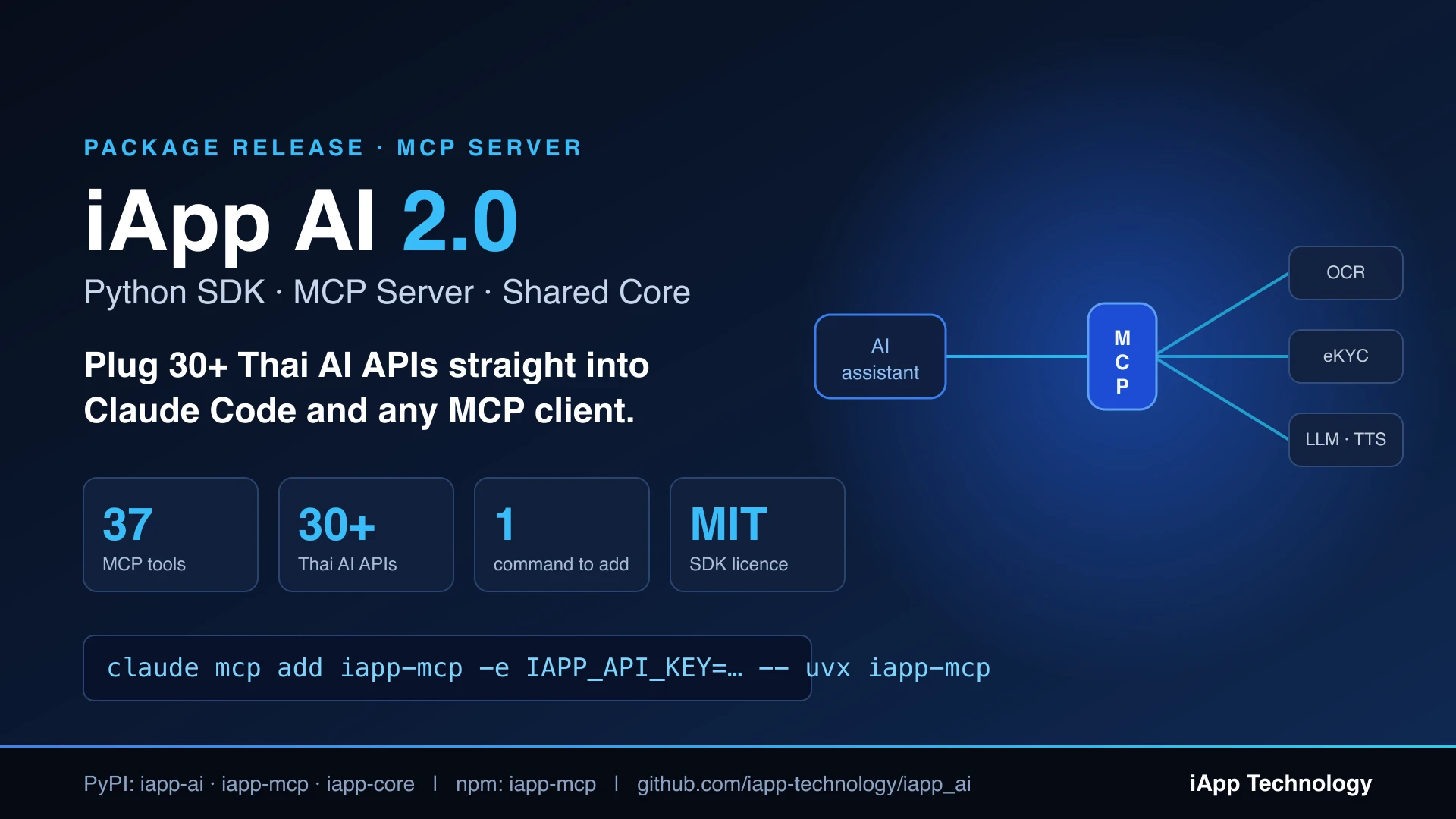
iApp AI 2.0 — แพ็กเกจ Python ใหม่ พร้อม MCP Server ที่เสียบ AI API ไทยกว่า 30 ตัวเข้า Claude Code

iapp-mcp 2.1.0 เพิ่มเครื่องมือ ข้อมูลกฎหมายไทย 6 ตัว — ค้นตัวบทมาตรา, ค้นฎีกา, และถาม-ตอบกฎหมายแบบอ้างอิงได้ — รวมเป็น 44 เครื่องมือ ดู Thai Legal Data API/MCP
claude mcp add iapp-mcp -s user -e IAPP_API_KEY=YOUR_API_KEY -- uvx iapp-mcp
ต้องมี uv (brew install uv) และ API key จาก iapp.co.th → API Keys → Create New API Key จากนั้นพิมพ์สั่งงานเป็นภาษาปกติได้เลย ไม่ต้องใช้คำสั่งพิเศษ → คู่มือ MCP Server ฉบับเต็ม (เครื่องมือครบ 37 ตัว ไคลเอนต์อื่น ๆ และการแก้ปัญหา)
SDK ภาษา Python ของเราโตขึ้นอีกขั้น iApp AI 2.0 จัดโครงสร้าง github.com/iapp-technology/iapp_ai ใหม่เป็น monorepo ที่มีสามแพ็กเกจ และของใหม่ชิ้นสำคัญคือ MCP server ที่ส่งเครื่องมือ 37 ตัวครอบคลุมทั้ง iApp AI Marketplace ให้ผู้ช่วย AI ของคุณใช้งานได้ทันที
สรุปสั้น ๆ คือ ด้วยคำสั่งเดียว Claude Code จะอ่านบัตรประชาชนไทย ถอดเสียงการประชุม แปลเป็นภาษาญี่ปุ่น สร้างวิดีโอ หรือจัดเส้นทางส่งของให้คุณได้ เพราะตอนนี้มันคุยกับ API ของเราได้โดยตรง
สามแพ็กเกจ แกนกลางเดียว
| แพ็กเกจ | ติดตั้ง | คืออะไร |
|---|---|---|
iapp-ai | pip install iapp-ai | SDK ภาษา Python แบบ synchronous — from iapp_ai import api เป็น wrapper บาง ๆ ที่คืนค่า requests.Response ดิบ |
iapp-mcp | uvx iapp-mcp | ใหม่ — MCP server ที่เปิดบริการทั้งมาร์เก็ตเพลสให้เป็นเครื่องมือสำหรับ Claude และไคลเอนต์ MCP อื่น ๆ มีบน npm ด้วย |
iapp-core | (เป็น dependency) | แกนกลางที่ใช้ร่วมกัน ทั้ง base URL, การยืนยันตัวตนด้วย API key, การจัดการข้อผิดพลาด, การจัดรูปแบบผลลัพธ์ และ HTTP transport ทั้งแบบ sync และ async |
ผู้ใช้ SDK เดิมไม่ได้รับผลกระทบ pip install iapp_ai และ from iapp_ai import api ยังทำงานเหมือนเดิมทุกประการ เพราะ MCP server แยกออกมาเป็นคนละแพ็กเกจ
ถ้าคุณเรียก API ของเราจากโค้ด Python ของตัวเอง SDK ยังคงเป็นตัวเลือกที่ใช่
from iapp_ai import api

client = api("YOUR_API_KEY")
resp = client.idcard_front("id.jpg")   # คืนค่า requests.Response
print(resp.json())
แต่ถ้าอยากให้ ผู้ช่วย AI เรียกให้แทน อ่านต่อได้เลย
MCP คืออะไร (แบบสั้น ๆ)
Model Context Protocol คือมาตรฐานเปิดสำหรับเชื่อมผู้ช่วย AI เข้ากับเครื่องมือภายนอก คุณรันเซิร์ฟเวอร์เล็ก ๆ ตัวหนึ่ง ผู้ช่วยจะค้นพบเครื่องมือที่มีและเรียกใช้เมื่องานนั้นต้องการ iapp-mcp คือเซิร์ฟเวอร์ตัวนั้นสำหรับ iApp AI Marketplace โดยรันบนเครื่องคุณผ่าน stdio ดังนั้น API key จึงไม่ออกจากเครื่อง และไฟล์ก็อ่านจากดิสก์ของคุณโดยตรง
37 เครื่องมือ พร้อมใช้ทันที
| หมวด | ผู้ช่วยของคุณทำอะไรได้บ้าง |
|---|---|
| eKYC | OCR บัตรประชาชนไทย (หน้า/หลัง/สำเนา), พาสปอร์ต, ใบขับขี่, สมุดบัญชี, เทียบใบหน้า, ตรวจจับใบหน้า, ตรวจภาพปลอม, KYC ใบหน้าคู่บัตร, จดจำใบหน้าแบบ 1:N |
| OCR เอกสาร | OCR เอกสารไทย (ข้อความ / โครงสร้าง / แปลงเป็น DOCX), ใบเสร็จ, สเตทเมนต์บัตรเครดิต, หนังสือรับรองหักภาษี 50 ทวิ, ทะเบียนราษฎร, เรซูเม่พร้อมประเมินด้วย AI, ประกาศรับสมัครงาน |
| LLM | Chinda Thai LLM 4B (ฟรี), DeepSeek-V3.2, DeepSeek V4 Flash/Pro, ทนอย AI กฎหมายไทย |
| NLP ภาษาไทย | แปลภาษา (28 ภาษา), สรุปความ, วิเคราะห์อารมณ์, ตรวจข้อความ toxic, ถาม-ตอบจากเอกสารไทย, สร้างคำถาม |
| เสียงพูด | ถอดเสียงพร้อมแยกผู้พูด (ไทย/อังกฤษ/จีน), TTS ภาษาไทย 4 เสียง, โคลนเสียง, ตรวจว่าเสียงสร้างจาก AI |
| ภาพและวิดีโอ | สร้างภาพ (Nano Banana / Pro), ลบพื้นหลัง, สร้างวิดีโอ Seedance 2.0 (ส่งงานแบบ async + เช็คสถานะ) |
| เมืองอัจฉริยะและข้อมูล | อ่านป้ายทะเบียนไทย, อ่านมิเตอร์น้ำ/ไฟ, จัดเส้นทางเดินรถ, ข้อมูลวันหยุดไทย |
วิธีเพิ่มเข้า Claude Code
1. ขอ API key เข้าสู่ระบบที่ iapp.co.th → API Keys → Create New API Key แล้วคัดลอกเก็บไว้ เพราะระบบแสดงให้เห็นเพียงครั้งเดียว
2. ติดตั้ง uv (ทำครั้งเดียว) เพื่อให้รันเซิร์ฟเวอร์ได้โดยไม่ต้องติดตั้งถาวร
curl -LsSf https://astral.sh/uv/install.sh | sh # หรือ: brew install uv
3. เพิ่มเซิร์ฟเวอร์ เลือกบรรทัดที่ตรงกับวิธีติดตั้งของคุณ ใส่ API key ด้วย -e และคั่นด้วย -- ก่อนคำสั่งที่ใช้เรียกเซิร์ฟเวอร์
# uv / uvx (แนะนำ ไม่ต้องติดตั้งอะไรเพิ่ม)
claude mcp add iapp-mcp -s user -e IAPP_API_KEY=YOUR_API_KEY -- uvx iapp-mcp

# npm / npx
claude mcp add iapp-mcp -s user -e IAPP_API_KEY=YOUR_API_KEY -- npx -y iapp-mcp

# กรณีติดตั้งถาวรไว้แล้ว (pip / uv tool / npm / yarn / pnpm)
claude mcp add iapp-mcp -s user -e IAPP_API_KEY=YOUR_API_KEY -- iapp-mcp
-s user จะลงทะเบียนให้ใช้ได้ใน ทุก โปรเจกต์ หากต้องการเก็บไว้ในไฟล์ .mcp.json ของโปรเจกต์นี้เพื่อแชร์กับเพื่อนร่วมทีมให้ใช้ -s project หรือใช้ -s local หากต้องการเฉพาะโปรเจกต์ปัจจุบันบนเครื่องนี้เท่านั้น
4. ตรวจสอบ รันคำสั่ง claude mcp list หรือพิมพ์ /mcp ในเซสชัน Claude Code ก็จะเห็น iapp-mcp เชื่อมต่อสำเร็จพร้อมรายการเครื่องมือ หากต้องการถอดออกภายหลังใช้ claude mcp remove iapp-mcp
เพียงเท่านี้ก็เสร็จ ไม่ต้องเรียนรู้ไวยากรณ์คำสั่งพิเศษใด ๆ แค่พิมพ์บอกสิ่งที่ต้องการในแชต แล้ว Claude Code จะเลือกเครื่องมือของ iapp-mcp ที่เหมาะสมให้เอง
ไคลเอนต์ MCP อื่น ๆ (Claude Desktop, Cursor ฯลฯ)
ใช้ได้กับไคลเอนต์ MCP ทุกตัว เพราะเซิร์ฟเวอร์สื่อสารผ่าน stdio เพียงใส่ค่านี้ลงในไฟล์ตั้งค่าของไคลเอนต์
{
  "mcpServers": {
    "iapp-mcp": {
      "command": "uvx",
      "args": ["iapp-mcp"],
      "env": {
        "IAPP_API_KEY": "YOUR_API_KEY"
      }
    }
  }
}
ตัวอย่างการใช้งาน
เมื่อเชื่อมต่อแล้ว ไม่ว่าจะใช้ Claude Code, Claude Desktop หรือไคลเอนต์ MCP ตัวใดก็ตาม สั่งงานเป็นภาษาไทยหรืออังกฤษได้เลย ไม่ต้องใช้รูปแบบคำสั่งพิเศษ ผู้ช่วยจะเลือกเครื่องมือให้เอง
eKYC และเอกสาร
อ่านข้อมูลจากบัตรประชาชนในไฟล์ idcard.jpg
เช็คว่ารูป selfie.jpg กับ idcard.jpg เป็นคนเดียวกันไหม
อ่านข้อมูล MRZ จากพาสปอร์ต passport.jpg
OCR ใบเสร็จ receipt.jpg แล้วรวมยอดให้หน่อย
แปลงเอกสารสแกนนี้เป็นไฟล์ Word
สกัดข้อมูลจาก resume.pdf แล้วประเมินความเหมาะสมกับตำแหน่ง
เสียงพูดและภาษา
ถอดเสียงไฟล์ประชุม meeting.wav พร้อมระบุว่าใครพูด
อ่านข้อความนี้เป็นเสียงพูดด้วยเสียงไข่ต้ม เซฟเป็น speech.wav
แปลข้อความนี้เป็นภาษาญี่ปุ่น
วิเคราะห์ว่ารีวิวลูกค้าพวกนี้เป็นบวกหรือลบ
LLM และกฎหมาย
ถาม Chinda Thai LLM ว่า ส้มตำมีกี่แคลอรี่
ใช้ DeepSeek V4 Flash ช่วยจัดหมวดหมู่ข้อความลูกค้าพวกนี้
ถามทนอย: สัญญาเช่าบ้านไม่มีลายเซ็นพยานมีผลไหม
งานสร้างสรรค์และเมืองอัจฉริยะ
สร้างรูปแมวใส่ชุดไทยนั่งริมเจ้าพระยา เซฟเป็น cat.png
สร้างวิดีโอ 5 วินาที ภาพแมวโต้คลื่นตอนพระอาทิตย์ตก
จัดเส้นทางส่งของ 20 จุดนี้ให้คนขับ 3 คน เริ่มจากคลังสินค้า
อ่านป้ายทะเบียนรถจากภาพกล้องวงจรปิด cctv.jpg
จุดที่ได้เปรียบจริง ๆ คือการต่อเครื่องมือเข้าด้วยกัน ลองสั่งว่า "อ่านใบเสร็จทุกใบในโฟลเดอร์ ./expenses รวมยอดแยกตามหมวด แล้วเขียนสรุปเป็นภาษาไทย" ผู้ช่วยจะไล่ OCR ทั้งโฟลเดอร์ คำนวณ และร่างสรุปให้ โดยคุณไม่ต้องเขียนโค้ดเชื่อมเลยสักบรรทัด
ข้อควรรู้
- ใช้พาธไฟล์บนเครื่อง เครื่องมือที่รับไฟล์จะใช้พาธบนเครื่องคุณ ส่วนเสียง ภาพ และวิดีโอที่สร้างขึ้นจะถูกบันทึกไปยัง
output_pathที่คุณระบุ - เครดิต เครื่องมือส่วนใหญ่มีค่าใช้จ่ายเป็นเครดิต iApp (IC) ต่อการเรียกหนึ่งครั้ง โดยระบุไว้ในคำอธิบายของแต่ละเครื่องมือ ส่วน Chinda Thai LLM 4B ใช้ฟรี
- Seedance สร้างวิดีโอ ต้องเป็นบัญชีแบบชำระเงิน เพียงซื้อแพ็กเกจ IC ใดก็ได้ก็ปลดล็อก
- ประหยัดคอนเท็กซ์ ข้อมูล base64 ก้อนใหญ่ในผลลัพธ์ API (เช่น ภาพใบหน้าที่ครอบมา) จะถูกตัดทอนในผลลัพธ์ของเครื่องมือ
- ต้องใช้ Python 3.10+ หรือ Node 18+
ลิงก์
- GitHub: github.com/iapp-technology/iapp_ai
- PyPI: iapp-ai · iapp-mcp · iapp-core
- npm: iapp-mcp
- เอกสาร API: iapp.co.th/docs/intro
- ฝ่ายสนับสนุน: support@iapp.co.th · Discord