Thai Document OCR คืออะไร? คู่มือฉบับสมบูรณ์สำหรับผู้เริ่มต้น

โดย ดร.กอบกฤตย์ วิริยะยุทธกร CEO และผู้ก่อตั้ง iApp Technology
เคยสงสัยไหมว่าแอปสามารถอ่านบัตรประชาชนหรือพาสปอร์ตของคุณได้ทันทีได้อย่างไร? ธนาคารยืนยันตัวตนจากรูปถ่ายเอกสารของคุณได้อย่างไร? เบื้องหลังเวทมนตร์นี้เรียกว่า OCR - Optical Character Recognition ในคู่มือนี้ เราจะอธิบายทุกสิ่งที่คุณต้องรู้เกี่ยวกับ Thai Document OCR ด้วยภาษาที่เข้าใจง่าย
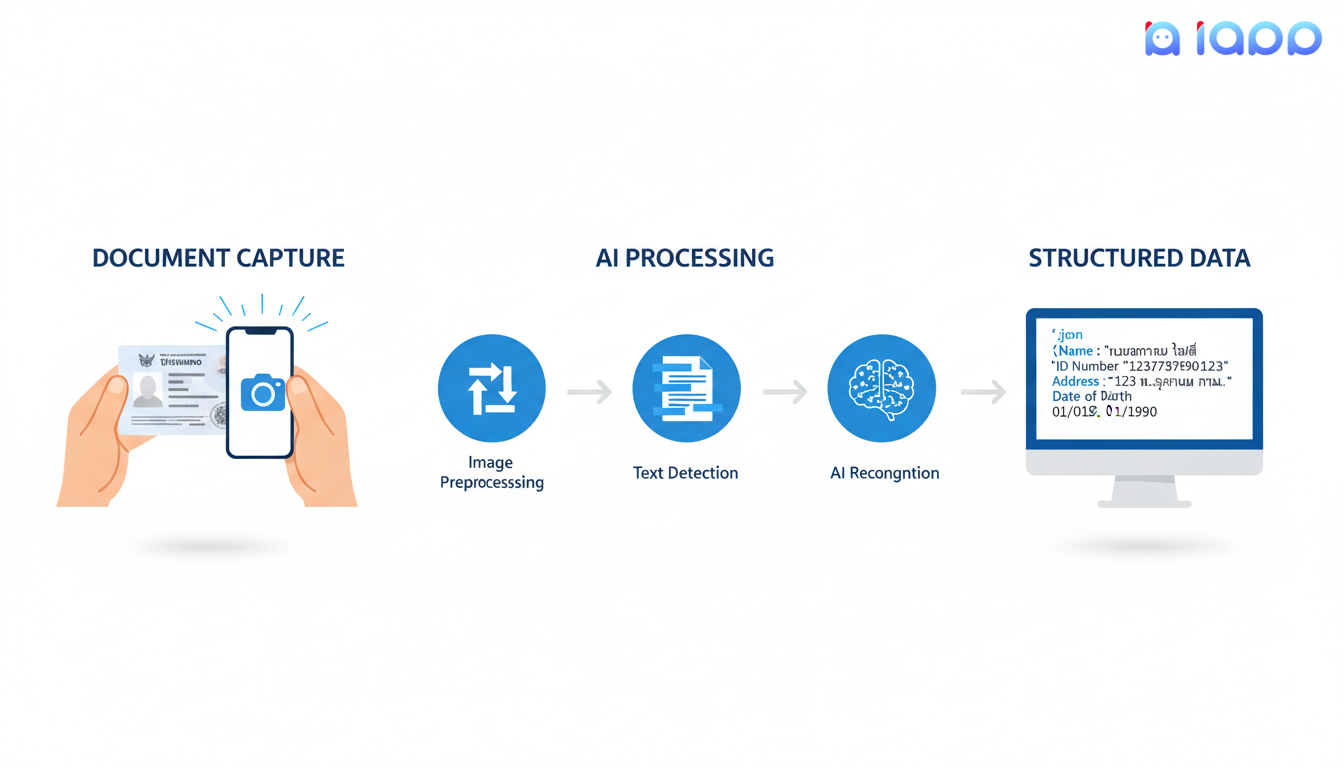
OCR คืออะไร?
OCR (Optical Character Recognition) หรือการรู้จำตัวอักษรด้วยแสง เป็นเทคโนโลยีที่แปลงรูปภาพของข้อความให้เป็นข้อมูลข้อความที่คอมพิวเตอร์อ่านได้ ลองคิดว่ามันเป็นการสอนคอมพิวเตอร์ให้ "อ่าน" เหมือนมนุษย์
การเปรียบเทียบให้เข้าใจง่าย
ลองจินตนาการว่าคุณมีรูปถ่ายบัตรประชาชน มนุษย์สามารถอ่านชื่อ ที่อยู่ และเลขบัตรประชาชนได้ง่าย เทคโนโลยี OCR ทำให้คอมพิวเตอร์สามารถทำสิ่งเดียวกัน - ดูรูปภาพและดึงข้อมูลข้อความทั้งหมดโดยอัตโนมัติ
อะไรทำให้ Thai OCR พิเศษ?
Thai OCR มีความท้าทายมากกว่า OCR ภาษาอังกฤษเพราะ:
- ตัวอักษรซับซ้อน: ภาษาไทยมี 44 พยัญชนะ 32 สระ และ 5 วรรณยุกต์
- ไม่มีช่องว่างระหว่างคำ: ข้อความภาษาไทยไม่มีช่องว่างระหว่างคำ
- ตัวอักษรซ้อนกัน: สระและวรรณยุกต์ซ้อนอยู่บน/ล่างพยัญชนะ
- ภาษาผสม: เอกสารไทยมักมีทั้งข้อความภาษาไทยและอังกฤษ
นี่คือเหตุผลที่โซลูชัน Thai OCR เฉพาะทางอย่างของ iApp จำเป็นสำหรับผลลัพธ์ที่แม่นยำ
5 คำศัพท์สำคัญที่คุณต้องรู้
ก่อนลงลึก มาทำความเข้าใจศัพท์ OCR ที่มักทำให้ผู้เริ่มต้นสับสน:
1. Accuracy Rate (อัตราความแม่นยำ)
Accuracy Rate วัดว่าระบบ OCR อ่านข้อความได้ถูกต้องแค่ไหน โดยปกติแสดงเป็นเปอร์เซ็นต์
| ระดับ | คำอธิบาย | ตัวอย่าง |
|---|---|---|
| ระดับตัวอักษร | ความแม่นยำต่อตัวอักษร | 98.13% (iApp Thai ID Card OCR) |
| ระดับฟิลด์ | ความแม่นยำต่อฟิลด์ข้อมูล | 96.82% สำหรับเลขบัญชี |
| ระดับเอกสาร | ความแม่นยำโดยรวมของเอกสาร | 95%+ สำหรับภาพที่ชัดเจน |
ทำไมถึงสำคัญ: ความแม่นยำสูงขึ้นหมายถึงข้อผิดพลาดน้อยลงและต้องแก้ไขด้วยตนเองน้อยลง
2. Bounding Box (กรอบล้อมรอบ)
Bounding Box คือสี่เหลี่ยมที่ระบุว่าข้อความอยู่ที่ไหนในภาพ
พิกัดภาพ: [x1, y1, x2, y2]
ตัวอย่าง: [119, 292, 376, 334] = ตำแหน่งข้อความ
ทำไมถึงสำคัญ: Bounding boxes ช่วยให้คุณเข้าใจว่าแต่ละข้อมูลถูกพบที่ไหนในเอกสาร
3. Preprocessing (การประมวลผลเบื้องต้น)
Preprocessing คือการเตรียมภาพก่อนวิเคราะห์ OCR ขั้นตอนทั่วไปได้แก่:
- Cropping: ตัดส่วนที่ไม่จำเป็นออก
- Rotation: แก้ไขเอกสารที่เอียง
- Deskewing: ทำให้ข้อความที่เอียงตรง
- Enhancement: ปรับปรุงความคมชัด
ทำไมถึงสำคัญ: Preprocessing ที่ดีช่วยเพิ่มความแม่นยำ OCR อย่างมาก
4. Confidence Score (คะแนนความมั่นใจ)
Confidence Score บ่งบอกว่าระบบ OCR มั่นใจในการอ่านแค่ไหน โดยปกติจาก 0 ถึง 1 (หรือ 0% ถึง 100%)
{
  "id_number": "1234567890123",
  "detection_score": 0.98  // มั่นใจ 98%
}
ทำไมถึงสำคัญ: คะแนนความมั่นใจต่ำบ่งบอกว่าผลลัพธ์ควรตรวจสอบด้วยตนเอง
5. Structured Data Output (ผลลัพธ์ข้อมูลที่จัดโครงสร้างแล้ว)
Structured Data Output คือรูปแบบที่จัดระเบียบของข้อมูลที่ดึงออกมา โดยปกติเป็น JSON
{
  "th_name": "นาย ทดสอบ ตัวอย่าง",
  "en_name": "Mr. Test Example",
  "id_number": "1-2345-67890-12-3",
  "date_of_birth": "01 Jan 1990",
  "address": "123 ถนนสุขุมวิท กรุงเทพฯ"
}
ทำไมถึงสำคัญ: ข้อมูลที่จัดโครงสร้างสามารถใช้ในแอปพลิเคชันได้โดยตรงโดยไม่ต้องแยกวิเคราะห์เพิ่มเติม
ทำไม Thai Document OCR ถึงสำคัญ?
1. Digital Transformation
ประเทศไทยกำลังเปลี่ยนบริการภาครัฐและธุรกิจให้เป็นดิจิทัลอย่างรวดเร็ว OCR ช่วยให้:
- ลงทะเบียนแบบไร้กระดาษ
- ยืนยันตัวตนดิจิทัล
- ประมวลผลเอกสารอัตโนมัติ
2. ประหยัดเวลาและค่าใช้จ่าย
การป้อนข้อมูลด้วยตนเองช้าและแพง:
| วิธี | เวลาต่อเอกสาร | อัตราข้อผิดพลาด |
|---|---|---|
| ป้อนด้วยตนเอง | 2-5 นาที | 1-3% |
| OCR API | 1-2 วินาที | น้อยกว่า 2% |
3. การปฏิบัติตาม E-KYC
กฎระเบียบไทยกำหนดให้ธุรกิจต้องยืนยันตัวตนลูกค้า OCR ช่วยให้:
- ยืนยันตัวตนทันที
- ดึงเฉพาะฟิลด์ที่จำเป็น ช่วยให้ใช้ข้อมูลเท่าที่จำเป็นตามหลักของ PDPA
- มาตรการป้องกันการฉ้อโกง
4. ปรับปรุงประสบการณ์ลูกค้า
ลูกค้าคาดหวังบริการดิจิทัลที่รวดเร็ว:
- ไม่ต้องกรอกแบบฟอร์มด้วยตนเอง
- เปิดบัญชีทันที
- การลงทะเบียนที่ราบรื่น
Thai Document OCR แก้ปัญหาอะไรได้บ้าง?
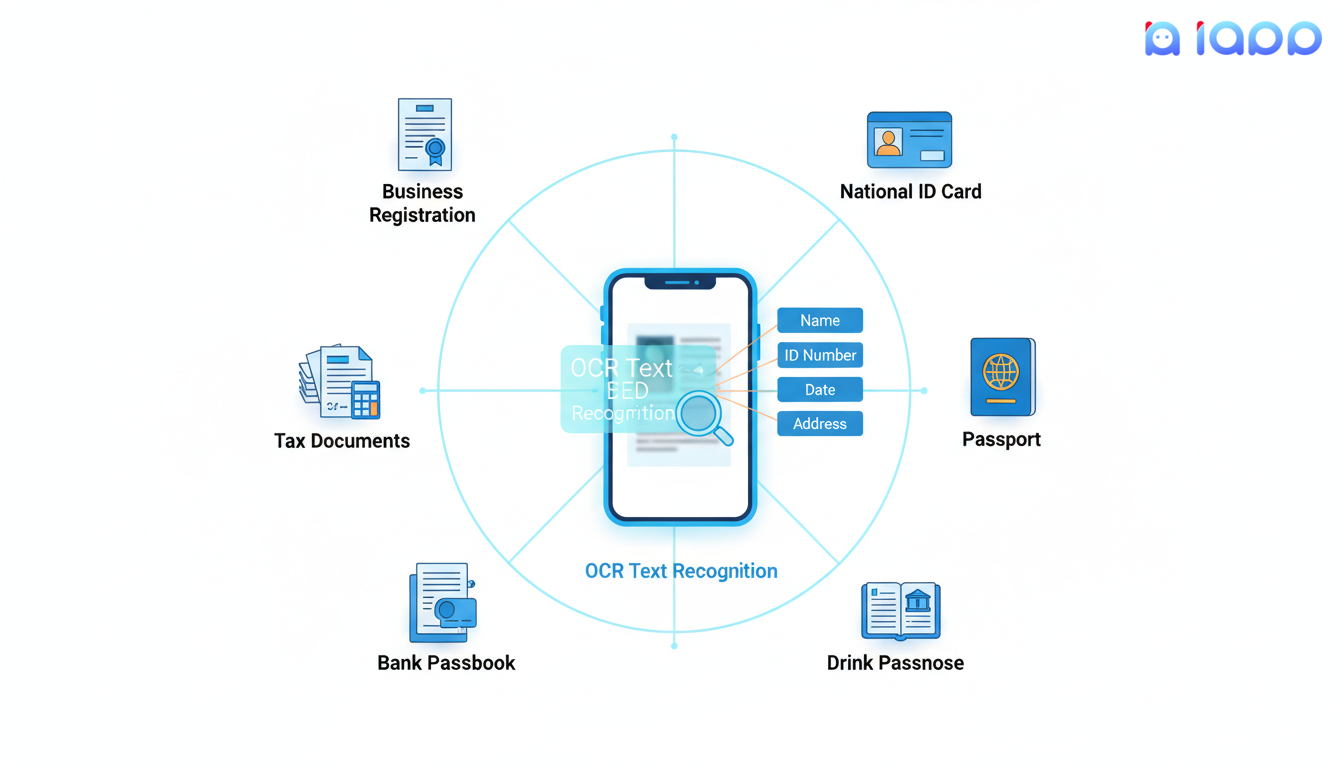
การธนาคารและการเงิน
- เปิดบัญชี: ดึงข้อมูลลูกค้าจากบัตรประชาชน
- สมัครสินเชื่อ: ประมวลผลเอกสารรายได้อัตโนมัติ
- ยืนยัน KYC: ตรวจสอบเอกสารยืนยันตัวตนทันที
ประกันภัย
- ประมวลผลการเคลม: อ่านรายงานอุบัติเหตุและเอกสารทางการแพทย์
- ลงทะเบียนกรมธรรม์: จับข้อมูลลูกค้าจากบัตรประชาชน
- ตรวจจับการฉ้อโกง: ตรวจสอบความถูกต้องของเอกสาร
การดูแลสุขภาพ
- ลงทะเบียนผู้ป่วย: ดึงข้อมูลจากบัตรประชาชน
- เคลมประกัน: ประมวลผลเอกสารประกันสุขภาพ
- บันทึกการแพทย์: แปลงบันทึกกระดาษให้เป็นดิจิทัล
บริการภาครัฐ
- บริการประชาชน: ทำให้การยื่นเอกสารคล่องตัว
- ประมวลผลภาษี: อ่านเอกสารภาษีและใบเสร็จ
- ตรวจสอบใบอนุญาต: ตรวจสอบใบขับขี่และใบอนุญาต
อีคอมเมิร์ซและโลจิสติกส์
- ยืนยันผู้ขาย: ตรวจสอบตัวตนผู้ค้า
- ดึงที่อยู่: อ่านฉลากจัดส่ง
- ประมวลผลการคืนสินค้า: ประมวลผลเอกสารคืนสินค้า
Thai Document OCR ทำงานอย่างไร?
มาแบ่งกระบวนการ OCR ทีละขั้นตอน:
ขั้นตอนที่ 1: การจับภาพเอกสาร
กระบวนการเริ่มต้นด้วยการจับภาพเอกสารผ่าน:
- กล้องสมาร์ทโฟน
- สแกนเนอร์
- ไฟล์ภาพที่อัปโหลด
ขั้นตอนที่ 2: การประมวลผลภาพเบื้องต้น
ระบบเตรียมภาพสำหรับการวิเคราะห์:
- หมุนอัตโนมัติ: แก้ไขภาพที่เอียง
- ครอป: ลบพื้นหลัง
- ปรับปรุง: เพิ่มความชัดเจนของข้อความ
- ลดสัญญาณรบกวน: ลบสิ่งแปลกปลอม
ขั้นตอนที่ 3: การตรวจจับข้อความ
AI ระบุว่าข้อความอยู่ที่ไหนในภาพ:
- ค้นหาพื้นที่ข้อความ
- สร้าง bounding boxes
- ระบุประเภทฟิลด์ (ชื่อ, เลขบัตรประชาชน ฯลฯ)
ขั้นตอนที่ 4: การรู้จำตัวอักษร
เครื่อง OCR หลักอ่านข้อความ:
- วิเคราะห์แต่ละตัวอักษร
- ใช้โมเดล deep learning ที่ฝึกกับข้อความภาษาไทย
- จัดการทั้งตัวอักษรไทยและอังกฤษ
ขั้นตอนที่ 5: การประมวลผลหลัง
ระบบปรับปรุงผลลัพธ์:
- ตรวจสอบการสะกด
- ตรวจสอบรูปแบบ (เช่น เลขบัตรประชาชน 13 หลัก)
- จัดโครงสร้างข้อมูล
ขั้นตอนที่ 6: สร้างผลลัพธ์
ข้อมูลที่จัดโครงสร้างสุดท้ายถูกส่งกลับเป็น JSON
วิธีใช้ Thai Document OCR
วิธีที่ 1: Web Demo
ลองใช้ OCR ของ iApp บนเว็บไซต์โดยตรง - ไม่ต้องเขียนโค้ด!
- เข้าไปที่ Thai ID Card OCR Demo
- อัปโหลดรูปภาพ
- ดูผลลัพธ์ทันที
วิธีที่ 2: การเชื่อมต่อ API
สำหรับนักพัฒนา เชื่อมต่อ OCR ผ่าน REST API:
import requests

# Thai ID Card OCR
url = "https://api.iapp.co.th/v3/store/ekyc/thai-national-id-card/front"

files = {"file": open("id_card.jpg", "rb")}
headers = {"apikey": "YOUR_API_KEY"}

response = requests.post(url, headers=headers, files=files)
result = response.json()

print(f"ชื่อ: {result['th_name']}")
print(f"เลขบัตรประชาชน: {result['id_number']}")
print(f"ที่อยู่: {result['address']}")
วิธีที่ 3: Mobile SDK
สำหรับแอปมือถือ ใช้ SDK ของเราสำหรับ iOS และ Android พร้อมการจับภาพด้วยกล้องและประมวลผลแบบเรียลไทม์
ตัวอย่าง Thai Document OCR
ตัวอย่างที่ 1: Thai National ID Card OCR
Input: รูปถ่ายบัตรประชาชนไทย (ด้านหน้า)
Output:
{
  "id_number": "1-2345-67890-12-3",
  "th_name": "นาง ทดสอบ ตัวอย่าง",
  "en_name": "Mrs. Test Example",
  "th_dob": "15 ม.ค. 2533",
  "en_dob": "15 Jan 1990",
  "address": "123/45 ถ.สุขุมวิท แขวงคลองตัน เขตวัฒนา กรุงเทพฯ",
  "province": "กรุงเทพมหานคร",
  "detection_score": 0.98,
  "process_time": 1.2
}
กรณีใช้งาน: E-KYC, เปิดบัญชี, ยืนยันตัวตน
ตัวอย่างที่ 2: Passport OCR
Input: รูปถ่ายหน้าโปรไฟล์พาสปอร์ต
Output:
{
  "type": "P",
  "country": "THA",
  "surname": "EXAMPLE",
  "names": "TEST",
  "number": "AA1234567",
  "nationality": "THA",
  "date_of_birth": "900115",
  "sex": "F",
  "expiration_date": "300114",
  "personal_number": "1234567890123",
  "valid_score": 100
}
กรณีใช้งาน: จองการเดินทาง, ตรวจคนเข้าเมือง, KYC ระหว่างประเทศ
ตัวอย่างที่ 3: Thai Driver License OCR
Input: รูปถ่ายใบขับขี่ไทย
Output:
{
  "license_number": "12345678",
  "th_name": "นาย ทดสอบ ตัวอย่าง",
  "en_name": "Mr. Test Example",
  "date_of_birth": "15/01/1990",
  "expiry_date": "15/01/2030",
  "license_type": "รถยนต์ส่วนบุคคล",
  "province": "กรุงเทพมหานคร"
}
กรณีใช้งาน: เช่ารถ, ยืนยันตัวตนไรด์แชร์ริ่ง, ตรวจสอบอายุ
ตัวอย่างที่ 4: Bank Passbook OCR
Input: รูปถ่ายสมุดบัญชีธนาคารไทย
Output:
{
  "bank_name": "ธนาคารไทยพาณิชย์",
  "account_number": "123-4-56789-0",
  "account_name": "นาย ทดสอบ ตัวอย่าง",
  "bank_branch": "สาขาสยามพารากอน",
  "signature_detected": true
}
กรณีใช้งาน: ยืนยันการชำระเงิน, ประมวลผลสินเชื่อ, เชื่อมต่อบัญชี
บริการ Thai Document OCR ของ iApp Technology
ที่ iApp Technology เรานำเสนอโซลูชัน OCR ครบวงจรสำหรับเอกสารไทย:
Thai National ID Card OCR
- ความแม่นยำ: 98.13% ระดับตัวอักษร
- ความเร็ว: 1-2 วินาที
- ราคา: 1.25 IC ต่อคำขอ (ด้านหน้า)
- ทดลองใช้ Demo
Passport OCR
- ความแม่นยำ: 95.51%
- รองรับ: พาสปอร์ต MRZ ทั่วโลก
- ราคา: 0.75 IC ต่อหน้า
- ทดลองใช้ Demo
Thai Driver License OCR
- ฟิลด์: เลขใบขับขี่, ชื่อ, วันหมดอายุ, ประเภท
- ราคา: 1.25 IC ต่อคำขอ
- ทดลองใช้ Demo
Thai Bank Passbook OCR
- รองรับ: ธนาคารไทยรายใหญ่ทุกแห่ง
- ความแม่นยำ: 93% โดยรวม
- ราคา: 1.25 IC ต่อหน้า
- ทดลองใช้ Demo
บริการ OCR เพิ่มเติม
- หนังสือรับรองการหักภาษี
- หนังสือสำคัญการจดทะเบียน
- รู้จำป้ายทะเบียน
- อ่านมิเตอร์ไฟฟ้า/น้ำ
- แยกวิเคราะห์ CV/Resume
เริ่มต้นใช้ iApp OCR APIs
ขั้นตอนที่ 1: สร้างบัญชีฟรี
เข้าไปที่ iapp.co.th/register เพื่อสร้างบัญชี
ขั้นตอนที่ 2: รับ API Key
ไปที่ API Key Management เพื่อสร้าง key ของคุณ
ขั้นตอนที่ 3: เลือกบริการ OCR
เลือกประเภทเอกสารที่คุณต้องการประมวลผลจาก เอกสาร
ขั้นตอนที่ 4: เรียก API ครั้งแรก
curl -X POST "https://api.iapp.co.th/v3/store/ekyc/thai-national-id-card/front" \
  -H "apikey: YOUR_API_KEY" \
  -F "file=@id_card.jpg"
ขั้นตอนที่ 5: เชื่อมต่อและใช้งานจริง
ใช้ตัวอย่างโค้ดของเราใน Python, JavaScript, PHP, Swift, Kotlin, Java และ Dart
แนวทางปฏิบัติที่ดีสำหรับ Thai Document OCR
เคล็ดลับคุณภาพภาพ
- แสงดี: หลีกเลี่ยงเงาและแสงสะท้อน
- พื้นผิวเรียบ: วางเอกสารให้เรียบ
- เต็มเฟรม: จับภาพเอกสารทั้งหมด
- ความละเอียดสูง: แนะนำขั้นต่ำ 300 DPI
- โฟกัสชัด: หลีกเลี่ยงภาพเบลอ
เคล็ดลับการเชื่อมต่อ
- จัดการข้อผิดพลาด: ตรวจสอบรหัสข้อผิดพลาดในการตอบกลับ
- ตรวจสอบความมั่นใจ: ตรวจสอบผลลัพธ์ที่มีความมั่นใจต่ำด้วยตนเอง
- ลอจิกลองใหม่: ใช้การลองใหม่สำหรับความล้มเหลวของเครือข่าย
- จัดเก็บอย่างปลอดภัย: อย่าเก็บภาพเอกสารที่ละเอียดอ่อน
เคล็ดลับการปฏิบัติตามกฎระเบียบ
- ความยินยอมของผู้ใช้: ขออนุญาตก่อนจับภาพเอกสาร
- ลดข้อมูล: ดึงเฉพาะฟิลด์ที่จำเป็น
- ปฏิบัติตาม PDPA: ปฏิบัติตามกฎหมายคุ้มครองข้อมูลไทย
- บันทึกการตรวจสอบ: เก็บบันทึกการดำเนินการ OCR
สรุป
Thai Document OCR เปลี่ยนแปลงวิธีที่ธุรกิจจัดการการประมวลผลเอกสารในประเทศไทย นี่คือสิ่งที่เราครอบคลุม:
- OCR แปลงภาพเอกสารให้เป็นข้อมูลที่จัดโครงสร้างและคอมพิวเตอร์อ่านได้
- คำศัพท์สำคัญ: Accuracy Rate, Bounding Box, Preprocessing, Confidence Score, Structured Data
- การประยุกต์ใช้: การธนาคาร, ประกันภัย, การดูแลสุขภาพ, ภาครัฐ, อีคอมเมิร์ซ
- ความท้าทายของ Thai OCR: ตัวอักษรซับซ้อน, ไม่มีช่องว่างระหว่างคำ, ภาษาผสม
- โซลูชัน iApp: บัตรประชาชน, พาสปอร์ต, ใบขับขี่, สมุดบัญชีธนาคาร OCR
การเปลี่ยนแปลงดิจิทัลของธุรกิจไทยขึ้นอยู่กับการประมวลผลเอกสารที่แม่นยำและรวดเร็ว - และ OCR ทำให้เป็นไปได้
พร้อมทดลองใช้ Thai Document OCR หรือยัง?
เริ่มทำให้เวิร์กโฟลว์เอกสารของคุณเป็นดิจิทัลวันนี้:
- สร้างบัญชีฟรี - เริ่มต้นได้ในไม่กี่นาที
- ทดลองใช้ Thai ID Card OCR - API ยอดนิยมของเรา
- สำรวจ OCR APIs ทั้งหมด - เอกสารฉบับเต็ม
- ติดต่อเรา - โซลูชันสำหรับองค์กร
มีคำถาม? เข้าร่วม Discord community หรืออีเมลหาเราที่ support@iapp.co.th
บริษัท ไอแอพ เทคโนโลยี จำกัด บริษัท AI ชั้นนำของประเทศไทย