n8n คืออะไร? คู่มือฉบับสมบูรณ์สำหรับการทำ Workflow Automation

ลองนึกภาพว่าคุณสามารถดึงข้อมูลจากบัตรประชาชนไทยโดยอัตโนมัติเมื่อลูกค้าอัปโหลด ส่งข้อมูลไปยัง CRM แจ้งเตือนทีมงานบน Slack และอัปเดต Google Sheet — ทั้งหมดนี้โดยไม่ต้องเขียนโค้ดแม้แต่บรรทัดเดียว นั่นคือพลังของ n8n แพลตฟอร์มอัตโนมัติ Workflow แบบ Open-source ที่เชื่อมต่อแอปของคุณและทำให้กระบวนการต่างๆ เป็นอัตโนมัติ
n8n คืออะไร?
n8n (อ่านว่า "เอ็น-เอท-เอ็น" หรือ "โนดเมชัน") เป็น fair-code แพลตฟอร์มอัตโนมัติ Workflow ที่ช่วยให้คุณเชื่อมต่อแอปพลิเคชันต่างๆ และทำงานอัตโนมัติผ่านอินเทอร์เฟซแบบภาพที่ใช้ Node เป็นหลัก คิดว่ามันเป็น "สมอง" ที่ประสานงานให้แอปและบริการทั้งหมดของคุณทำงานร่วมกันได้อย่างราบรื่น
ต่างจากเครื่องมืออัตโนมัติแบบดั้งเดิมที่คิดค่าใช้จ่ายต่อ Task n8n เสนอ:
- ตัวเลือก Self-hosting: รันบนเซิร์ฟเวอร์ของคุณเองเพื่อควบคุมข้อมูลอย่างสมบูรณ์
- Visual Workflow Builder: ลากและวาง Node เพื่อสร้าง Automation
- 400+ การเชื่อมต่อ: การเชื่อมต่อสำเร็จรูปกับแอปและบริการยอดนิยม
- โค้ดเมื่อต้องการ: เพิ่ม JavaScript หรือ Python สำหรับ Logic แบบกำหนดเอง
- ความสามารถ AI-native: รวม LangChain สำหรับ AI Workflow
ปรัชญาของ n8n
n8n ทำงานภายใต้ใบอนุญาต "fair-code" ซึ่งหมายความว่า:
- Source Code เปิดเผยต่อสาธารณะ
- ฟรีสำหรับ Self-host บนโครงสร้างพื้นฐานของคุณ
- ข้อมูลของคุณอยู่บนเซิร์ฟเวอร์ของคุณ
- ไม่มี Vendor Lock-in
สิ่งนี้ทำให้ n8n น่าสนใจเป็นพิเศษสำหรับธุรกิจที่ต้องการ อำนาจอธิปไตยเหนือข้อมูล — สำคัญอย่างยิ่งสำหรับบริษัทไทยที่จัดการข้อมูลลูกค้าที่มีความละเอียดอ่อนภายใต้กฎหมาย PDPA
n8n ทำงานอย่างไร
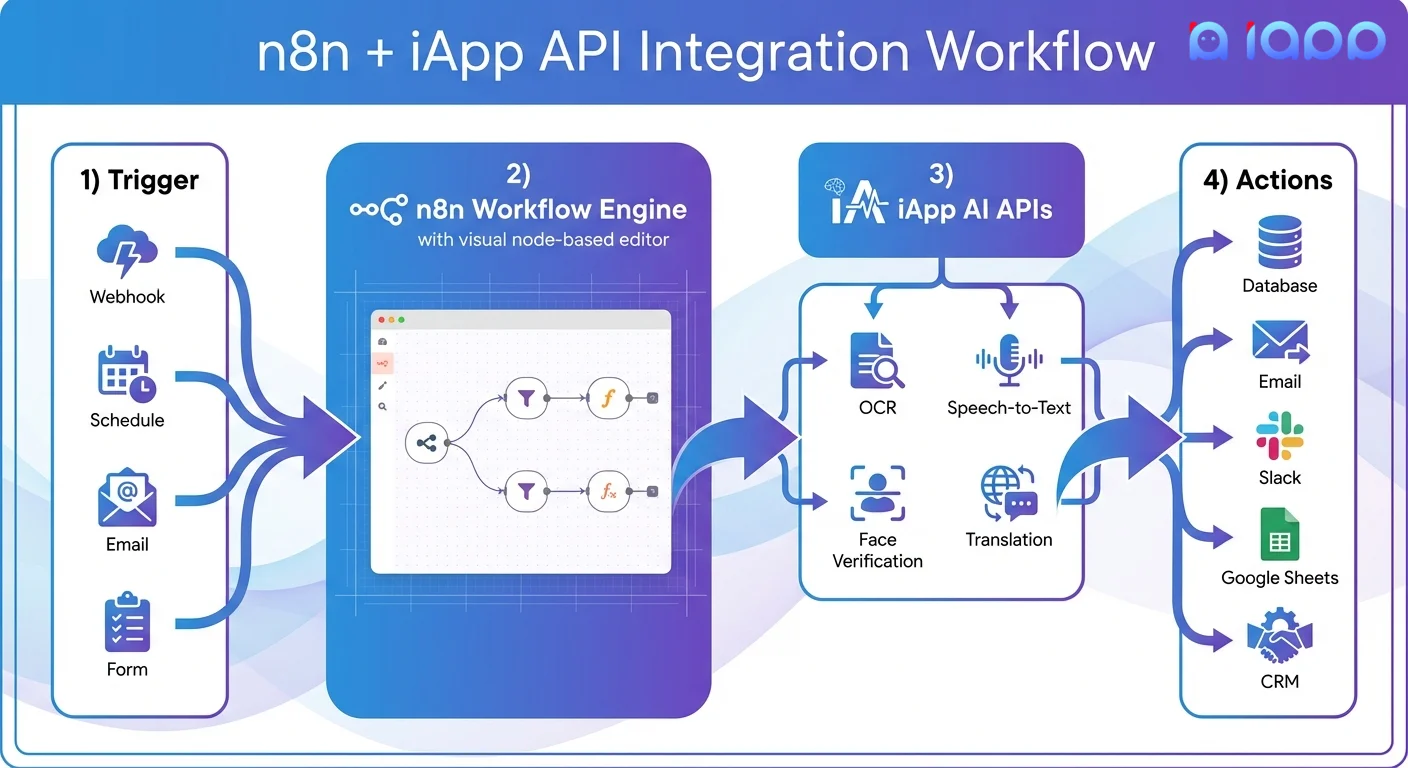
กระบวนการ Workflow
1. Trigger (จุดเริ่มต้น) ทุก Workflow เริ่มต้นด้วย Trigger — เหตุการณ์ที่เริ่มต้น Automation:
- Webhook: รับข้อมูลจากระบบภายนอก
- Schedule: รันตามเวลาที่กำหนด (ทุกชั่วโมง, ทุกวัน ฯลฯ)
- App Event: อีเมลใหม่, แถวใหม่ในสเปรดชีต, การส่งแบบฟอร์ม
- Manual: คลิกปุ่มเพื่อเริ่มต้น
2. n8n Workflow Engine ตัวแก้ไขแบบภาพที่คุณ:
- เชื่อมต่อ Node (บล็อกสร้าง) เข้าด้วยกัน
- กำหนดค่าการตั้งค่าของแต่ละ Node
- เพิ่มเงื่อนไขและ Logic การแยกสาขา
- แปลงและจัดการข้อมูล
3. Node ประมวลผล Node ที่ประมวลผลข้อมูลของคุณ:
- HTTP Request: เรียก API ใดๆ (รวมถึง iApp AI API)
- Code Node: เขียน JavaScript หรือ Python
- Data Transformation: จัดรูปแบบ กรอง รวมข้อมูล
- AI Nodes: เชื่อมต่อกับ LLM วิเคราะห์เนื้อหา
4. Node การกระทำ Node ที่ดำเนินการ:
- ส่งอีเมลหรือข้อความ Slack
- อัปเดตฐานข้อมูลหรือ CRM
- สร้างเอกสารหรือสเปรดชีต
- Trigger Workflow อื่น
5. Output และการตรวจสอบ
- ดูประวัติการทำงาน
- Debug Workflow ที่ล้มเหลว
- ตรวจสอบประสิทธิภาพ
- ตั้งค่าการแจ้งเตือนข้อผิดพลาด
n8n vs Zapier vs Make: ควรเลือกอันไหน?
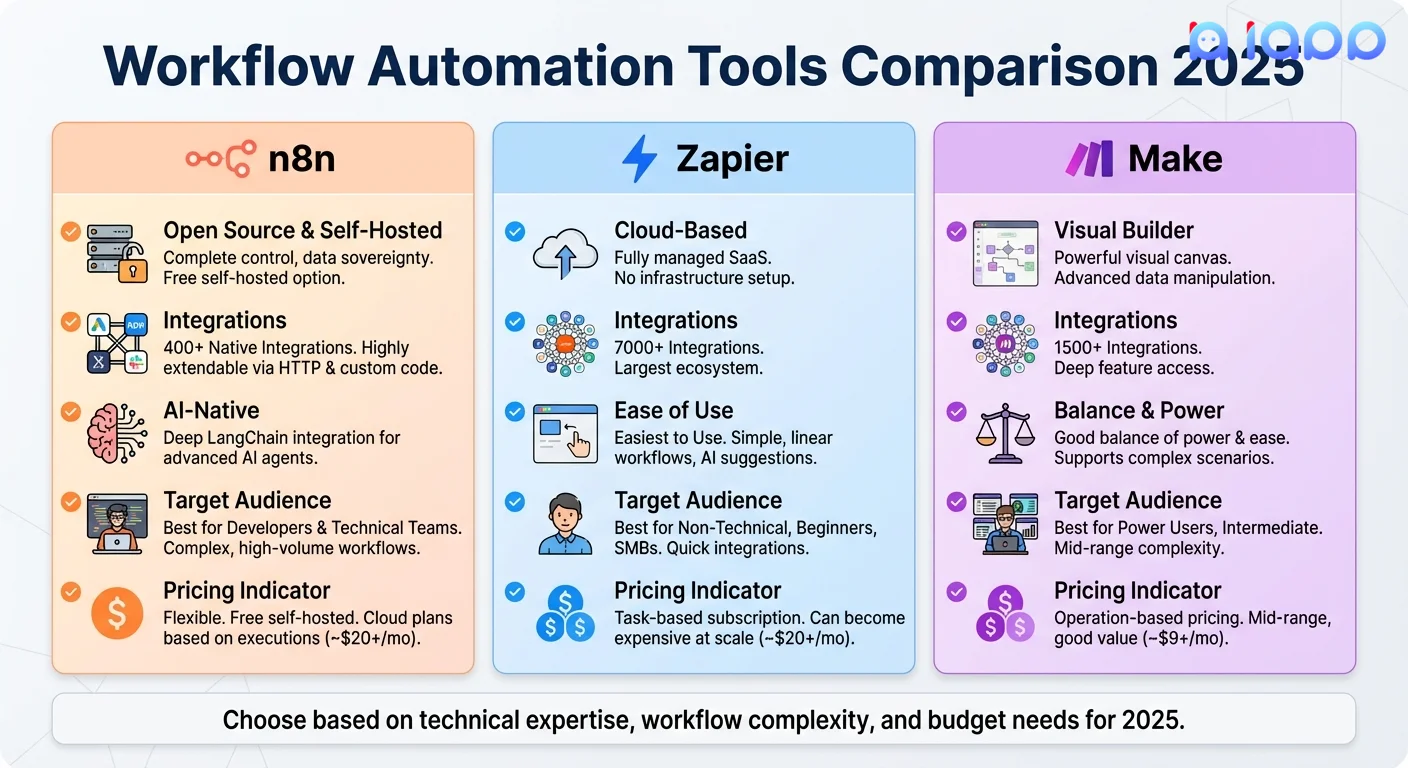
การเปรียบเทียบโดยย่อ
| ฟีเจอร์ | n8n | Zapier | Make |
|---|---|---|---|
| ราคา | ฟรี (self-hosted) / Paid cloud | เริ่มต้น $29.99/เดือน | เริ่มต้น $10.59/เดือน |
| การเชื่อมต่อ | 400+ | 7,000+ | 1,800+ |
| Self-hosting | ได้ | ไม่ได้ | ไม่ได้ |
| ความยากในการเรียนรู้ | ปานกลาง-สูง | ต่ำ | ปานกลาง |
| AI Integration | ขั้นสูง (LangChain) | พื้นฐาน | ปานกลาง |
| เหมาะสำหรับ | นักพัฒนา, ธุรกิจที่ละเอียดเรื่องข้อมูล | ผู้ใช้ไม่เทคนิค | Power User |
| ความเป็นส่วนตัวของข้อมูล | ควบคุมเต็มที่ | Cloud เท่านั้น | Cloud เท่านั้น |
เลือก n8n ถ้า:
- คุณต้องการ อำนาจอธิปไตยเหนือข้อมูล (เก็บข้อมูลบนเซิร์ฟเวอร์ของคุณ)
- คุณสบายใจกับเครื่องมือทางเทคนิค
- คุณต้องการ Workflow ไม่จำกัด โดยไม่มีราคาต่อ Task
- คุณต้องการ AI Integration ขั้นสูง
- คุณกำลังสร้าง Automation ที่ซับซ้อนและกำหนดเอง
เลือก Zapier ถ้า:
- คุณต้องการ การเชื่อมต่อมากที่สุด (7,000+ แอป)
- คุณต้องการ ความง่ายในการเรียนรู้ที่สุด
- Automation แบบง่ายเพียงพอ
- งบประมาณยืดหยุ่น
เลือก Make ถ้า:
- คุณต้องการ ความสมดุล ระหว่างพลังและความง่าย
- การสร้าง Workflow แบบภาพสำคัญ
- คุณต้องการความซับซ้อนมากกว่าที่ Zapier อนุญาต
- ความคุ้มค่าต้นทุนสำคัญ
คำศัพท์สำคัญที่ควรรู้ (อธิบายศัพท์เทคนิค)
1. Node
คืออะไร: บล็อกสร้างเดี่ยวใน Workflow ของคุณที่ทำหน้าที่หรือฟังก์ชันเฉพาะอย่างหนึ่ง
อธิบายง่ายๆ: คิดว่า Node เหมือน LEGO แต่ละบล็อกทำสิ่งหนึ่ง (trigger, process, action) และคุณเชื่อมต่อพวกมันเข้าด้วยกันเพื่อสร้างสิ่งที่มีประโยชน์
ประเภทของ Node:
- Trigger Node: เริ่มต้น Workflow (webhook, schedule, app event)
- Regular Node: ประมวลผลข้อมูลหรือดำเนินการ
- Sticky Note: เพิ่มความคิดเห็นและเอกสาร
2. Workflow
คืออะไร: Automation ที่สมบูรณ์ประกอบด้วย Node ที่เชื่อมต่อกันซึ่งทำงานตามลำดับ
อธิบายง่ายๆ: เหมือนสูตรอาหารที่บอก n8n ว่าต้องทำอะไร ทีละขั้นตอน "เมื่อลูกค้าใหม่สมัคร (trigger) ดึงข้อมูลบัตรประชาชน (HTTP request ไปยัง OCR API) บันทึกลงฐานข้อมูล (action) และส่งอีเมลต้อนรับ (action)"
สถานะ Workflow:
- Active: กำลังทำงานและรอ Trigger
- Inactive: หยุดชั่วคราว ไม่ทำงาน
- Draft: กำลังแก้ไข ยังไม่ได้เผยแพร่ (ใหม่ใน n8n 2.0)
3. Webhook
คืออะไร: URL ที่รับข้อมูลจากระบบภายนอกและ Trigger Workflow ของคุณ
อธิบายง่ายๆ: เหมือนตู้ไปรษณีย์สำหรับ Automation ของคุณ เมื่อระบบอื่น "ส่งจดหมาย" (ข้อมูล) ไปยังที่อยู่นี้ Workflow ของคุณจะตื่นขึ้นมาและประมวลผล
กรณีใช้งาน:
- รับการส่งแบบฟอร์มจากเว็บไซต์ของคุณ
- ได้รับแจ้งเตือนเมื่อมีการชำระเงิน
- ประมวลผลเอกสารหรือภาพที่เข้ามา
4. Execution
คืออะไร: การรัน Workflow หนึ่งครั้งตั้งแต่ต้นจนจบ
อธิบายง่ายๆ: ทุกครั้งที่ Workflow ของคุณรัน นั่นคือหนึ่ง Execution ถ้า Workflow ของคุณประมวลผล 100 ใบแจ้งหนี้ นั่นคือ 100 Execution
ข้อมูล Execution:
- Input/Output ของแต่ละ Node
- ข้อมูลเวลา
- สถานะสำเร็จหรือข้อผิดพลาด
- ข้อมูล Debug
5. Credentials
คืออะไร: ข้อมูลการยืนยันตัวตนที่จัดเก็บ (API Key, รหัสผ่าน, Token) ที่อนุญาตให้ n8n เชื่อมต่อกับบริการภายนอก
อธิบายง่ายๆ: "รหัสผ่าน" ที่ให้ n8n เข้าถึงแอปอื่นๆ ของคุณ คุณตั้งค่าครั้งเดียว และ n8n ใช้อย่างปลอดภัยเมื่อจำเป็น
ฟีเจอร์ความปลอดภัย:
- การจัดเก็บแบบเข้ารหัส
- การควบคุมการเข้าถึง (ใครสามารถใช้ Credential ใด)
- การแชร์ Credential ข้าม Workflow
ทำไม n8n จึงสำคัญในปี 2025
1. AI-Native Automation
n8n 2.0 (เปิดตัวธันวาคม 2025) นำความสามารถ AI ขั้นสูงมา:
- LangChain Integration: สร้าง AI Agent และ Chain
- 70+ AI Node: เชื่อมต่อกับ ChatGPT, Claude, Gemini และอื่นๆ
- Vector Database: จัดเก็บและค้นหา Embedding
- RAG Workflow: สร้างระบบถาม-ตอบเอกสาร
2. ประสิทธิภาพต้นทุนในระดับขนาดใหญ่
ต่างจากการคิดราคาต่อ Task ของ Zapier n8n เสนอ:
- Workflow ไม่จำกัด ในทุกแผน
- ผู้ใช้ไม่จำกัด ในทุกแผน
- ตัวเลือก Self-hosted สำหรับต้นทุนต่อ Execution เป็นศูนย์
- 220 Execution/วินาที บน Instance เดียว
3. อำนาจอธิปไตยเหนือข้อมูล & การปฏิบัติตามกฎหมาย
สำหรับธุรกิจไทยภายใต้ PDPA:
- Self-host ในประเทศไทย สำหรับการอยู่อาศัยของข้อมูล
- ไม่มีข้อมูลออกจากโครงสร้างพื้นฐานของคุณ
- Audit Log สำหรับการปฏิบัติตามกฎหมาย
- การควบคุมการเข้าถึงตามบทบาท
4. เป็นมิตรกับนักพัฒนา
n8n เชื่อมโยง No-code และ Code:
- Visual Builder สำหรับงานส่วนใหญ่
- JavaScript/Python สำหรับ Logic แบบกำหนดเอง
- HTTP Request Node สำหรับ API ใดๆ
- Version Control ผ่าน Git
n8n แก้ปัญหาอะไรได้บ้าง?
| ความท้าทายทางธุรกิจ | ไม่มี n8n | มี n8n |
|---|---|---|
| การป้อนข้อมูลด้วยตนเอง | พนักงาน Copy-paste ระหว่างระบบ | การไหลของข้อมูลอัตโนมัติระหว่างแอป |
| การ Onboarding ลูกค้าช้า | ใช้เวลาหลายวันในการตรวจสอบเอกสาร | นาทีด้วย OCR + การตรวจสอบอัตโนมัติ |
| พลาดการติดตาม | พึ่งพาความจำของมนุษย์ | การแจ้งเตือนและการติดตามอัตโนมัติ |
| Data Silo | ข้อมูลติดอยู่ในแอปแยกกัน | ข้อมูลรวมข้ามระบบทั้งหมด |
| งานซ้ำซาก | ทำงานด้วยตนเองหลายชั่วโมงต่อวัน | "ตั้งค่าแล้วลืมได้" Automation |
| การขยายการดำเนินงาน | จ้างคนเพิ่ม | ขยายด้วย Automation |
การใช้ n8n กับ iApp Technology API
iApp Technology ให้บริการ AI API ที่ปรับแต่งสำหรับภาษาไทยซึ่งเชื่อมต่อกับ n8n ได้อย่างราบรื่นผ่าน HTTP Request Node
ตัวอย่าง 1: ประมวลผลบัตรประชาชนอัตโนมัติ
สถานการณ์: เมื่อลูกค้าอัปโหลดบัตรประชาชนไทย ดึงข้อมูลและบันทึกลงฐานข้อมูลโดยอัตโนมัติ
// การกำหนดค่า n8n HTTP Request Node
// Method: POST
// URL: https://api.iapp.co.th/v3/store/ekyc/thai-national-id
// Headers: apikey: YOUR_API_KEY
// Body Type: Form Data
// File: {{ $binary.file }}
Workflow:
- Webhook Trigger: รับภาพที่อัปโหลด
- HTTP Request: เรียก iApp Thai ID OCR API
- Set Node: ดึงฟิลด์ที่เกี่ยวข้อง (ชื่อ, เลขบัตรประชาชน, วันเกิด)
- MySQL/Postgres: บันทึกลงฐานข้อมูล
- Slack: แจ้งทีมงานเรื่องการลงทะเบียนใหม่
ตัวอย่าง 2: ถอดความข้อความเสียง
สถานการณ์: ถอดความข้อความเสียงจากลูกค้าโดยอัตโนมัติและสร้าง Support Ticket
// การกำหนดค่า n8n HTTP Request Node
// Method: POST
// URL: https://api.iapp.co.th/v3/speech/stt-pro
// Headers: apikey: YOUR_API_KEY
// Body Type: Form Data
// File: {{ $binary.audio }}
Workflow:
- Email Trigger: อีเมลใหม่พร้อมไฟล์แนบเสียง
- HTTP Request: เรียก iApp Speech-to-Text API
- HTTP Request: วิเคราะห์ Sentiment (ตัวเลือก)
- Zendesk/Freshdesk: สร้าง Support Ticket
- Email: ส่งการยืนยันไปยังลูกค้า
ตัวอย่าง 3: Support ลูกค้าหลายภาษา
สถานการณ์: แปลข้อความที่เข้ามาและตอบกลับในภาษาของลูกค้า
// การกำหนดค่า n8n HTTP Request Node
// Method: POST
// URL: https://api.iapp.co.th/v3/nlp/translation
// Headers: apikey: YOUR_API_KEY
// Body: {
//   "text": "{{ $json.message }}",
//   "source_lang": "auto",
//   "target_lang": "en"
// }
Workflow:
- Webhook: รับข้อความแชท
- HTTP Request: ตรวจจับภาษาและแปลเป็นภาษาอังกฤษ
- AI Agent: สร้างคำตอบ
- HTTP Request: แปลคำตอบกลับเป็นภาษาของลูกค้า
- Webhook Response: ส่งคำตอบที่แปลแล้ว
เริ่มต้นใช้งาน n8n
ขั้นตอน 1: เลือกการติดตั้ง
ตัวเลือก A: n8n Cloud (ง่ายที่สุด)
- สมัครที่ n8n.io
- เริ่มทดลองใช้ฟรี
- ไม่ต้องติดตั้งอะไร
ตัวเลือก B: Self-Hosted ด้วย Docker (แนะนำสำหรับ PDPA)
docker run -it --rm \
  --name n8n \
  -p 5678:5678 \
  -v ~/.n8n:/home/node/.n8n \
  n8nio/n8n
ตัวเลือก C: ติดตั้งผ่าน npm
npm install n8n -g
n8n start
ขั้นตอน 2: สร้าง Workflow แรกของคุณ
- เปิด n8n (เข้าถึง
http://localhost:5678หรือ Cloud URL ของคุณ) - คลิก "Add workflow"
- เพิ่ม Trigger Node (เช่น Manual Trigger สำหรับทดสอบ)
- เพิ่ม HTTP Request Node
- กำหนดค่าด้วย iApp API Endpoint
- ทดสอบและเปิดใช้งาน
ขั้นตอน 3: เชื่อมต่อ iApp API
รับ API Key จาก iApp Control Panel และกำหนดค่า:
// การตั้งค่า HTTP Request Node
{
  "method": "POST",
  "url": "https://api.iapp.co.th/v3/store/ekyc/thai-national-id",
  "headers": {
    "apikey": "{{ $credentials.iappApiKey }}"
  },
  "body": {
    "formData": {
      "file": "={{ $binary.data }}"
    }
  }
}
กรณีใช้งานจริงในประเทศไทย
1. Automation ใบสมัครสินเชื่อธนาคาร
ปัญหา: การตรวจสอบเอกสารด้วยตนเองใช้เวลา 3-5 วันต่อใบสมัคร
โซลูชัน n8n:
- ลูกค้าอัปโหลดเอกสารผ่านเว็บฟอร์ม
- n8n Trigger เมื่อมีการส่งใหม่
- iApp OCR ดึงข้อมูลบัตรประชาชน, หนังสือรับรองรายได้, Statement บัญชี
- iApp Face Verification จับคู่เซลฟี่กับรูปบัตรประชาชน
- ข้อมูลตรวจสอบกับกฎธุรกิจ
- ใบสมัครที่ได้รับอนุมัติส่งต่ออัตโนมัติ; อื่นๆ เข้าคิวรอตรวจสอบ
ผลลัพธ์: ลดเวลาประมวลผลจากหลายวันเหลือนาที
2. การประมวลผลคำสั่งซื้อ E-Commerce
ปัญหา: จัดการคำสั่งซื้อจาก Shopee, Lazada และเว็บไซต์โดยตรง
โซลูชัน n8n:
- Webhook รับคำสั่งซื้อจากทุกช่องทาง
- n8n ทำให้ข้อมูลคำสั่งซื้อเป็นมาตรฐาน
- ตรวจสอบและอัปเดตสต็อก
- สร้างใบส่งสินค้า
- แจ้งลูกค้าในภาษาของพวกเขา (ผ่าน iApp Translation API)
- ประมวลผลการคืนสินค้าอัตโนมัติ
ผลลัพธ์: ลดการจัดการคำสั่งซื้อด้วยตนเอง 80%
3. การประมวลผลเอกสาร HR
ปัญหา: การ Onboarding พนักงานใหม่ต้องตรวจสอบเอกสารด้วยตนเอง
โซลูชัน n8n:
- พนักงานอัปโหลดบัตรประชาชน, ทะเบียนบ้าน, สมุดบัญชี
- iApp OCR ดึงข้อมูลทั้งหมดโดยอัตโนมัติ
- ข้อมูลได้รับการตรวจสอบและอ้างอิงข้าม
- สร้าง Record พนักงานใน HRIS
- ส่งอีเมลต้อนรับพร้อมข้อมูลสวัสดิการ
- แจ้ง IT เพื่อจัดเตรียมบัญชี
ผลลัพธ์: ลดเวลา Onboarding จาก 2 วันเหลือ 2 ชั่วโมง
iApp API สำหรับ n8n Integration
| กรณีใช้งาน | API | ประเภท n8n Node |
|---|---|---|
| OCR บัตรประชาชนไทย | Thai National ID | HTTP Request |
| OCR พาสปอร์ต | Passport OCR | HTTP Request |
| ยืนยันใบหน้า | Face Verification | HTTP Request |
| ตรวจจับ Liveness | Liveness Detection | HTTP Request |
| Speech-to-Text | Speech-to-Text Pro | HTTP Request |
| Text-to-Speech | Text-to-Speech | HTTP Request |
| แปลภาษา | Multilingual Translation | HTTP Request |
| วิเคราะห์ Sentiment | Sentiment Analysis | HTTP Request |
n8n 2.0: มีอะไรใหม่ (ธันวาคม 2025)
n8n 2.0 รุ่นล่าสุดนำการปรับปรุงสำคัญมา:
อัปเดตสำคัญ
- Save vs Publish: Draft แยกจาก Workflow ที่ทำงานอยู่
- Task Runner: Code Execution รันในสภาพแวดล้อมแยก (ปลอดภัยกว่า)
- SQLite Pooling: ประสิทธิภาพเร็วขึ้นถึง 10 เท่า
- Security Defaults: Environment Variable ถูกบล็อกจาก Code Node โดยค่าเริ่มต้น
- Breaking Changes: ตรวจสอบคู่มืออัปเกรดก่อนย้าย
ราคาใหม่ (สิงหาคม 2025)
- ทุกแผนรวมผู้ใช้ไม่จำกัด
- ทุกแผนรวม Workflow ไม่จำกัด
- ทุกแผนรวม Step ไม่จำกัด
- ไม่มีข้อจำกัด Active Workflow อีกต่อไป
สรุป
n8n เป็นตัวแทนอนาคตของ Workflow Automation — ทรงพลังเพียงพอสำหรับนักพัฒนา เข้าถึงได้สำหรับ Power User และยืดหยุ่นเพียงพอที่จะจัดการความท้าทายในการ Integration ใดๆ ลักษณะ Open-source ความสามารถในการ Self-host และฟีเจอร์ AI ขั้นสูงทำให้มันน่าสนใจเป็นพิเศษสำหรับธุรกิจไทยที่ต้องการ:
- อำนาจอธิปไตยเหนือข้อมูล ภายใต้ PDPA
- Custom Integration กับบริการเฉพาะประเทศไทย
- การขยายที่คุ้มค่า โดยไม่มีราคาต่อ Task
- AI-powered Workflow ด้วย LangChain
เมื่อรวมกับ AI API ที่ปรับแต่งสำหรับภาษาไทยของ iApp Technology n8n ช่วยให้คุณสร้าง Automation ที่ซับซ้อนซึ่งเข้าใจภาษาไทย อ่านเอกสารไทย และให้บริการลูกค้าไทย — ทั้งหมดนี้โดยไม่ต้องเขียนโค้ดที่ซับซ้อน
พร้อมที่จะทำ Automation? รับ iApp API Key ของคุณ และเริ่มสร้าง n8n Workflow วันนี้!
ต้องการความช่วยเหลือ? เข้าร่วม Discord Community ของเราหรือส่งอีเมลถึงเราที่ support@iapp.co.th
iApp Technology Co., Ltd. บริษัทเทคโนโลยี AI ชั้นนำของประเทศไทย
แหล่งข้อมูล: