Chatbot คืออะไร? คู่มือฉบับสมบูรณ์สำหรับผู้เริ่มต้น

คุณเคยแชทกับฝ่ายบริการลูกค้าบนเว็บไซต์ตอนตี 2 แล้วได้รับคำตอบทันทีไหม? หรือเคยถามผู้ช่วยเสียงให้เปิดเพลงหรือเช็คสภาพอากาศ? โอกาสสูงที่คุณกำลังคุยกับ Chatbot ตัวแทนการสนทนาที่ขับเคลื่อนด้วย AI เหล่านี้กำลังเปลี่ยนแปลงวิธีที่ธุรกิจโต้ตอบกับลูกค้า และพวกมันฉลาดขึ้นทุกวัน
Chatbot คืออะไร?
Chatbot คือโปรแกรมคอมพิวเตอร์ที่ออกแบบมาเพื่อจำลองการสนทนาของมนุษย์ สามารถสื่อสารผ่านข้อความ เสียง หรือทั้งสองอย่าง และใช้เพื่อทำให้การโต้ตอบกับผู้ใช้เป็นอัตโนมัติ
โดยหลักแล้ว chatbot:
- รับ ข้อความจากผู้ใช้ (ข้อความหรือเสียง)
- เข้าใจ สิ่งที่ผู้ใช้ต้องการ
- สร้าง คำตอบที่เหมาะสม
- ดำเนินการ เมื่อจำเป็น (เช่น จองนัดหมาย หรือประมวลผลคำสั่งซื้อ)
Chatbot มีตั้งแต่ระบบแบบกฎง่ายๆ ที่ทำตามสคริปต์ ไปจนถึงระบบ AI ที่ซับซ้อนที่เข้าใจบริบท จดจำการสนทนาก่อนหน้า และเรียนรู้จากการโต้ตอบ
ตัวอย่างง่ายๆ
Chatbot พื้นฐาน:
- ผู้ใช้: "เปิดทำการกี่โมงครับ?"
- บอท: "เราเปิดทำการวันจันทร์ถึงศุกร์ เวลา 9:00 - 18:00 น. ครับ"
Chatbot ที่ขับเคลื่อนด้วย AI:
- ผู้ใช้: "สั่งของเมื่อสัปดาห์ที่แล้วแต่ยังไม่ได้รับเลย"
- บอท: "ขออภัยด้วยครับ ให้ผมตรวจสอบคำสั่งซื้อล่าสุดของคุณ... พบคำสั่งซื้อ #12345 ที่สั่งเมื่อวันที่ 2 ธันวาคม สถานะแสดงว่า 'กำลังจัดส่ง' และควรถึงภายในพรุ่งนี้ครับ ต้องการให้ส่งลิงก์ติดตามพัสดุไหมครับ?"
ประเภทของ Chatbot
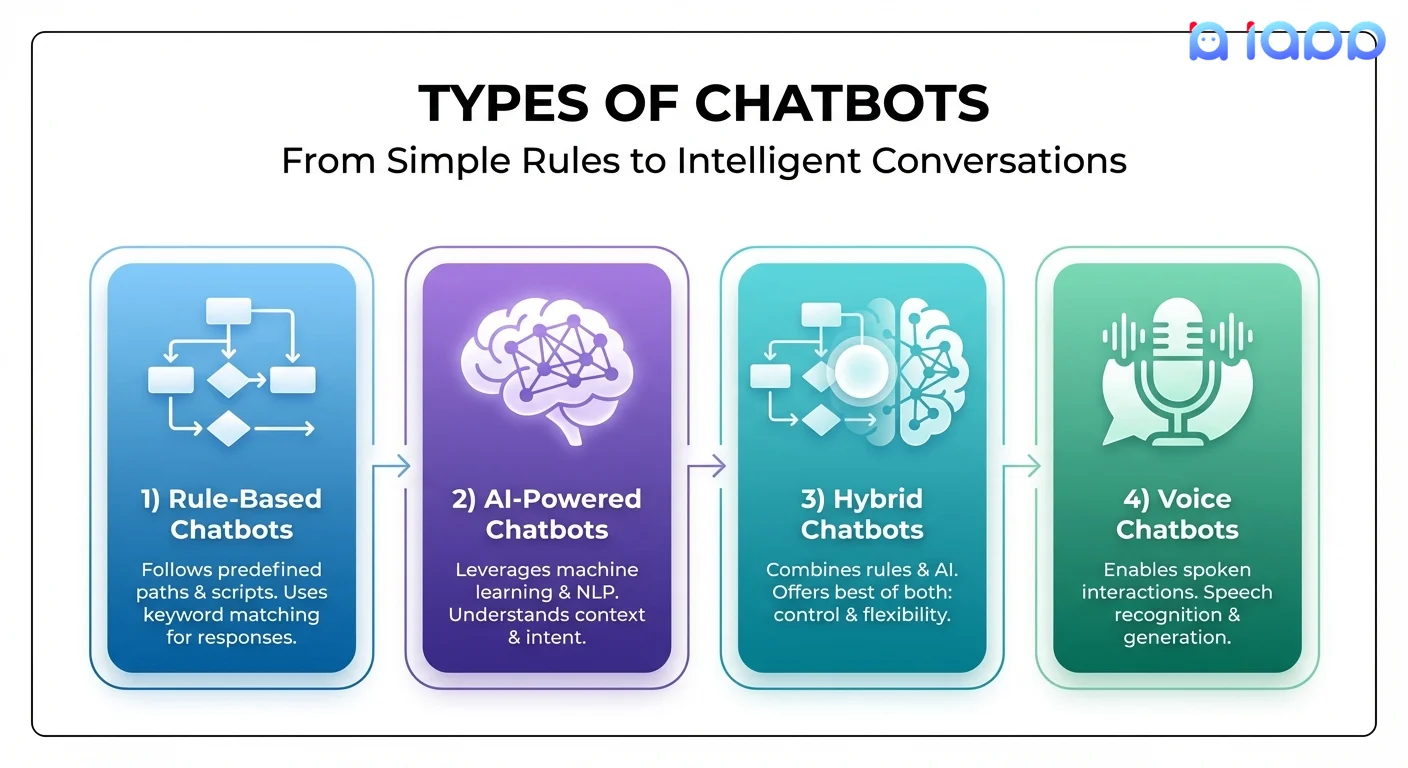
1. Chatbot แบบกฎ (Rule-Based)
ประเภทที่ง่ายที่สุดที่ทำตามกฎและต้นไม้ตัดสินใจที่กำหนดไว้ล่วงหน้า
วิธีทำงาน:
- จับคู่คำสำคัญในข้อความผู้ใช้
- ทำตามตรรกะ if-then
- แสดงตัวเลือกเมนูให้ผู้ใช้เลือก
ข้อดี: สร้างง่าย ตอบได้คาดเดาได้ ต้นทุนต่ำ ข้อเสีย: จัดการคำถามที่ไม่คาดคิดไม่ได้ ความยืดหยุ่นจำกัด
เหมาะกับ: FAQ การนำทางเมนูง่ายๆ การค้นหาข้อมูลพื้นฐาน
2. Chatbot ที่ขับเคลื่อนด้วย AI (แบบ NLU)
ใช้ Natural Language Understanding เพื่อตีความเจตนาของผู้ใช้
วิธีทำงาน:
- วิเคราะห์ความหมายเบื้องหลังข้อความ
- ระบุเจตนาของผู้ใช้และแยกข้อมูลสำคัญ
- สร้างคำตอบตามบริบท
ข้อดี: เข้าใจภาษาธรรมชาติ จัดการรูปแบบต่างๆ ได้ เหมือนมนุษย์มากขึ้น ข้อเสีย: ต้องการข้อมูลฝึกฝน สร้างซับซ้อนกว่า
เหมาะกับ: บริการลูกค้า การคัดกรองลูกค้าเป้าหมาย ตั๋วสนับสนุน
3. Chatbot ที่ขับเคลื่อนด้วย LLM
รุ่นล่าสุดที่ใช้โมเดลภาษาขนาดใหญ่เช่น GPT หรือ Thai LLMs
วิธีทำงาน:
- ใช้โมเดล AI ขนาดใหญ่ที่ฝึกฝนกับข้อความหลายพันล้านข้อความ
- สร้างคำตอบที่เหมือนมนุษย์แบบไดนามิก
- สามารถปรับแต่งด้วยความรู้เฉพาะ
ข้อดี: ยืดหยุ่นสูง การสนทนาเป็นธรรมชาติ จัดการคำถามซับซ้อนได้ ข้อเสีย: ต้นทุนสูงกว่า อาจมีคำตอบที่ไม่คาดคิด
เหมาะกับ: คำถามลูกค้าที่ซับซ้อน การสร้างเนื้อหา การช่วยเหลือส่วนบุคคล
4. Voice Chatbot
Chatbot ที่สื่อสารผ่านเสียงพูดแทน (หรือเพิ่มเติมจาก) ข้อความ
วิธีทำงาน:
- แปลงเสียงพูดเป็นข้อความ (STT)
- ประมวลผลข้อความด้วย NLU/LLM
- แปลงคำตอบกลับเป็นเสียงพูด (TTS)
ข้อดี: โต้ตอบแบบไม่ใช้มือ เข้าถึงได้ง่าย การสื่อสารเป็นธรรมชาติ ข้อเสีย: ต้องการการรู้จำเสียงที่ดี มีความท้าทายด้านสำเนียง/ภาษาถิ่น
เหมาะกับ: Call center ผู้ช่วยเสียง แอปพลิเคชันเพื่อการเข้าถึง
5. Hybrid Chatbot
รวมตรรกะแบบกฎเข้ากับความสามารถ AI
วิธีทำงาน:
- ใช้กฎสำหรับสถานการณ์ทั่วไปที่คาดเดาได้
- ใช้ AI สำหรับคำถามที่ซับซ้อนหรือไม่คาดคิด
- ส่งต่อให้เจ้าหน้าที่มนุษย์ได้อย่างราบรื่นเมื่อจำเป็น
ข้อดี: ได้ดีที่สุดของทั้งสองแบบ ควบคุมได้แต่ยืดหยุ่น ข้อเสีย: สถาปัตยกรรมซับซ้อนกว่า
เหมาะกับ: บริการลูกค้าองค์กร ธนาคาร สาธารณสุข
คำศัพท์ Chatbot สำคัญที่ควรรู้
1. Intent (เจตนา)
คืออะไร: เป้าหมายหรือวัตถุประสงค์เบื้องหลังข้อความของผู้ใช้
เปรียบเทียบง่ายๆ: เหมือนการเข้าใจ "คำขอ" ของใครบางคนไม่ว่าจะพูดอย่างไร
ตัวอย่าง:
- "ยอดเงินของฉันเท่าไหร่?" → Intent:
check_balance - "มีเงินเหลือเท่าไหร่?" → Intent:
check_balance - "ดูบัญชีหน่อย" → Intent:
check_balance
ทั้งสามมี intent เดียวกัน แค่พูดต่างกัน
2. Entity (ข้อมูลสำคัญ)
คืออะไร: ข้อมูลเฉพาะที่แยกออกมาจากข้อความ
เปรียบเทียบง่ายๆ: "รายละเอียด" ที่เติมในช่องว่างของคำขอ
ตัวอย่าง:
- "จองตั๋วเครื่องบินไปกรุงเทพวันศุกร์"
- Intent:
book_flight - Entities: ปลายทาง=
กรุงเทพ, วันที่=วันศุกร์
- Intent:
3. NLU (Natural Language Understanding)
คืออะไร: เทคโนโลยี AI ที่ตีความภาษามนุษย์เพื่อแยกความหมาย
เปรียบเทียบง่ายๆ: เหมือนนักแปลที่แปลงคำพูดมนุษย์เป็นข้อมูลที่มีโครงสร้างที่คอมพิวเตอร์ทำงานได้
ส่วนประกอบ:
- การจำแนก Intent (ผู้ใช้ต้องการอะไร?)
- การแยก Entity (รายละเอียดเฉพาะคืออะไร?)
- การวิเคราะห์ Sentiment (ผู้ใช้พอใจหรือไม่พอใจ?)
4. Fallback (การรับมือเมื่อไม่เข้าใจ)
คืออะไร: สิ่งที่ chatbot ทำเมื่อไม่เข้าใจผู้ใช้
เปรียบเทียบง่ายๆ: เหมือนการพูดว่า "ขอโทษครับ ไม่เข้าใจ ช่วยพูดอีกครั้งได้ไหม?" แทนที่จะให้คำตอบผิด
กลยุทธ์ Fallback ที่ดี:
- ขอให้ชี้แจง
- เสนอตัวเลือกทางเลือก
- ส่งต่อให้เจ้าหน้าที่มนุษย์
- แนะนำหัวข้อที่เกี่ยวข้อง
5. Context / Conversation Memory (บริบท/ความจำการสนทนา)
คืออะไร: ความสามารถของ chatbot ในการจดจำข้อความก่อนหน้าในการสนทนา
เปรียบเทียบง่ายๆ: เหมือนวิธีที่มนุษย์จำสิ่งที่พูดไปก่อนหน้าในการสนทนา
ตัวอย่าง:
- ผู้ใช้: "อยากสั่งพิซซ่า"
- บอท: "ต้องการขนาดไหนครับ?"
- ผู้ใช้: "ใหญ่"
- บอท: "พิซซ่าขนาดใหญ่หนึ่งถาด ต้องการหน้าอะไรครับ?" (จำบริบทพิซซ่าได้)
ถ้าไม่มีบริบท บอทจะไม่รู้ว่า "ใหญ่" หมายถึงขนาดพิซซ่า
ทำไม Chatbot ถึงสำคัญ
1. พร้อมให้บริการ 24/7
Chatbot ไม่เคยหลับ ไม่พักเบรก ไม่ไปพักร้อน สามารถให้บริการลูกค้าได้ตลอดเวลา แม้ในช่วงวันหยุด
2. ตอบทันที
ไม่ต้องรอคิว ลูกค้าได้รับคำตอบทันทีสำหรับคำถาม เพิ่มความพึงพอใจ
3. ประหยัดต้นทุน
Chatbot ตัวเดียวสามารถจัดการการสนทนาพันๆ รายการพร้อมกัน ลดความจำเป็นในการมีทีมบริการลูกค้าขนาดใหญ่
4. ความสม่ำเสมอ
Chatbot ให้ข้อมูลที่ถูกต้องเหมือนกันทุกครั้ง ลดข้อผิดพลาดของมนุษย์และความแปรปรวนของอารมณ์
5. ขยายขนาดได้
ในช่วงพีค (เซลส์ โปรโมชัน วิกฤต) chatbot รับมือกับปริมาณที่เพิ่มขึ้นโดยไม่ต้องจ้างเพิ่ม
6. เก็บข้อมูล
ทุกการสนทนาให้ข้อมูลมีค่าเกี่ยวกับความต้องการของลูกค้า ปัญหาที่พบบ่อย และโอกาสในการปรับปรุง
Chatbot แก้ปัญหาอะไร?
| ปัญหา | วิธีแบบดั้งเดิม | โซลูชัน Chatbot |
|---|---|---|
| รอนาน | เพิ่มพนักงาน | ตอบทันที 24/7 |
| คำถามซ้ำๆ | หน้า FAQ (แทบไม่มีคนอ่าน) | คำตอบแบบโต้ตอบ เฉพาะบุคคล |
| สนับสนุนนอกเวลา | จำกัดหรือไม่มี | พร้อมให้บริการตลอดเวลา |
| อุปสรรคด้านภาษา | พนักงานหลายภาษา (แพง) | ผสานรวมแปลภาษา AI |
| ต้นทุนสนับสนุนสูง | ทีมใหญ่ | สนับสนุนด่านแรกอัตโนมัติ |
| คำตอบไม่สม่ำเสมอ | อบรม & QA | คำตอบมาตรฐาน |
| คัดกรองลูกค้าเป้าหมาย | คัดกรองด้วยมือ | คัดกรองอัตโนมัติ |
Chatbot ทำงานอย่างไร
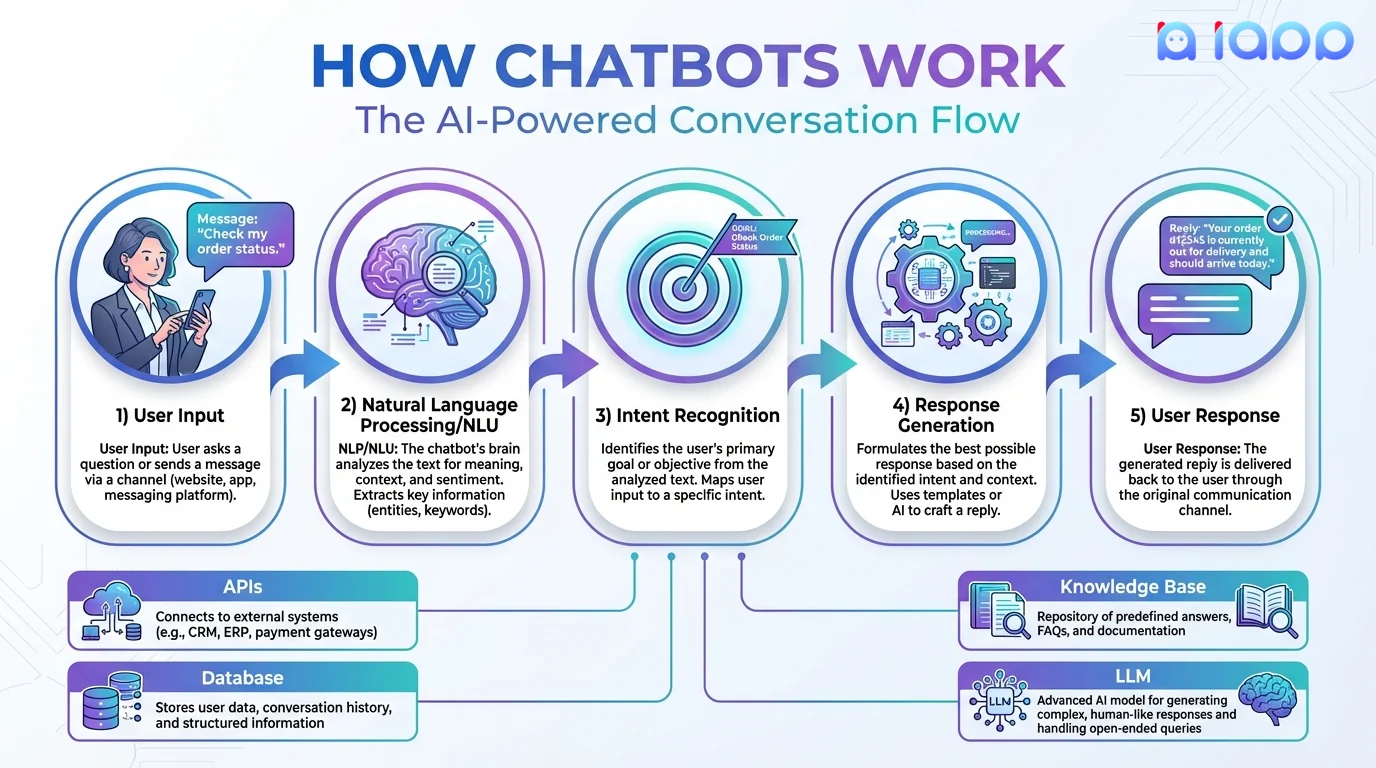
ขั้นตอนการสนทนา
-
Input ของผู้ใช้
- ผู้ใช้พิมพ์ข้อความหรือพูด
- Interface แชทจับ input
-
ประมวลผลภาษาธรรมชาติ
- วิเคราะห์ข้อความเพื่อหาความหมาย
- ระบุ Intent
- แยก Entities
- พิจารณาบริบทจากข้อความก่อนหน้า
-
การจัดการบทสนทนา
- ตัดสินใจว่าจะทำอะไร
- อาจ query ฐานข้อมูลหรือ APIs
- ตัดสินใจกลยุทธ์การตอบ
-
สร้างคำตอบ
- สร้างคำตอบที่เหมาะสม
- อาจใช้ templates หรือ AI generation
- จัดรูปแบบสำหรับช่องทาง (ข้อความ เสียง rich media)
-
ส่ง Output
- ส่งคำตอบกลับผู้ใช้
- อาจรวมปุ่ม รูปภาพ หรือเสียง
- บันทึกสถานะการสนทนา
ตัวอย่างสถาปัตยกรรม
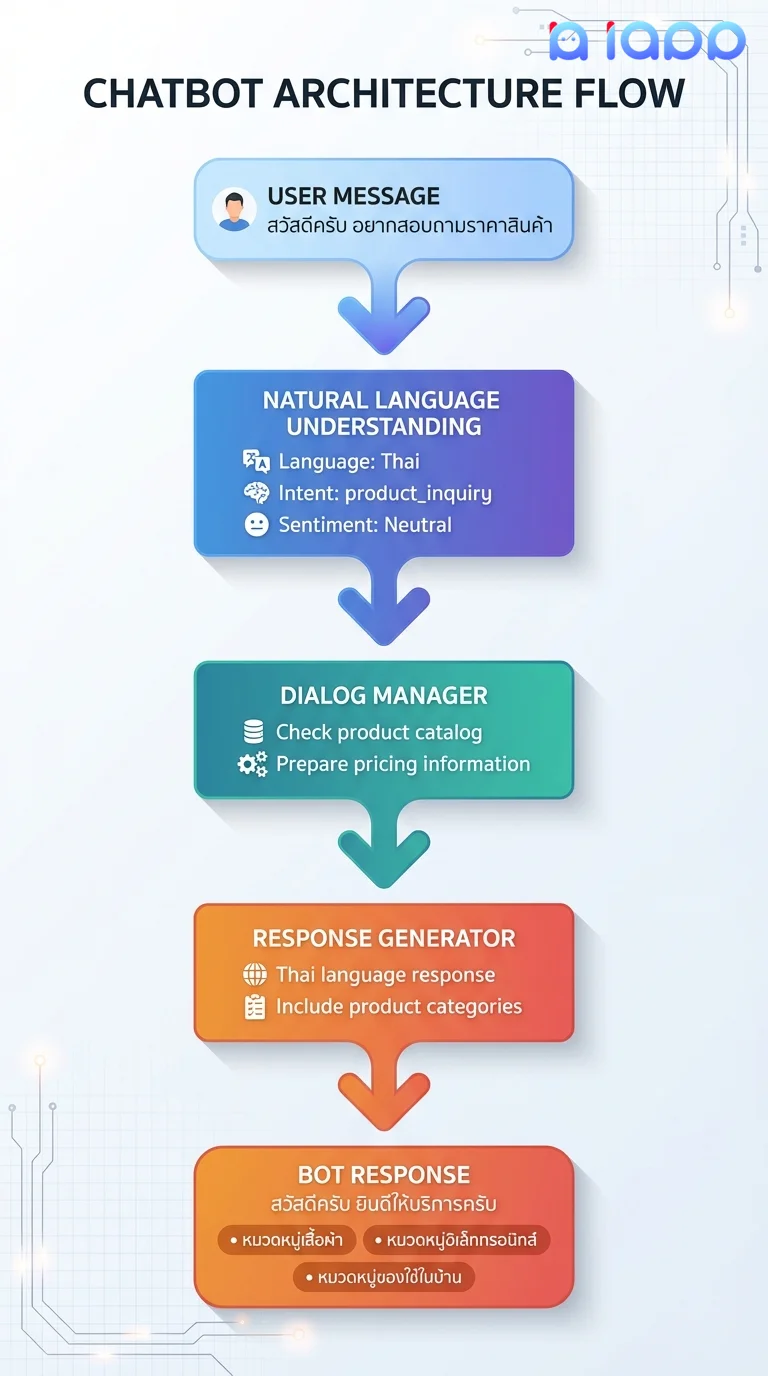
Chatbot ในประเทศไทย: การใช้งานจริง
1. บริการลูกค้าภาษาไทย
ใช้ DeepSeek V4:
- เข้าใจความละเอียดอ่อนของภาษาไทยและคำลงท้าย
- จัดการอักษรไทยและการทับศัพท์
- ตอบเป็นภาษาไทยอย่างเป็นธรรมชาติ
- เข้าใจบริบทและการอ้างอิงทางวัฒนธรรม
2. Voice Chatbot ภาษาไทย
รวม Speech-to-Text และ Text-to-Speech:
- รับ input เสียงภาษาไทย
- ประมวลผลด้วย AI ที่ปรับแต่งสำหรับภาษาไทย
- ตอบด้วยเสียงไทยที่เป็นธรรมชาติ
- เหมาะสำหรับ IVR และ call center
3. สนับสนุนหลายภาษา
ใช้ Translation API:
- ให้บริการลูกค้าเป็นภาษาไทย อังกฤษ จีน ญี่ปุ่น
- ตรวจจับภาษาลูกค้าอัตโนมัติ
- แปลแบบเรียลไทม์
- รักษาบริบทการสนทนาข้ามภาษา
4. Chatbot ที่ช่วยประมวลผลเอกสาร
รวม chatbot กับ Thai OCR:
- อัปโหลดบัตรประชาชนหรือเอกสารในแชท
- แยกข้อมูลอัตโนมัติ
- ประมวลผลใบสมัครแบบสนทนา
- ลดขั้นตอน eKYC
5. ความรู้ด้านกฎหมายและเฉพาะทาง
ใช้ Thanoy Legal AI:
- ตอบคำถามกฎหมายไทย
- อ้างอิงกฎหมายและระเบียบที่เกี่ยวข้อง
- อธิบายแนวคิดกฎหมายอย่างง่าย
- พร้อมให้บริการ 24/7 สำหรับคำแนะนำเบื้องต้น
สร้าง Chatbot ด้วย iApp
iApp Technology ให้ส่วนประกอบพื้นฐานสำหรับ Chatbot ไทย:
ส่วนประกอบที่มี
| ส่วนประกอบ | ผลิตภัณฑ์ iApp | บทบาทใน Chatbot |
|---|---|---|
| สมองภาษาไทย | OpenThai Chinda | เข้าใจและสร้างภาษาไทย |
| การคิดวิเคราะห์ขั้นสูง | DeepSeek-V3.2 | คำถามและการวิเคราะห์ซับซ้อน |
| ความรู้กฎหมาย | Thanoy Legal AI | ความเชี่ยวชาญกฎหมายไทย |
| Input เสียง | Speech-to-Text | แปลงเสียงเป็นข้อความ |
| Output เสียง | Text-to-Speech | เสียงพูดไทยที่เป็นธรรมชาติ |
| การแปลภาษา | Translation API | สนับสนุนหลายภาษา |
ตัวอย่าง: สร้าง Chatbot บริการลูกค้าไทย
import requests

def thai_chatbot(user_message, conversation_history=[]):
    """
    Chatbot ไทยอย่างง่ายใช้ OpenThai Chinda
    """

    # สร้างบริบทการสนทนา
    messages = [
        {
            "role": "system",
            "content": """คุณเป็นผู้ช่วยบริการลูกค้าของบริษัท iApp Technology
            ตอบคำถามด้วยความสุภาพและเป็นมิตร
            ช่วยเหลือเรื่องผลิตภัณฑ์ AI และ API ต่างๆ
            ถ้าไม่แน่ใจ ให้แนะนำติดต่อทีมสนับสนุน"""
        }
    ]

    # เพิ่มประวัติการสนทนา
    messages.extend(conversation_history)

    # เพิ่มข้อความปัจจุบัน
    messages.append({
        "role": "user",
        "content": user_message
    })

    # เรียก OpenThai Chinda
    response = requests.post(
        'https://api.iapp.co.th/v3/llm/deepseek-v4/chat/completions',
        headers={
            'apikey': 'YOUR_API_KEY',
            'Content-Type': 'application/json'
        },
        json={
            'model': 'deepseek-v4-flash',
            'messages': messages,
            'max_tokens': 512,
            'temperature': 0.7
        }
    )

    result = response.json()
    bot_reply = result['choices'][0]['message']['content']

    # อัปเดตประวัติการสนทนา
    conversation_history.append({"role": "user", "content": user_message})
    conversation_history.append({"role": "assistant", "content": bot_reply})

    return bot_reply, conversation_history

# ตัวอย่างการใช้งาน
history = []
reply, history = thai_chatbot("สวัสดีครับ อยากสอบถามเรื่อง API", history)
print(reply)

reply, history = thai_chatbot("มี API อะไรบ้างครับ", history)
print(reply)
ตัวอย่าง: Voice Chatbot
import requests

def voice_chatbot(audio_file):
    """
    Voice chatbot: เสียง → ข้อความ → AI → เสียง
    """

    # ขั้นตอนที่ 1: แปลงเสียงเป็นข้อความ
    stt_response = requests.post(
        'https://api.iapp.co.th/thai-speech-to-text/v2',
        headers={'apikey': 'YOUR_API_KEY'},
        files={'file': audio_file}
    )
    user_text = stt_response.json()['transcript']

    # ขั้นตอนที่ 2: ประมวลผลด้วย LLM
    bot_reply, _ = thai_chatbot(user_text)

    # ขั้นตอนที่ 3: แปลงข้อความเป็นเสียง
    tts_response = requests.post(
        'https://api.iapp.co.th/thai-text-to-speech/v1',
        headers={'apikey': 'YOUR_API_KEY'},
        json={
            'text': bot_reply,
            'voice': 'female',
            'speed': 1.0
        }
    )

    return {
        'user_said': user_text,
        'bot_reply': bot_reply,
        'audio': tts_response.content
    }
เริ่มต้นใช้งาน Chatbot
ขั้นตอนที่ 1: กำหนด Use Case ของคุณ
จุดเริ่มต้นที่พบบ่อย:
- FAQ Bot: ตอบคำถามทั่วไปเกี่ยวกับธุรกิจของคุณ
- Lead Bot: คัดกรองลูกค้าที่สนใจ
- Support Bot: จัดการคำขอสนับสนุนพื้นฐาน
- Booking Bot: จองนัดหมายหรือการจอง
ขั้นตอนที่ 2: เลือกแพลตฟอร์ม
Chatbot ของคุณจะอยู่ที่ไหน?
- Widget บนเว็บไซต์
- LINE Official Account
- Facebook Messenger
- แอปมือถือ
- ระบบโทรศัพท์/IVR
ขั้นตอนที่ 3: สร้างด้วย iApp APIs
- รับ API key ของคุณ
- เริ่มด้วย OpenThai Chinda สำหรับภาษาไทย
- เพิ่ม Speech APIs สำหรับเสียง
- ผสานรวมกับแพลตฟอร์มที่คุณเลือก
แหล่งข้อมูล
- รับ API Access: จัดการ API Key
- ลอง Chinda: Thai LLM Demo
- ลอง Speech APIs: Speech-to-Text Demo
- สำรวจ APIs ทั้งหมด: แคตตาล็อก API ครบ
- เข้าร่วมชุมชน: Discord
อนาคตของ Chatbot
แนวโน้มที่ควรติดตาม
- เหมือนมนุษย์มากขึ้น: LLM ทำให้การสนทนาแยกไม่ออกจากมนุษย์
- Multimodal: Chatbot ที่เห็นภาพ ได้ยินเสียง และอ่านเอกสาร
- เชิงรุก: บอทที่เริ่มการสนทนาที่เป็นประโยชน์ ไม่ใช่แค่ตอบ
- ความฉลาดทางอารมณ์: เข้าใจและตอบสนองต่ออารมณ์ของผู้ใช้
- การดำเนินการอัตโนมัติ: บอทที่ทำงานซับซ้อนได้ครบตั้งแต่ต้นจนจบ
ทำไมธุรกิจไทยควรลงมือตอนนี้
- ความคาดหวังของลูกค้า: ผู้ใช้คาดหวังการตอบทันที 24/7
- ได้เปรียบในการแข่งขัน: โดดเด่นด้วยประสบการณ์ลูกค้าที่เหนือกว่า
- ประหยัดต้นทุน: ลดต้นทุนสนับสนุนพร้อมปรับปรุงบริการ
- ข้อมูลเชิงลึก: เรียนรู้จากการสนทนาลูกค้าหลายพันรายการ
- ขยายขนาดได้: รับมือการเติบโตโดยไม่เพิ่มต้นทุนตามส่วน
สรุป
Chatbot พัฒนาจากระบบตอบแบบกฎง่ายๆ เป็นผู้ช่วย AI ที่ซับซ้อนที่เข้าใจภาษาไทย ประมวลผลเสียง และจัดการการสนทนาที่ซับซ้อน พวกมันไม่ใช่แค่ "มีก็ดี" อีกต่อไป แต่จำเป็นสำหรับธุรกิจที่ต้องการให้บริการลูกค้าที่ยอดเยี่ยมในระดับที่ขยายได้
ด้วยชุด AI APIs ที่ปรับแต่งสำหรับภาษาไทยของ iApp Technology — OpenThai Chinda สำหรับเข้าใจภาษา, Speech APIs สำหรับโต้ตอบด้วยเสียง และ Translation สำหรับสนับสนุนหลายภาษา — ธุรกิจไทยสามารถสร้าง chatbot ระดับโลกที่เข้าใจลูกค้าของตนอย่างแท้จริง
พร้อมสร้าง Chatbot ไทยตัวแรกแล้วหรือยัง? ลงทะเบียนฟรี และเริ่มต้นด้วย OpenThai Chinda วันนี้!
มีคำถาม? เข้าร่วม Discord Community ของเราหรือส่งอีเมลมาที่ support@iapp.co.th
บริษัท ไอแอพพ์ เทคโนโลยี จำกัด บริษัท AI ชั้นนำของประเทศไทย