E-KYC คืออะไร? คู่มือฉบับสมบูรณ์สำหรับการยืนยันตัวตนทางอิเล็กทรอนิกส์

โดย ดร.กอบกฤตย์ วิริยะยุทธกร, CEO & Founder, iApp Technology
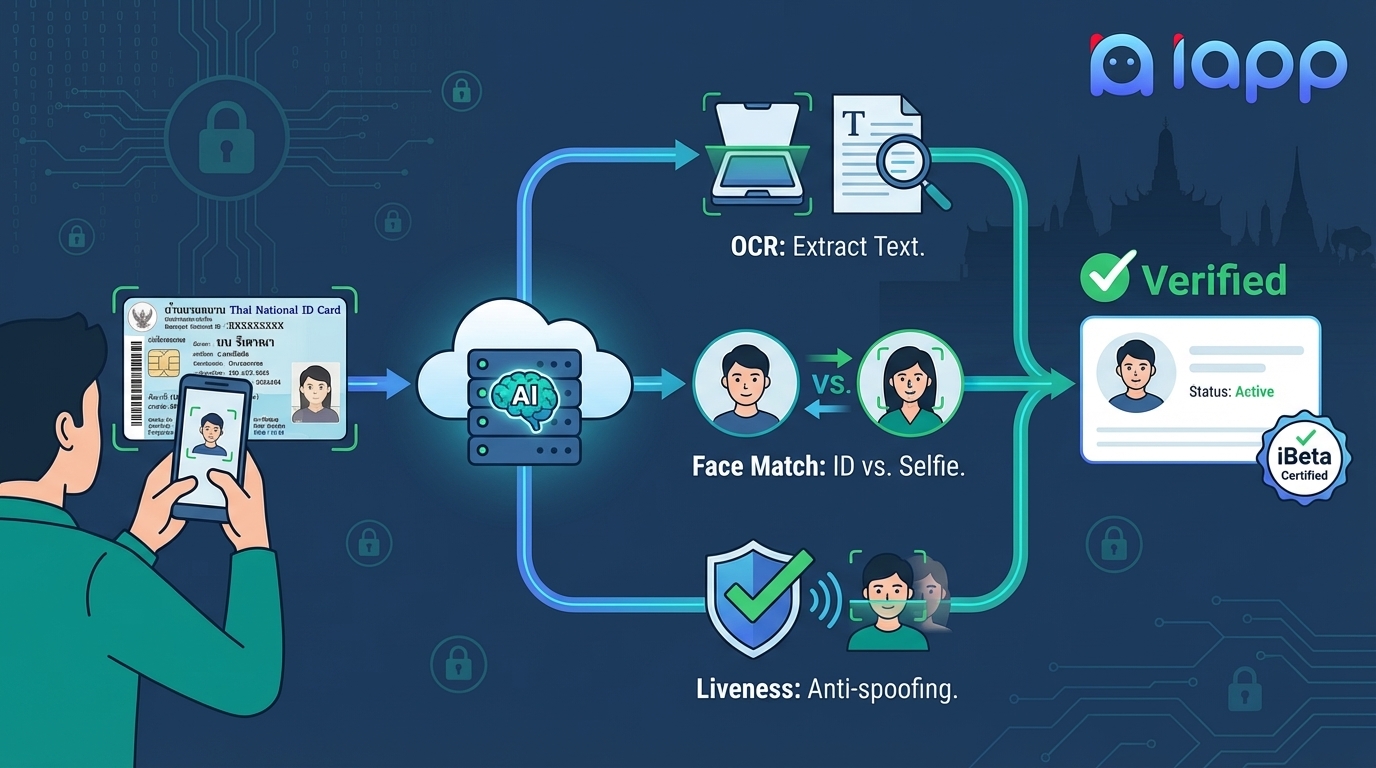
ในโลกยุคดิจิทัลที่ทุกอย่างต้องรวดเร็ว การยืนยันตัวตนของบุคคลจากระยะไกลกลายเป็นสิ่งจำเป็นสำหรับธุรกิจทุกประเภท ไม่ว่าจะเป็นการเปิดบัญชีธนาคาร สมัครบริการมือถือ หรือลงทะเบียนบนแพลตฟอร์มต่างๆ E-KYC (Electronic Know Your Customer) ทำให้สามารถยืนยันตัวตนได้ภายในไม่กี่วินาที แทนที่จะใช้เวลาหลายวัน
คู่มือฉบับสมบูรณ์นี้จะอธิบายว่า E-KYC คืออะไร ทำไมจึงสำคัญ ทำงานอย่างไรในเชิงเทคนิค และให้บทเรียนเชิงปฏิบัติสำหรับการนำ E-KYC ไปใช้ในแอปพลิเคชันของคุณด้วย API ของ iApp Technology
สารบัญ
- E-KYC คืออะไร?
- ทำไม E-KYC จึงสำคัญ?
- องค์ประกอบของ E-KYC
- เทคโนโลยี Document OCR
- Face Verification
- Liveness Detection: Active vs Passive
- ทำความเข้าใจ Face Spoofing
- ใบรับรอง iBeta
- บทเรียนเชิงปฏิบัติ
- แนวทางปฏิบัติที่ดี
E-KYC คืออะไร?
E-KYC ย่อมาจาก Electronic Know Your Customer คือ กระบวนการยืนยันตัวตนของบุคคลจากระยะไกลผ่านวิธีการทางอิเล็กทรอนิกส์ โดยไม่จำเป็นต้องส่งเอกสารจริงหรือมาดำเนินการด้วยตนเอง
KYC แบบดั้งเดิม vs E-KYC
| หัวข้อ | KYC แบบดั้งเดิม | E-KYC |
|---|---|---|
| สถานที่ | ต้องไปสาขา/สำนักงาน | ที่ไหนก็ได้ที่มีอินเทอร์เน็ต |
| เวลา | หลายวันถึงหลายสัปดาห์ | ไม่กี่นาทีถึงไม่กี่วินาที |
| เอกสาร | ต้องใช้สำเนาจริง | รูปถ่าย/สแกนดิจิทัล |
| การตรวจสอบ | พนักงานตรวจสอบด้วยตนเอง | AI อัตโนมัติ |
| ต้นทุน | สูง (พนักงาน, การจัดเก็บ, โลจิสติกส์) | ต่ำ (อัตโนมัติ) |
| ประสบการณ์ผู้ใช้ | ไม่สะดวก | ราบรื่น |
| ความสามารถในการขยาย | จำกัด | ไม่จำกัด |
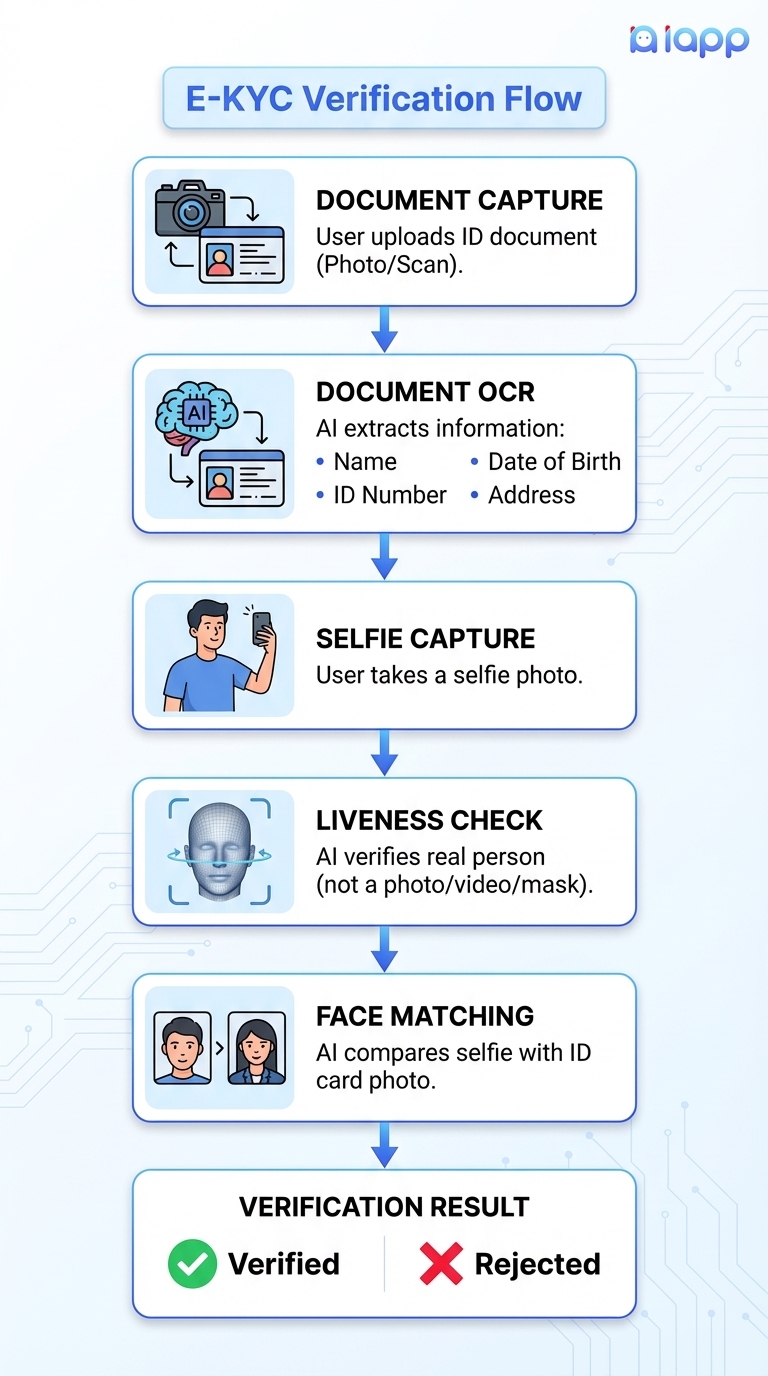
ขั้นตอนการทำงานของ E-KYC
ทำไม E-KYC จึงสำคัญ?
1. การปฏิบัติตามกฎระเบียบ
สถาบันการเงิน บริษัทโทรคมนาคม และอุตสาหกรรมอื่นๆ ต้องยืนยันตัวตนลูกค้าตามกฎหมาย E-KYC ช่วยให้ปฏิบัติตามกฎระเบียบต่างๆ:
- กฎหมาย ป้องกันการฟอกเงิน (AML)
- ข้อกำหนด ต่อต้านการสนับสนุนการก่อการร้าย (CTF)
- PDPA (พ.ร.บ.คุ้มครองข้อมูลส่วนบุคคล)
- GDPR (กฎระเบียบคุ้มครองข้อมูลของ EU)
2. ป้องกันการฉ้อโกง
E-KYC พร้อม Liveness Detection ป้องกัน:
- การขโมยตัวตน - ใช้เอกสารของผู้อื่น
- การสร้างตัวตนปลอม - สร้างตัวตนที่ไม่มีอยู่จริง
- การเข้าบัญชีโดยไม่ได้รับอนุญาต - Account Takeover
- การฟอกเงิน - ใช้ตัวตนปลอมในการโอนเงินผิดกฎหมาย
3. ประโยชน์ทางธุรกิจ
| ประโยชน์ | ผลกระทบ |
|---|---|
| Onboarding เร็วขึ้น | เปลี่ยนลูกค้าภายในไม่กี่นาที ไม่ใช่หลายวัน |
| ต้นทุนต่ำลง | ลดค่าใช้จ่ายการตรวจสอบด้วยตนเอง 70-90% |
| ประสบการณ์ที่ดีขึ้น | ลูกค้ายืนยันตัวตนได้ทุกที่ทุกเวลา |
| Conversion สูงขึ้น | ลดการเลิกกลางทางระหว่างลงทะเบียน |
| ขยายได้ไม่จำกัด | จัดการการยืนยันหลายล้านครั้งโดยอัตโนมัติ |
4. การใช้งานในอุตสาหกรรมต่างๆ
| อุตสาหกรรม | กรณีใช้งาน E-KYC |
|---|---|
| ธนาคาร | เปิดบัญชี, สมัครสินเชื่อ, บัตรเครดิต |
| Fintech | กระเป๋าเงินดิจิทัล, P2P Lending, แอปลงทุน |
| ประกันภัย | สมัครกรมธรรม์, ดำเนินการเคลม |
| โทรคมนาคม | ลงทะเบียน SIM, สัญญามือถือ |
| สาธารณสุข | ลงทะเบียนผู้ป่วย, Telemedicine |
| ภาครัฐ | Digital ID, e-Voting, บริการสาธารณะ |
| อสังหาริมทรัพย์ | สัญญาเช่า, ซื้อขายทรัพย์สิน |
| E-commerce | ยืนยันตัวตนผู้ขาย, การซื้อมูลค่าสูง |
องค์ประกอบของ E-KYC
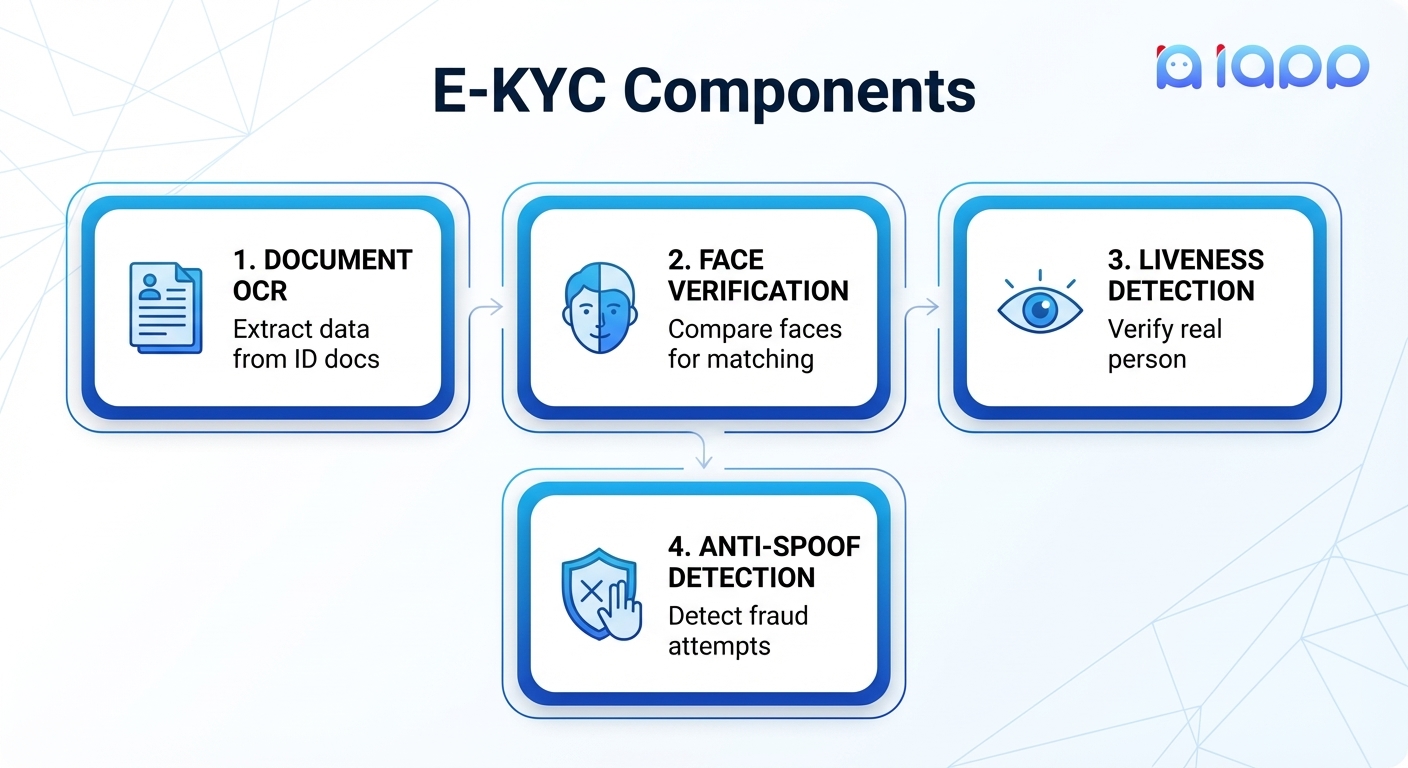
ระบบ E-KYC ที่สมบูรณ์ประกอบด้วย 4 องค์ประกอบหลัก:
เทคโนโลยี Document OCR
OCR (Optical Character Recognition) คือ เทคโนโลยีที่สกัดข้อความและข้อมูลจากรูปภาพเอกสาร ใน E-KYC จะใช้ OCR เฉพาะทางสำหรับเอกสารแสดงตน
ประเภทเอกสารที่รองรับ
1. Thai National ID Card OCR (บัตรประชาชนไทย)
บัตรประชาชนไทยเป็นเอกสารที่ใช้บ่อยที่สุดสำหรับ E-KYC ในประเทศไทย iApp OCR API สกัดข้อมูล:
ด้านหน้า:
| ฟิลด์ | รายละเอียด |
|---|---|
id_number | เลขบัตรประชาชน 13 หลัก |
th_name / en_name | ชื่อ-นามสกุลภาษาไทยและอังกฤษ |
th_dob / en_dob | วันเกิด |
address | ที่อยู่ตามทะเบียนบ้าน |
province, district, sub_district | จังหวัด, อำเภอ, ตำบล |
th_issue / th_expire | วันออกบัตรและวันหมดอายุ |
religion | ศาสนา (ถ้ามี) |
face | รูปใบหน้าที่สกัดออกมา (Base64) |
ด้านหลัง:
| ฟิลด์ | รายละเอียด |
|---|---|
back_number | เลขเลเซอร์สำหรับตรวจสอบ |
API Endpoint: POST /v3/store/ekyc/thai-national-id-card/front
ความแม่นยำ: 98.13% ในระดับตัวอักษร
2. Thai Driver License OCR (ใบขับขี่ไทย)
สกัดข้อมูลจากใบอนุญาตขับขี่สำหรับการยืนยันตัวตนและบริการที่เกี่ยวกับการขับขี่
ข้อมูลที่สกัด:
- เลขใบอนุญาต
- ชื่อ (ไทย/อังกฤษ)
- วันเกิด
- ประเภทและชั้นใบอนุญาต
- วันออกและวันหมดอายุ
- ที่อยู่
API Endpoint: POST /v3/store/ekyc/thai-driver-license
3. Thai Bank Book OCR (สมุดบัญชีธนาคาร)
สกัดข้อมูลบัญชีจากรูปสมุดบัญชีธนาคารเพื่อยืนยันข้อมูลทางการเงิน
ข้อมูลที่สกัด:
- เลขบัญชี
- ชื่อเจ้าของบัญชี
- ชื่อธนาคารและสาขา
- ประเภทบัญชี
API Endpoint: POST /v3/store/ekyc/book-bank
4. Passport OCR (หนังสือเดินทาง)
สกัดข้อมูลจากหนังสือเดินทางนานาชาติ รวมถึงข้อมูล MRZ (Machine Readable Zone)
ข้อมูลที่สกัด:
| ฟิลด์ | รายละเอียด |
|---|---|
passport_number | เลขหนังสือเดินทาง |
surname / given_name | ชื่อ-นามสกุล |
nationality | สัญชาติ |
date_of_birth | วันเกิด |
sex | เพศ |
expiry_date | วันหมดอายุ |
mrz_line1 / mrz_line2 | ข้อมูล MRZ |
face | รูปใบหน้า |
API Endpoint: POST /v3/store/ekyc/passport
Face Verification
Face Verification คือ การเปรียบเทียบรูปใบหน้าสองรูปเพื่อตรวจสอบว่าเป็นบุคคลเดียวกันหรือไม่ สิ่งนี้จำเป็นมากในการยืนยันว่าผู้ที่นำเสนอเอกสารเป็นเจ้าของเอกสารจริง
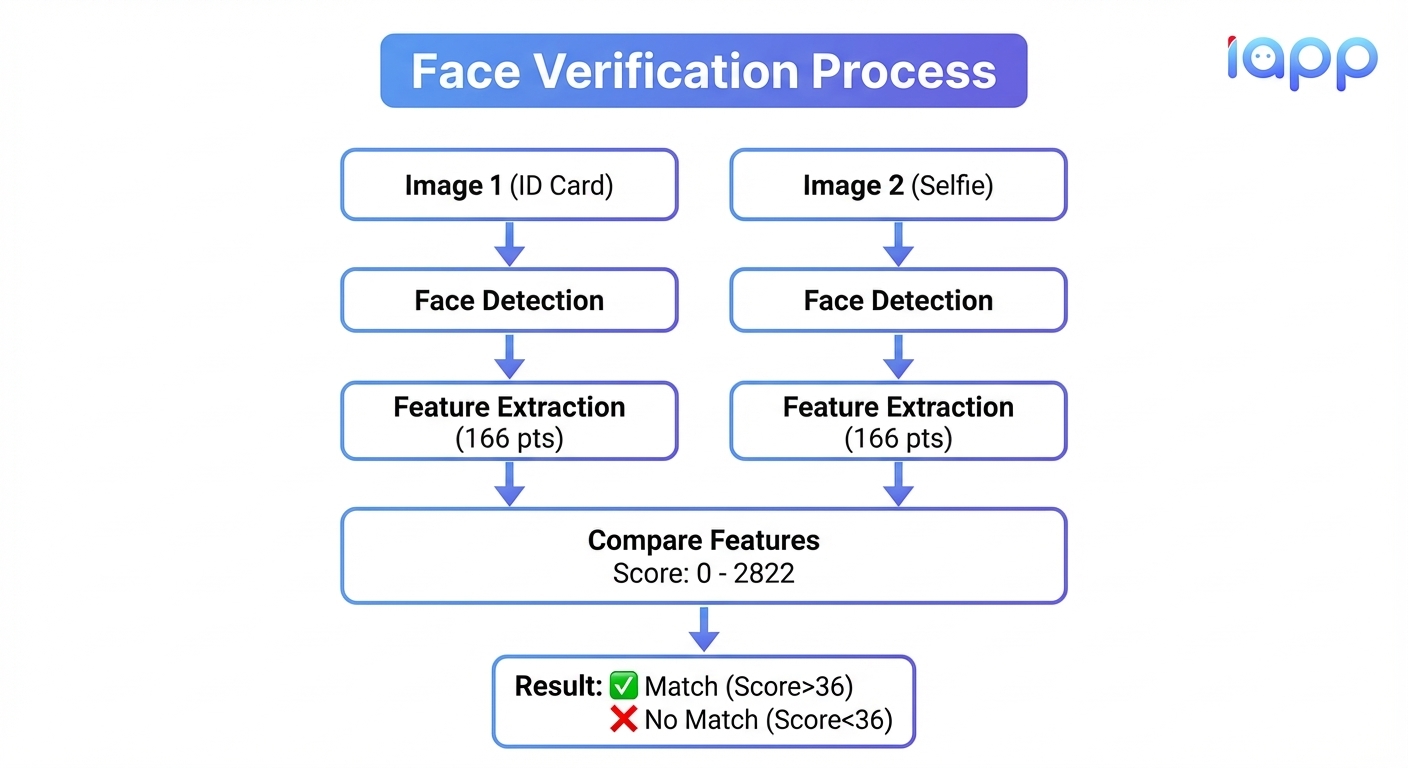
Face Verification ทำงานอย่างไร
ทำความเข้าใจคะแนนความคล้ายคลึง
คะแนนความคล้ายคลึงมีค่าตั้งแต่ 0 ถึง 2822 คำนวณจากการจับคู่ 166 จุดบนใบหน้า
| Threshold | ความแม่นยำ | คำแนะนำ |
|---|---|---|
| 36 | 99.50% | การยืนยันมาตรฐาน |
| 48 | 99.95% | แอปพลิเคชันความปลอดภัยสูง |
API Endpoint: POST /v3/store/ekyc/face-verification
Liveness Detection: Active vs Passive
Liveness Detection คือ การตรวจสอบว่าใบหน้าที่กำลังยืนยันเป็นของคนจริงที่อยู่ตรงหน้าในขณะนั้น—ไม่ใช่รูปถ่าย วิดีโอ หรือหน้ากาก
Active Liveness vs Passive Liveness
| หัวข้อ | Active Liveness | Passive Liveness |
|---|---|---|
| การกระทำของผู้ใช้ | ต้องทำตาม (กะพริบตา, หันหน้า, ยิ้ม) | รูปเดียว ไม่ต้องทำอะไร |
| ประสบการณ์ผู้ใช้ | มี Friction, ใช้เวลานานกว่า | ราบรื่น, ทันที |
| ระดับความปลอดภัย | สูงมาก | สูง (iBeta Level 1) |
| การตรวจจับ Spoofing | Challenge-response แบบ Real-time | AI วิเคราะห์รูปเดียว |
| การ Implementation | ซับซ้อนกว่า (ต้องใช้วิดีโอ/SDK) | ง่าย (เรียก API ครั้งเดียว) |
| เหมาะกับ | ธุรกรรมความปลอดภัยสูง | Onboarding จำนวนมาก |
Active Liveness Detection
Active Liveness ต้องให้ผู้ใช้ทำกิจกรรมเฉพาะ:
- ตรวจจับการกะพริบตา - ผู้ใช้ต้องกะพริบตาตามธรรมชาติ
- การเคลื่อนไหวศีรษะ - หันหน้าซ้าย/ขวา/ขึ้น/ลง
- การแสดงออกทางสีหน้า - ยิ้ม, อ้าปาก
- ความท้าทายแบบสุ่ม - ลำดับกิจกรรมที่คาดเดาไม่ได้
ข้อดี:
- ยากที่จะ Spoof มาก
- พิสูจน์การมีอยู่แบบ Real-time
- ความมั่นใจด้านความปลอดภัยสูงกว่า
ข้อเสีย:
- ประสบการณ์ผู้ใช้ไม่ดี
- อัตราการเลิกกลางทางสูง
- ต้องใช้ SDK/การบันทึกวิดีโอ
- ปัญหาการเข้าถึง (คนพิการ)
Passive Liveness Detection
Passive Liveness วิเคราะห์ รูปภาพเดียว โดยใช้ AI เพื่อตรวจจับการ Spoof โดยไม่ต้องให้ผู้ใช้ทำกิจกรรมใดๆ
สิ่งที่ตรวจจับได้:
- รูปถ่ายที่พิมพ์
- หน้าจอแสดงผล (โทรศัพท์/คอมพิวเตอร์)
- หน้ากากใบหน้าเหมือนจริง
- การเล่นวิดีโอซ้ำ
- กระดาษตัด
วิธีการทำงาน:
- วิเคราะห์รูปแบบพื้นผิว
- ตรวจจับลายหน้าจอ Moiré
- ระบุสิ่งแปลกปลอมจากกระดาษ/การพิมพ์
- ตรวจสอบความลึกและลักษณะ 3 มิติ
- วิเคราะห์ความสม่ำเสมอของแสง
API Endpoint: POST /v3/store/ekyc/face-passive-liveness
เมื่อไหร่ควรใช้แบบไหน?
| สถานการณ์ | วิธีที่แนะนำ |
|---|---|
| เปิดบัญชีธนาคาร | Active + Passive |
| ลงทะเบียนแอปมือถือ | Passive อย่างเดียว |
| ธุรกรรมมูลค่าสูง | Active |
| การยืนยันด่วน | Passive อย่างเดียว |
| บริการภาครัฐ | Active + Passive |
| ยืนยันผู้ขาย E-commerce | Passive อย่างเดียว |
ทำความเข้าใจ Face Spoofing
Face Spoofing (หรือเรียกว่า Presentation Attack) คือ การพยายามหลอกระบบจดจำใบหน้าโดยการนำเสนอใบหน้าปลอมแทนคนจริง
ประเภทของการโจมตี Face Spoofing
1. Print Attack (การโจมตีด้วยรูปพิมพ์)
- รายละเอียด: ใช้รูปถ่ายที่พิมพ์ของเหยื่อ
- การตรวจจับ: พื้นผิวกระดาษ, พื้นผิวแบน, ขาดความลึก
2. Screen/Replay Attack (การโจมตีด้วยหน้าจอ)
- รายละเอียด: แสดงรูป/วิดีโอของเหยื่อบนหน้าจอ
- การตรวจจับ: ลาย Moiré ของหน้าจอ, สิ่งแปลกปลอมของพิกเซล
3. 3D Mask Attack (การโจมตีด้วยหน้ากาก 3 มิติ)
- รายละเอียด: สวมหน้ากาก 3 มิติเหมือนจริงของเหยื่อ
- การตรวจจับ: วิเคราะห์พื้นผิว, ตรวจจับผิวหนัง, การเคลื่อนไหวของตา
4. Deepfake Attack (การโจมตีด้วย Deepfake)
- รายละเอียด: วิดีโอปลอมที่สร้างโดย AI ของเหยื่อ
- การตรวจจับ: ความไม่สม่ำเสมอในเวลา, การเคลื่อนไหวที่ไม่เป็นธรรมชาติ

ทำไม Anti-Spoofing จึงสำคัญ
หากไม่มีการป้องกัน Anti-Spoofing:
- อาชญากรสามารถเปิดบัญชีโดยใช้รูปบัตรประชาชนที่ขโมยมา
- การ Takeover บัญชีทำได้ง่าย
- การฉ้อโกงทางการเงินเพิ่มขึ้นมาก
- ความเชื่อมั่นในบริการดิจิทัลลดลง
ใบรับรอง iBeta
iBeta คือ ห้องปฏิบัติการทดสอบอิสระที่รับรองระบบไบโอเมตริกส์สำหรับ Presentation Attack Detection (PAD) การรับรอง iBeta เป็นมาตรฐานสูงสุดในการพิสูจน์ว่าระบบ Liveness Detection มีความปลอดภัย
ระดับ iBeta PAD
| ระดับ | รายละเอียด | ข้อกำหนด |
|---|---|---|
| Level 1 | PAD พื้นฐาน | ต้องตรวจจับการโจมตีทั่วไป (รูปพิมพ์, หน้าจอ) |
| Level 2 | PAD ขั้นสูง | ต้องตรวจจับการโจมตีที่ซับซ้อน (หน้ากาก 3D, Spoof ขั้นสูง) |
สิ่งที่ iBeta ทดสอบ
- Print Attack - กระดาษหลายประเภท, ขนาด, และคุณภาพ
- Screen Attack - อุปกรณ์ต่างๆ (โทรศัพท์, แท็บเล็ต, จอมอนิเตอร์)
- Artifact Species - เครื่องมือนำเสนอหลายแบบ
- สภาพแวดล้อม - สถานการณ์แสงต่างๆ
การรับรอง iBeta ของ iApp Technology
Face Passive Liveness Detection ของ iApp Technology ได้รับการรับรอง iBeta PAD Level 1 ด้วย:
- ความแม่นยำ 99.43% จากการทดสอบ 7,680 ครั้ง
- ตรวจจับรูปถ่ายที่พิมพ์
- ตรวจจับหน้าจอแสดงผล
- ตรวจจับหน้ากากเหมือนจริง
- ตรวจจับการเล่นวิดีโอซ้ำ
บทเรียนเชิงปฏิบัติ
มาสร้างระบบ E-KYC ที่สมบูรณ์โดยใช้ API ของ iApp Technology
สิ่งที่ต้องมี
- API key จาก iApp Technology
- Python 3.x หรือ Node.js ติดตั้งแล้ว
- รูปทดสอบ (บัตรประชาชน, เซลฟี่)
ขั้นตอนที่ 1: Thai ID Card OCR
สกัดข้อมูลจากบัตรประชาชนไทย
import requests
import json

API_KEY = "YOUR_API_KEY"

def extract_id_card(image_path):
    """สกัดข้อมูลจากบัตรประชาชนด้านหน้า"""
    url = "https://api.iapp.co.th/v3/store/ekyc/thai-national-id-card/front"

    with open(image_path, 'rb') as image_file:
        files = {'file': image_file}
        headers = {'apikey': API_KEY}

        response = requests.post(url, headers=headers, files=files)
        return response.json()

# ตัวอย่างการใช้งาน
result = extract_id_card("thai_id_card.jpg")

print("=== ผลลัพธ์ OCR บัตรประชาชน ===")
print(f"เลขบัตร: {result.get('id_number')}")
print(f"ชื่อ (ไทย): {result.get('th_name')}")
print(f"ชื่อ (อังกฤษ): {result.get('en_name')}")
print(f"วันเกิด: {result.get('en_dob')}")
print(f"ที่อยู่: {result.get('address')}")
ขั้นตอนที่ 2: ตรวจสอบ Liveness
ตรวจสอบว่าเซลฟี่เป็นคนจริง
def check_liveness(selfie_path):
    """ตรวจสอบว่าใบหน้าเป็นคนจริง (ไม่ใช่ Spoof)"""
    url = "https://api.iapp.co.th/v3/store/ekyc/face-passive-liveness"

    with open(selfie_path, 'rb') as image_file:
        files = {'file': image_file}
        headers = {'apikey': API_KEY}

        response = requests.post(url, headers=headers, files=files)
        return response.json()

# ตัวอย่างการใช้งาน
liveness_result = check_liveness("selfie.jpg")

print("\n=== ผลการตรวจสอบ Liveness ===")
print(f"ผลทำนาย: {liveness_result.get('predict')}")
print(f"เป็นคนจริง: {liveness_result.get('predict') == 'REAL'}")

if liveness_result.get('predict') == 'SPOOF':
    print(" คำเตือน: ตรวจพบความพยายาม Spoof!")
else:
    print("✓ ยืนยันว่าเป็นคนจริง")
ขั้นตอนที่ 3: เปรียบเทียบใบหน้า
เปรียบเทียบรูปในบัตรกับเซลฟี่
def verify_faces(id_card_path, selfie_path, threshold=36):
    """เปรียบเทียบรูปใบหน้าสองรูปเพื่อยืนยันว่าเป็นคนเดียวกัน"""
    url = "https://api.iapp.co.th/v3/store/ekyc/face-verification"

    files = {
        'file1': open(id_card_path, 'rb'),
        'file2': open(selfie_path, 'rb')
    }
    headers = {'apikey': API_KEY}
    data = {'threshold': threshold}

    response = requests.post(url, headers=headers, files=files, data=data)

    files['file1'].close()
    files['file2'].close()

    return response.json()

# ตัวอย่างการใช้งาน
verification_result = verify_faces("id_card_face.jpg", "selfie.jpg")

print("\n=== ผลการยืนยันใบหน้า ===")
print(f"ตรงกัน: {verification_result.get('matched')}")
print(f"คะแนน: {verification_result.get('score')}")

if verification_result.get('matched'):
    print("✓ ยืนยันตัวตนสำเร็จ - เป็นคนเดียวกัน")
else:
    print("✗ ยืนยันไม่สำเร็จ - คนละคนหรือคุณภาพรูปต่ำ")
ขั้นตอนที่ 4: E-KYC แบบสมบูรณ์
รวมทุกขั้นตอนเป็นระบบยืนยันตัวตนที่สมบูรณ์
def complete_ekyc_verification(id_card_path, selfie_path):
    """
    ระบบยืนยันตัวตน E-KYC แบบสมบูรณ์:
    1. สกัดข้อมูลบัตรประชาชน
    2. ตรวจสอบ Liveness ของเซลฟี่
    3. ยืนยันใบหน้าตรงกัน
    """
    results = {
        'success': False,
        'steps': {},
        'errors': []
    }

    # ขั้นตอนที่ 1: สกัดข้อมูลบัตรประชาชน
    print("ขั้นตอนที่ 1: กำลังสกัดข้อมูลบัตรประชาชน...")
    id_result = extract_id_card(id_card_path)
    results['steps']['id_card_ocr'] = id_result

    if not id_result.get('id_number'):
        results['errors'].append("สกัดข้อมูลบัตรประชาชนไม่สำเร็จ")
        return results

    print(f" ✓ เลขบัตร: {id_result.get('id_number')}")
    print(f" ✓ ชื่อ: {id_result.get('th_name')}")

    # ขั้นตอนที่ 2: ตรวจสอบ Liveness
    print("\nขั้นตอนที่ 2: กำลังตรวจสอบ Liveness...")
    liveness_result = check_liveness(selfie_path)
    results['steps']['liveness'] = liveness_result

    if liveness_result.get('predict') == 'SPOOF':
        results['errors'].append("ตรวจสอบ Liveness ไม่ผ่าน - ตรวจพบการ Spoof")
        return results

    print(f" ✓ ยืนยันว่าเป็นคนจริง")

    # ขั้นตอนที่ 3: ยืนยันใบหน้าตรงกัน
    print("\nขั้นตอนที่ 3: กำลังยืนยันใบหน้า...")
    verification_result = verify_faces(id_card_path, selfie_path)
    results['steps']['face_verification'] = verification_result

    if not verification_result.get('matched'):
        results['errors'].append("ยืนยันใบหน้าไม่สำเร็จ - ใบหน้าไม่ตรงกัน")
        return results

    print(f" ✓ ใบหน้าตรงกัน (คะแนน: {verification_result.get('score')})")

    # ผ่านทุกขั้นตอน
    results['success'] = True
    results['verified_identity'] = {
        'id_number': id_result.get('id_number'),
        'name_th': id_result.get('th_name'),
        'name_en': id_result.get('en_name'),
        'date_of_birth': id_result.get('en_dob'),
        'address': id_result.get('address')
    }

    print("\n" + "="*50)
    print(" ยืนยันตัวตน E-KYC สำเร็จ!")
    print("="*50)

    return results

# เรียกใช้งาน
result = complete_ekyc_verification("thai_id_card.jpg", "selfie.jpg")
แนวทางปฏิบัติที่ดี
1. ข้อกำหนดคุณภาพรูปภาพ
| ปัจจัย | คำแนะนำ |
|---|---|
| ความละเอียด | อย่างน้อย 600x400 พิกเซล |
| รูปแบบ | JPEG, PNG, HEIC, HEIF |
| ขนาด | ไม่เกิน 10MB สำหรับ OCR, 2MB สำหรับใบหน้า |
| แสง | สม่ำเสมอ, แสงธรรมชาติดีที่สุด |
| โฟกัส | ชัด, ไม่เบลอ |
| มุม | ใบหน้าตรงหน้า, เอกสารวางราบ |
2. แนวทางปฏิบัติด้านความปลอดภัย
# ดี: ใช้ Environment Variables
import os
API_KEY = os.environ.get('IAPP_API_KEY')

# ไม่ดี: API Key แบบ Hardcode
API_KEY = "sk-1234567890"

# ดี: ตรวจสอบ Liveness ก่อน Face Verification เสมอ
if liveness_result['predict'] == 'REAL':
    verification_result = verify_faces(...)

# ไม่ดี: ข้าม Liveness Check
verification_result = verify_faces(...)  # เสี่ยงต่อ Spoofing!
3. การปฏิบัติตามกฎหมาย
- การเก็บข้อมูล: ไม่เก็บข้อมูลไบโอเมตริกส์นานเกินจำเป็น
- ความยินยอม: ขอความยินยอมที่ชัดเจนก่อนทำ E-KYC
- การเข้ารหัส: เข้ารหัสข้อมูลไบโอเมตริกส์ทั้งขณะส่งและจัดเก็บ
- บันทึกการตรวจสอบ: เก็บ Log สำหรับการตรวจสอบ Compliance
- สิทธิ์ในการลบ: ให้ผู้ใช้สามารถขอลบข้อมูลได้
สรุป
E-KYC เป็นเทคโนโลยีที่ทรงพลังที่ช่วยให้ธุรกิจยืนยันตัวตนลูกค้าแบบดิจิทัล ระบบ E-KYC ที่สมบูรณ์ประกอบด้วย:
- Document OCR - สกัดข้อมูลจากเอกสารแสดงตน
- Face Verification - เปรียบเทียบใบหน้าเพื่อยืนยันตัวตน
- Liveness Detection - ตรวจสอบว่าเป็นคนจริงที่อยู่ตรงหน้า
- Anti-Spoofing - ป้องกันการฉ้อโกง
ประเด็นสำคัญ:
- เลือก Passive Liveness สำหรับ UX ที่ดีกว่า, Active Liveness สำหรับความปลอดภัยสูงกว่า
- ใช้งาน Anti-Spoofing เสมอเพื่อป้องกันการฉ้อโกง
- มองหา ใบรับรอง iBeta เมื่อเลือกผู้ให้บริการ
- ปฏิบัติตาม แนวทางปฏิบัติด้านความปลอดภัย และข้อกำหนด Compliance
แหล่งข้อมูล
- เอกสาร Thai ID Card OCR
- เอกสาร Face Verification
- เอกสาร Face Liveness Detection
- จัดการ API Key
- เครื่องคำนวณราคา
- ใบรับรอง iBeta
เกี่ยวกับผู้เขียน
ดร.กอบกฤตย์ วิริยะยุทธกร เป็น CEO และผู้ก่อตั้ง iApp Technology บริษัท AI ชั้นนำของไทยที่เชี่ยวชาญด้าน E-KYC, OCR และการยืนยันตัวตนด้วยไบโอเมตริกส์ ด้วยใบรับรอง iBeta PAD Level 1 และ Level 2 iApp Technology ให้บริการลูกค้าองค์กรกว่า 100 ราย รวมถึงธนาคาร บริษัทประกัน และผู้ให้บริการโทรคมนาคม
อ้างอิง
- iBeta Quality Assurance, "Presentation Attack Detection (PAD) Testing", 2024
- NIST, "Biometric Quality Standards", 2024
- ธนาคารแห่งประเทศไทย, "แนวทางธนาคารดิจิทัล", 2024
- สำนักงานคุ้มครองข้อมูลส่วนบุคคล, "แนวทาง PDPA", 2024
- ISO/IEC 30107-3, "Biometric Presentation Attack Detection", 2023